
TL;DR: To stop sharing Instagram stories to Facebook, open Instagram and go to your profile settings. Tap « Sharing to other apps » or « Story sharing, » then select Facebook. Toggle off « Share your story to Facebook » or unlink your Facebook account. You can also disable this option before posting each individual story using the sharing toggle at the bottom of the story screen.
Frequently Asked Questions
How do I stop sharing Instagram Stories to Facebook automatically?
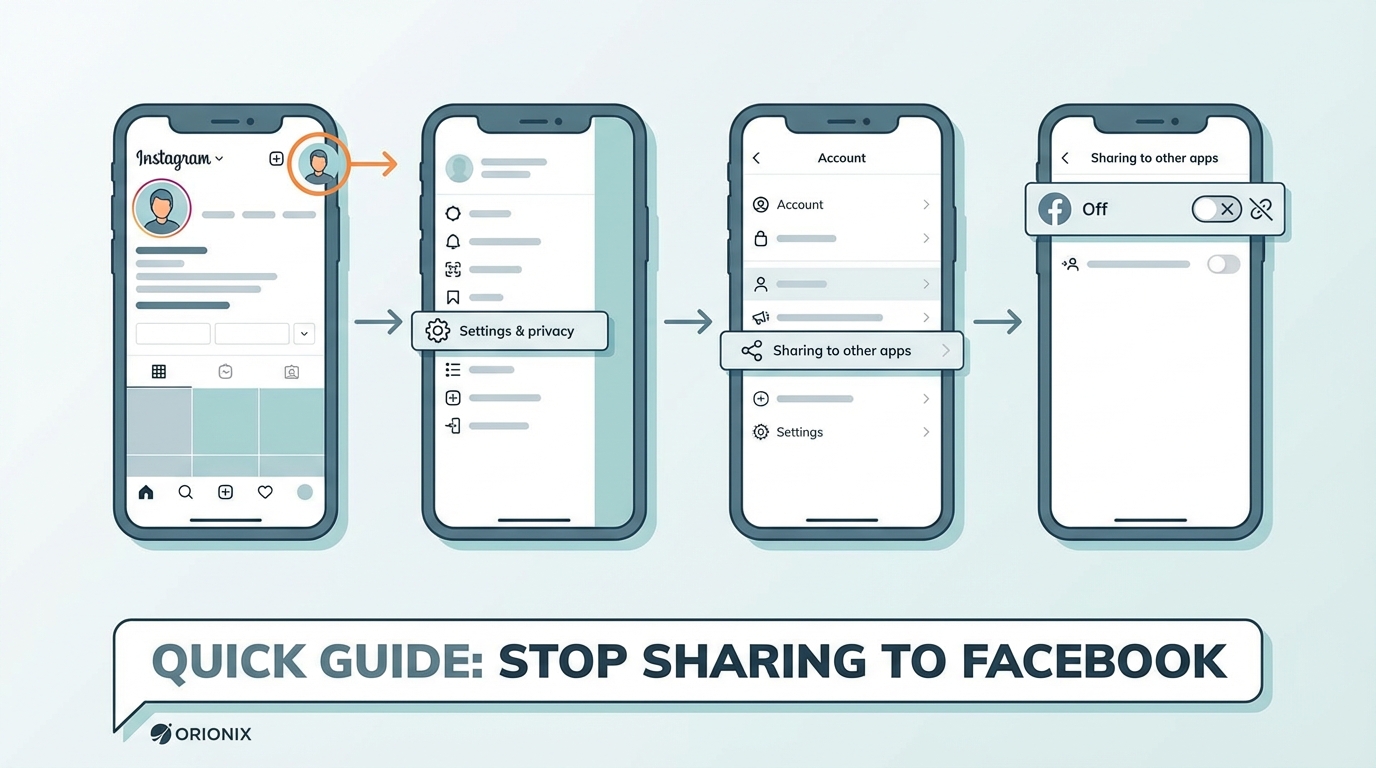
To stop sharing Instagram Stories to Facebook, open Instagram and go to your profile. Tap the three lines menu, select Settings, then Account, and choose Sharing to other apps. Find Facebook and toggle off the option to share your story. This prevents future stories from automatically posting to Facebook while maintaining your other social media platform connections.
Why are my Instagram Stories automatically posting to Facebook?
Instagram Stories automatically post to Facebook when you’ve enabled the sharing feature in your account settings. This happens because both platforms are owned by Meta and offer integrated sharing options. The automatic sharing remains active until you manually disable it in Instagram’s settings under Account and Sharing to other apps.
Can I stop sharing Instagram Stories to Facebook without unlinking my accounts?
Yes, you can stop sharing Instagram Stories to Facebook while keeping your accounts linked. Simply disable the story sharing toggle in Instagram’s settings without disconnecting the accounts entirely. This allows you to maintain the connection for other features like cross-posting regular posts while controlling story sharing independently across social media platforms.
How do I turn off Instagram Story sharing to Facebook on mobile?
On mobile, open Instagram and tap your profile icon. Access Settings through the menu, select Account, then Sharing to other apps. Locate Facebook in the list and toggle off the Share your story option. Changes take effect immediately for future stories. This method works for both iOS and Android devices.
What happens to my Facebook Stories when I disable Instagram sharing?
When you disable Instagram Story sharing to Facebook, only future Instagram Stories will stop posting to Facebook. Previously shared stories that already appeared on Facebook will remain there until they expire after 24 hours. Existing content isn’t automatically removed when you change your social media marketing settings.
Can I selectively share some Instagram Stories to Facebook but not others?
Yes, you can selectively share Instagram Stories to Facebook. Before posting each story, look for the sharing options at the bottom of the screen. Toggle the Facebook icon on or off for that specific story. This gives you control over individual posts without changing your default settings for social media platforms.
How do I manage Instagram and Facebook sharing settings from one dashboard?
Platforms like Orionix offer centralized dashboards for managing content across multiple social media platforms including Instagram and Facebook. These tools allow you to plan, create, and control sharing settings from a single interface, streamlining your social media marketing workflow and providing better control over cross-platform posting for digital marketing campaigns.
Does disabling Instagram Story sharing to Facebook affect my regular posts?
No, disabling Instagram Story sharing to Facebook only affects your stories. Regular Instagram feed posts and Reels have separate sharing settings. You can control each content type independently, allowing you to customize your social media marketing strategy based on the best times to post on Instagram and Facebook for different content formats.
Understanding Instagram and Facebook Story Sharing
If you’ve been wondering how to stop sharing Instagram Stories to Facebook, you’re not alone. Many social media users find themselves inadvertently posting their Instagram content to Facebook, creating duplicate posts across their social media platforms. This comprehensive guide will walk you through every step needed to disconnect your story sharing and regain control over your content distribution strategy.
Instagram’s automatic sharing feature was designed to help users maximize their reach across both platforms. However, as digital marketing strategies evolve, many content creators and businesses prefer to maintain separate presences on each social media platform. Understanding how to manage these settings is crucial for effective social media marketing and maintaining a professional brand presence.
Whether you’re a social media manager juggling multiple accounts or a small business owner refining your content strategy, controlling where your stories appear is essential for optimizing engagement and maintaining the right message for each audience. 📱
Why You Might Want to Stop Automatic Story Sharing
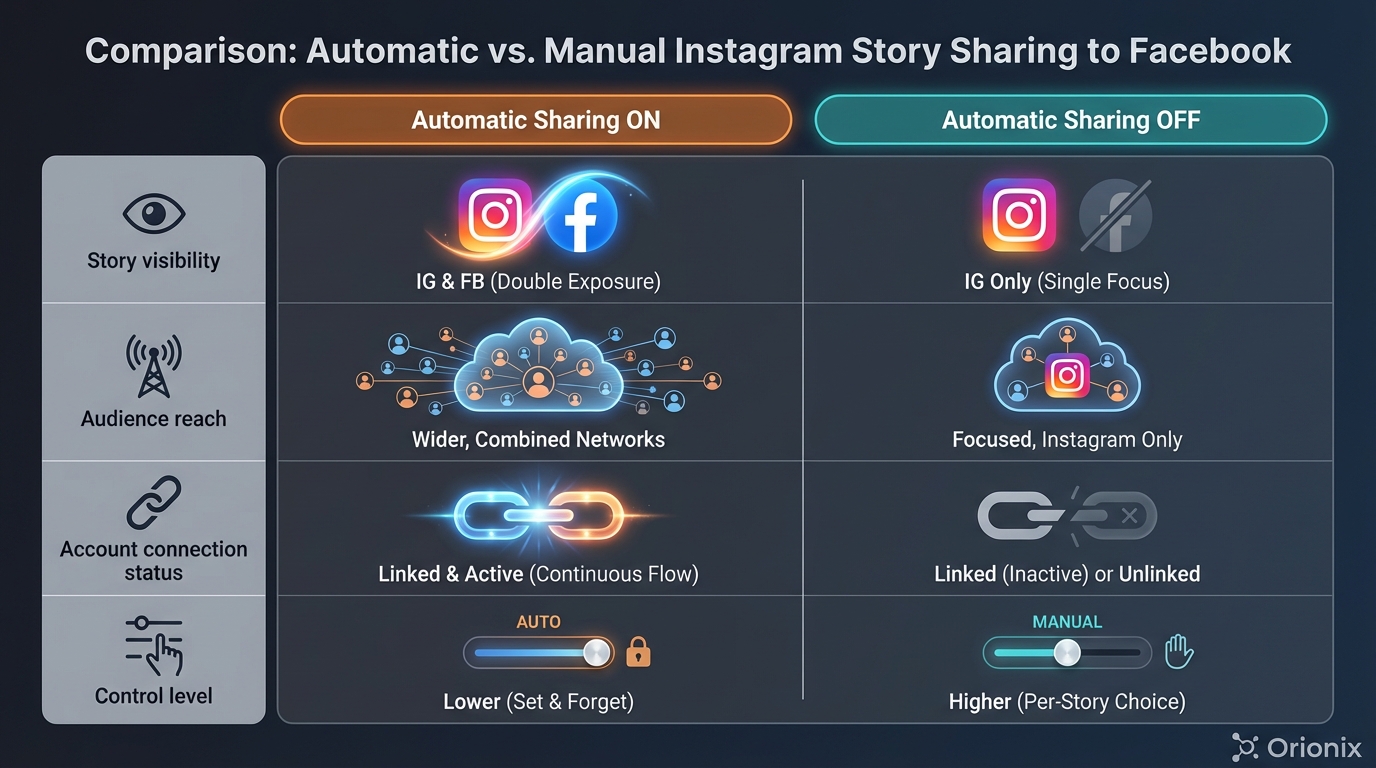
Before diving into the technical steps, it’s important to understand why separating your Instagram and Facebook story content can benefit your overall digital marketing strategy. Different platforms serve different purposes, and your audience expectations vary significantly between them.
Platform-Specific Audience Preferences
Your Facebook and Instagram audiences often have different demographics and engagement patterns. Research shows that the best times to post on Instagram differ from optimal Facebook posting times, meaning your cross-platform strategy should be more nuanced than simple automatic sharing.
- Facebook users typically prefer longer-form content and more detailed context
- Instagram audiences engage more with visual-first, quick-consumption content
- Different age demographics dominate each platform
- Professional versus personal content expectations vary
Content Strategy and Brand Management
Professional social media marketing requires tailored approaches for each platform. When you automatically share stories across platforms, you lose the ability to customize messaging, timing, and presentation for each unique audience.
Many digital marketing professionals recommend creating platform-specific content rather than duplicating posts. This approach allows you to optimize engagement rates and build stronger connections with your audience on each social media platform. ✨
How to Stop Sharing Instagram Stories to Facebook: Step-by-Step Guide
Now let’s get into the practical steps you need to take to disable automatic story sharing. This process is straightforward and can be completed in just a few minutes from your mobile device.
Method 1: Disable Sharing Before Posting a Story
The quickest way to control story sharing is to adjust settings each time you create a story. This method gives you post-by-post control over your content distribution.
- Open the Instagram app and create your story as usual
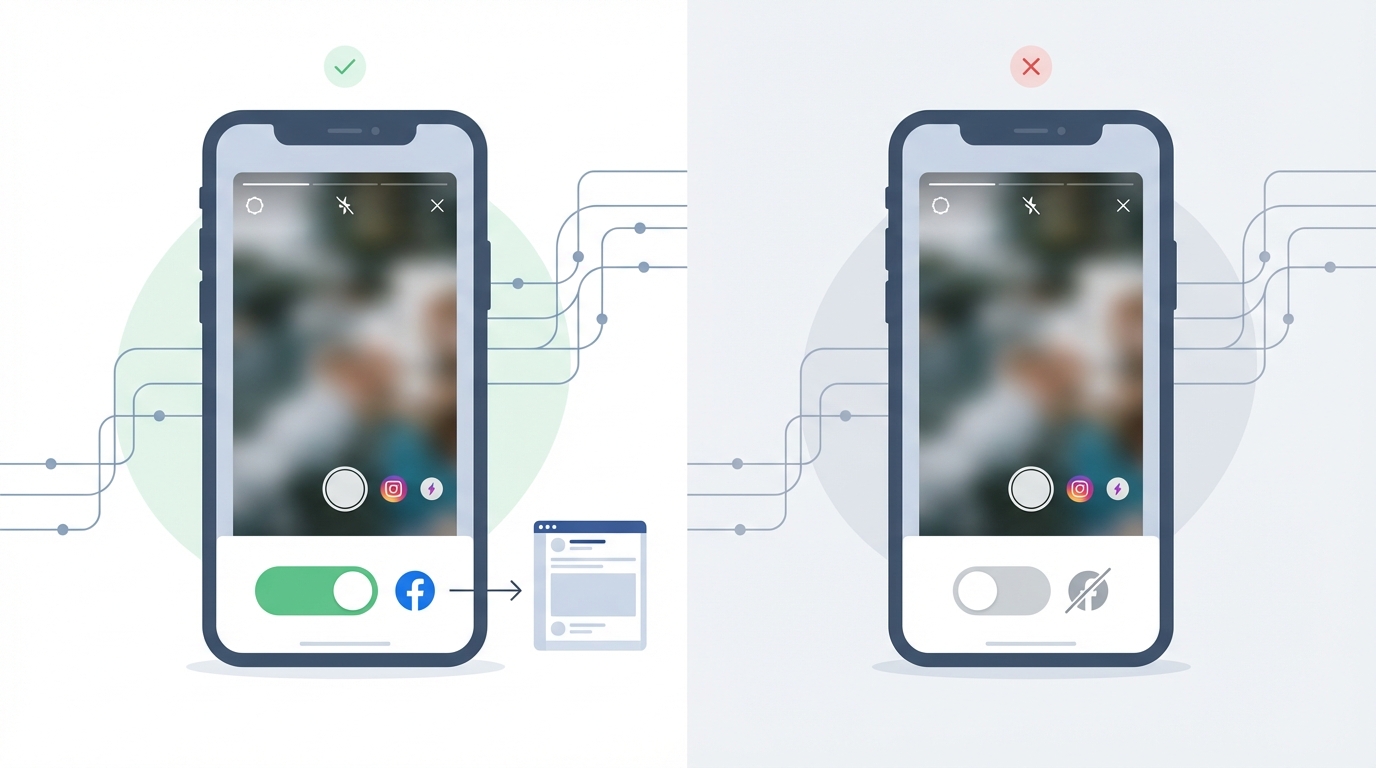
- Before posting, look for the sharing options at the bottom of the screen
- Locate the « Share to Facebook » toggle (it appears as a small Facebook icon)
- Tap the toggle to turn it off (it should no longer be highlighted in blue)
- Post your story – it will now only appear on Instagram
This method is perfect for users who want flexibility in their posting strategy, allowing them to choose which stories get shared and which remain Instagram-exclusive. 🎯
Method 2: Permanently Disable Automatic Sharing in Settings
For a more permanent solution, you can disconnect your accounts entirely through Instagram’s settings menu. This ensures that no future stories will automatically post to Facebook unless you manually enable sharing again.
- Open Instagram and navigate to your profile page
- Tap the three horizontal lines (menu icon) in the top right corner
- Select « Settings » from the menu options
- Tap « Account » then select « Sharing to other apps »
- Choose « Facebook » from the list of connected accounts
- Tap « Unlink Account » or toggle off « Share Your Story »
- Confirm your choice when prompted
This method is ideal for users who consistently want to keep their Instagram and Facebook content separate as part of their broader social media marketing strategy.
Method 3: Manage Sharing Through Facebook Settings
You can also control story sharing from the Facebook side of the connection. This approach is particularly useful if you’re managing multiple social media platforms and prefer centralizing your privacy controls.
- Open the Facebook app and go to Settings
- Navigate to « Apps and Websites »
- Find Instagram in your connected apps list
- Tap on Instagram and adjust permissions
- Remove story posting permissions or disconnect entirely
Managing Your Connected Accounts for Better Control
Understanding the relationship between your Instagram and Facebook accounts is crucial for effective content management. Since Facebook owns Instagram, the platforms are designed to integrate seamlessly, but this doesn’t mean you must use all integration features.
Checking Your Current Connection Status
Before making changes, it’s helpful to understand what’s currently connected between your accounts. Many users don’t realize the extent of their account integration until they review their settings.
| Connection Type | What It Controls | Impact on Stories |
|---|---|---|
| Full Account Link | All sharing features enabled | Stories auto-share by default |
| Story Sharing Only | Only story cross-posting | Stories share, posts don’t |
| No Connection | Accounts completely separate | No automatic sharing |
Understanding your current setup helps you make informed decisions about your social media and content distribution strategy. If you’re working on entry-level social media marketing tasks, mastering these connections is an essential skill. You can learn more about entry level social media marketing strategies on our blog.
Reconnecting Accounts Selectively
If you’ve completely disconnected your accounts but want to maintain some integration features, you can reconnect them with specific permissions. This selective approach gives you the best of both worlds – integration where it helps, separation where it matters. 🔗
When reconnecting, pay careful attention to the permission requests. You can often allow Facebook login for Instagram without enabling automatic story sharing, giving you convenience without sacrificing control.
Troubleshooting Common Issues with Story Sharing
Even after following the steps above, some users encounter persistent issues with story sharing. Let’s address the most common problems and their solutions.
Stories Still Appearing on Facebook
If your stories continue to post to Facebook despite changing your settings, several factors might be at play. The most common culprit is cached permissions or delayed synchronization between the platforms.
- Log out of both Instagram and Facebook, then log back in
- Clear your app cache in your device settings
- Update both apps to their latest versions
- Wait 24 hours for settings changes to fully propagate
- Check for multiple connected Facebook accounts
Can’t Find the Sharing Toggle
Some users report that the Facebook sharing toggle doesn’t appear when creating stories. This usually indicates that your accounts aren’t properly linked, or you’re using an outdated app version.
To resolve this, ensure you’re running the latest version of Instagram. If the problem persists, try reconnecting your accounts through the settings menu, then immediately disconnecting them again. This refresh often resolves display issues with sharing controls. 🔄
Business Account Complications
Instagram business accounts have additional complexities when connected to Facebook Pages. If you’re managing a business account, you may need to adjust permissions at both the personal account level and the Facebook Page level.
Business users should review their Facebook Business Manager settings to ensure story sharing permissions are properly configured. This is particularly important for social media marketing professionals managing multiple client accounts.
Best Practices for Multi-Platform Story Management
Once you’ve disabled automatic sharing, you’ll need a strategy for managing stories across platforms effectively. Here are proven approaches used by successful digital marketing professionals.
Creating Platform-Specific Content
The most effective social media marketing strategies involve creating unique content for each platform rather than duplicating posts. This approach respects the unique characteristics and audience expectations of each social media platform.
| Platform | Content Style | Optimal Frequency |
|---|---|---|
| Instagram Stories | Quick, visual, behind-the-scenes | 3-7 stories per day |
| Facebook Stories | More context, longer videos | 1-3 stories per day |
| Both Platforms | Major announcements, events | Occasional, strategic use |
Timing Your Posts Strategically
Understanding the best time to post on Instagram versus Facebook is crucial for maximizing engagement. These platforms have different peak activity times, and your audience behavior may vary significantly between them.
Most social media marketing experts recommend posting Instagram stories during morning commute hours (7-9 AM) and evening leisure time (7-9 PM). Facebook stories often perform better during lunch breaks (12-1 PM) and after dinner (8-10 PM). However, these times should be adjusted based on your specific audience analytics. ⏰
Using Scheduling Tools for Better Management
Managing multiple social media platforms becomes significantly easier with proper tools. Content management platforms allow you to plan, create, and schedule platform-specific stories without the hassle of manual posting.
Professional social media managers often use centralized dashboards to maintain consistent posting schedules while customizing content for each platform. This approach saves time while ensuring each audience receives optimized content.
Understanding Instagram’s Other Sharing Settings
While we’ve focused on story sharing, Instagram offers numerous other connection options with Facebook and other social media platforms. Understanding these settings helps you maintain complete control over your content distribution.
Regular Post Sharing Options
Beyond stories, Instagram allows you to share regular feed posts to Facebook. This setting is separate from story sharing and must be managed independently. The process is similar – you’ll find a « Share to Facebook » toggle when creating or editing posts.
Many users prefer to keep regular posts synchronized while keeping stories separate, or vice versa. Your choice should align with your overall content strategy and audience engagement goals.
Reels and IGTV Sharing
Instagram Reels and IGTV videos have their own sharing settings as well. These can be particularly important for content creators who want to maximize video reach across platforms. If you’re interested in learning more about video content, check out our guide on Instagram how-to videos.
Video content often performs differently across platforms, so consider whether automatic sharing serves your goals or if platform-specific editing would better serve your audience. 🎥
Privacy Considerations and Account Security
When managing connections between social media platforms, privacy and security should always be top priorities. Understanding what data is shared and how your accounts interact protects both you and your audience.
What Information Gets Shared
When you enable story sharing between Instagram and Facebook, more than just the story content transfers between platforms. Metadata, location information, and engagement metrics may also be synchronized.
- Story content (photos, videos, text)
- Location tags and check-ins
- Tagged accounts and mentions
- Stickers and interactive elements
- Viewer information and engagement data
Managing Account Connections Safely
Regularly reviewing your connected apps and services is an essential security practice. Beyond just Instagram and Facebook, check all social media platforms for unnecessary connections that could pose security risks.
If you’re considering more significant account changes, you might want to learn about how to deactivate Instagram temporarily or understand how to close your Instagram account permanently. These options give you complete control over your social media presence. 🔒
Impact on Your Digital Marketing Strategy
Disabling automatic story sharing isn’t just a technical change – it’s a strategic decision that can significantly impact your digital marketing efforts. Let’s explore how this choice affects your broader social media marketing approach.
Audience Segmentation Benefits
By maintaining separate story content for each platform, you gain powerful audience segmentation capabilities. This allows you to deliver targeted messages to specific demographic groups, improving engagement and conversion rates.
For example, your Instagram audience might be younger and more interested in visual trends, while your Facebook audience could be older and more responsive to detailed explanations. Tailoring content to these preferences dramatically improves marketing effectiveness.
Measuring Platform-Specific Performance
When you post unique content to each platform, you gain clearer insights into what works where. This data becomes invaluable for refining your social media and content strategy over time.
| Metric | Why It Matters | How to Track It |
|---|---|---|
| Engagement Rate | Shows content resonance | Platform analytics dashboards |
| Completion Rate | Indicates content quality | Story insights |
| Click-Through Rate | Measures call-to-action effectiveness | Link sticker analytics |
| Follower Growth | Tracks audience expansion | Monthly analytics reports |
Resource Allocation and Content Planning
Creating platform-specific content requires more resources than simple cross-posting. However, the improved engagement and clearer analytics often justify the additional investment in time and effort. 📊
Consider using content management tools to streamline your workflow. These platforms help you plan, create, and schedule unique content for multiple social media platforms efficiently, maximizing your return on investment in content creation.
Alternative Approaches to Cross-Platform Sharing
Disabling automatic sharing doesn’t mean you can never share content between platforms. Instead, it gives you control over when and how you choose to cross-post, allowing for more strategic content distribution.
Manual Selective Sharing
Rather than automatically sharing all stories, you can manually choose which content deserves cross-platform distribution. This approach works well for major announcements, special promotions, or particularly strong content pieces.
To manually share a story to Facebook after disabling automatic sharing, simply re-enable the toggle for that specific post. This gives you post-by-post control without committing to constant duplication.
Repurposing Content Strategically
The most sophisticated approach involves repurposing content rather than duplicating it. Take your Instagram story content and adapt it for Facebook’s audience and format expectations, creating a related but distinct piece of content.
- Add more context and explanation for Facebook audiences
- Adjust timing based on platform-specific best times to post on Instagram versus Facebook
- Modify hashtags and mentions to suit each platform’s culture
- Resize or reformat visual elements for optimal display
- Include platform-specific calls-to-action
Using Third-Party Tools for Smart Distribution
Professional social media managers often use scheduling and management tools that allow for sophisticated content distribution strategies. These platforms enable you to create variations of content and schedule them optimally for each platform. ⚡
Such tools often include features like automatic resizing, platform-specific hashtag suggestions, and optimal timing recommendations based on your historical engagement data.
Maintaining Consistency Across Platforms
While creating platform-specific content, maintaining brand consistency remains crucial. Your audience should recognize your brand whether they encounter you on Instagram, Facebook, or any other social media platform.
Brand Voice and Visual Identity
Even when customizing content for different platforms, maintain consistent brand elements like color schemes, fonts, logo placement, and overall tone. This consistency builds brand recognition and trust across your entire social media presence.
Consider creating platform-specific templates that incorporate your brand guidelines while optimizing for each platform’s unique characteristics. This approach balances consistency with customization effectively.
Content Themes and Messaging
Your core message and content themes should remain consistent even as you adapt presentation for different platforms. This strategic consistency ensures your audience receives coherent brand communication regardless of where they engage with you. 🎨
For example, if you’re running a product launch campaign, the announcement should appear on both platforms, but the Instagram story might focus on visual appeal and quick excitement while the Facebook story provides more detailed information and context.
Learning from Instagram Story Best Practices
Now that you’ve separated your Instagram and Facebook story strategies, it’s time to optimize your Instagram-specific approach. Understanding what makes Instagram stories successful helps you create more engaging content.
Interactive Elements and Engagement Tools
Instagram offers numerous interactive features specifically designed for stories: polls, questions, quizzes, countdowns, and more. These tools drive engagement and provide valuable audience insights.
Using these features strategically can significantly boost your story performance. Experiment with different interactive elements to discover what resonates most with your specific audience.
Story Highlights and Evergreen Content
Instagram’s story highlights feature allows you to preserve important stories beyond their 24-hour lifespan. This creates opportunities for evergreen content that continues delivering value long after initial posting.
Organize your highlights strategically to showcase different aspects of your brand, products, or services. This creates a permanent, easily accessible resource for both existing followers and potential new audience members. 💫
Monitoring and Responding to Engagement
With platform-specific content, you can better track and respond to audience engagement. Instagram’s story replies and direct messages provide direct communication channels with your audience.
Responding promptly to story interactions builds community and strengthens relationships with your followers. This personal touch is often more effective than broad, cross-platform broadcasting.
Advanced Tips for Social Media Professionals
For social media marketing professionals managing multiple accounts or clients, mastering story sharing settings is just the beginning. Here are advanced strategies to elevate your social media management.
Managing Multiple Accounts Efficiently
If you manage multiple Instagram accounts, each with different Facebook connection requirements, organization becomes critical. Document each account’s sharing settings and review them regularly to ensure they align with current strategies.
Consider creating a spreadsheet or checklist that tracks which accounts have automatic sharing enabled and which don’t. This prevents accidental cross-posting and maintains professional standards across all managed accounts.
Client Communication and Expectations
When working with clients, clearly communicate your approach to cross-platform sharing. Many clients assume automatic sharing is always beneficial, so educating them about platform-specific strategies demonstrates your expertise and adds value to your services. 🤝
Present data showing how platform-specific content typically outperforms cross-posted content. This evidence-based approach helps clients understand the value of investing in customized content for each social media platform.
Staying Updated with Platform Changes
Both Instagram and Facebook regularly update their features and settings. Stay informed about these changes to maintain control over your content distribution and take advantage of new opportunities as they arise.
Follow official Instagram and Facebook business blogs, join social media marketing communities, and regularly review your account settings to catch any changes that might affect your sharing configurations.
Related Instagram Management Topics
Understanding story sharing is part of comprehensive Instagram account management. Several related topics can further enhance your social media expertise and control over your online presence.
Account Privacy and Blocking Features
Managing who can see your content is just as important as controlling where it appears. If you need to limit access to specific users, learn how to block someone on Instagram or discover how to know if someone blocked you on Instagram.
These privacy controls work in conjunction with your sharing settings to give you complete control over your social media presence and audience access.
Following and Unfollowing Management
As your account grows, managing your following list becomes increasingly important. Check out our guides on how do you unfollow on Instagram and how to follow hashtags on Instagram to optimize your feed and discovery strategy. 👥
Content Reposting and Sharing
Beyond cross-platform sharing, you might want to share content from other users. Learn how to repost on Instagram properly while respecting copyright and giving appropriate credit to original creators.
Troubleshooting Facebook-Instagram Connection Issues
Sometimes the connection between Instagram and Facebook experiences technical difficulties beyond just story sharing. Understanding these broader issues helps you maintain smooth operation across both platforms.
When Instagram Won’t Connect to Facebook
If you’re experiencing problems linking or unlinking your accounts, several factors might be responsible. Server issues, app glitches, or account restrictions can all prevent proper connection management.
If you encounter persistent issues with Instagram not sharing to Facebook, our comprehensive troubleshooting guide can help identify and resolve the problem.
Account Status and Restrictions
Sometimes sharing issues stem from account restrictions or violations of platform policies. If you suspect your account might be restricted, review Instagram’s community guidelines and check for any notifications about policy violations. ⚠️
In some cases, you might need to verify your identity or appeal a restriction before full functionality, including sharing settings, returns to normal.
Streamline Your Social Media Management
Managing multiple social media platforms with different content strategies can be overwhelming. That’s where comprehensive social media management tools become invaluable for maintaining consistency while customizing content.
Professional content management platforms offer centralized dashboards where you can plan, create, and schedule unique content for each platform. This approach saves time while ensuring each audience receives optimized, platform-specific content that drives engagement. 🚀
Rather than juggling multiple apps and manually posting to each platform, you can streamline your entire workflow through a single interface. This efficiency allows you to focus on creating great content rather than managing technical details.
If you’re ready to take your social media marketing to the next level with professional-grade tools and streamlined workflows, visit our website to discover how Orionix can transform your content management process. Our platform helps you maintain control over your cross-platform presence while maximizing efficiency and engagement across all your social media channels.
Article created using IntentRank