
TL;DR: To repost on Instagram, use the built-in Share to Story feature for feed posts, or utilize third-party apps like Repost for Instagram that preserve original credits. Alternatively, screenshot the content and manually credit the creator, or use Instagram’s native Remix feature for Reels. Content management platforms like Orionix can streamline multi-channel reposting workflows.
Frequently Asked Questions
How do you repost on Instagram without using third-party apps?
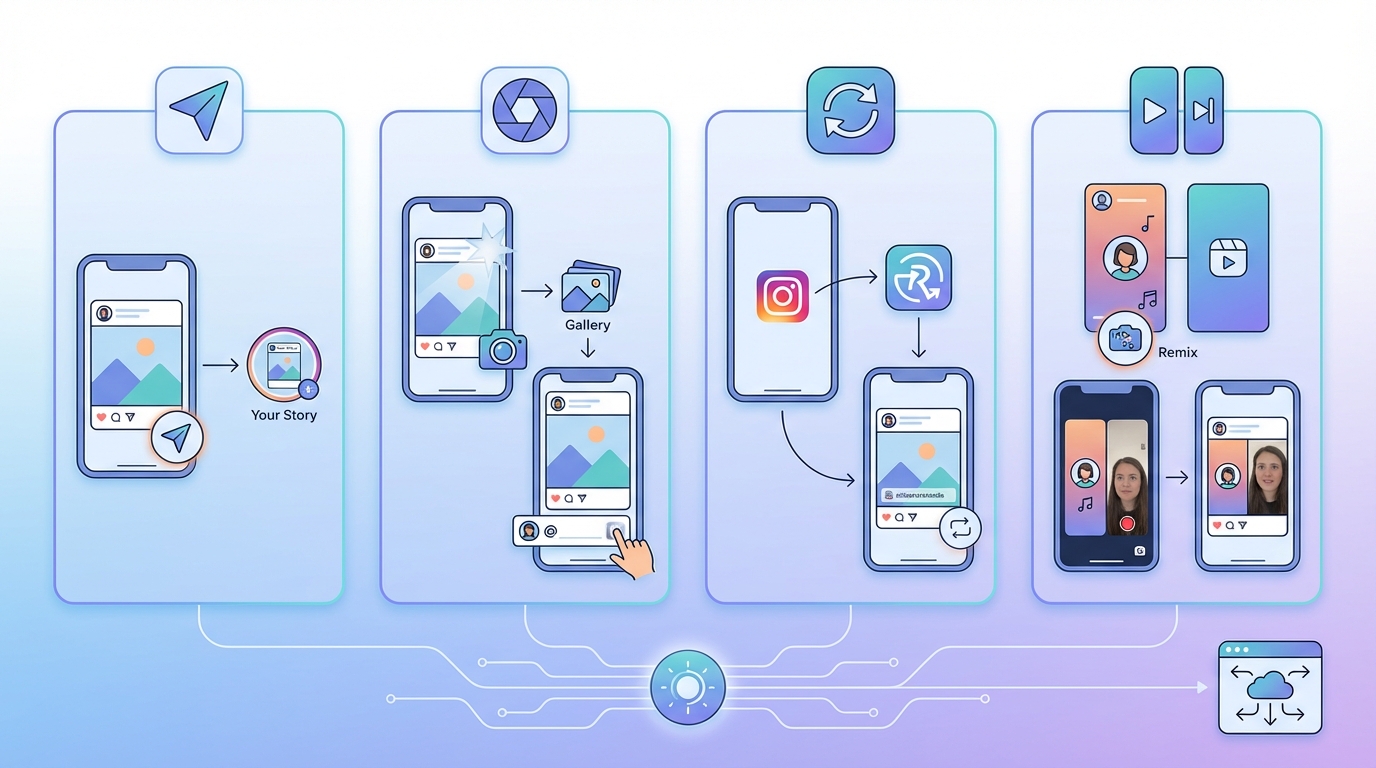
Instagram doesn’t have a native repost button, but you can share posts to your Story by tapping the paper airplane icon below the post and selecting ‘Add post to your story.’ For feed posts, you can manually screenshot the content, credit the original creator in your caption, and upload it as a new post. Always tag the original poster and request permission before reposting.
What’s the best way to repost Instagram content for social media marketing?
For effective social media marketing, use Instagram’s built-in sharing features or dedicated reposting apps that preserve credits. Always add value by including your commentary, tag the original creator, and ensure the content aligns with your brand. Schedule reposts during the best times to post on Instagram (typically 6-9 AM and 5-7 PM) to maximize engagement and reach your target audience effectively.
Can you repost Instagram Stories from other accounts?
Yes, you can repost Instagram Stories if you’re mentioned in them. When someone tags you in their Story, you’ll receive a notification and can tap ‘Add This to Your Story’ to reshare it. If you’re not tagged, you can screenshot the Story and repost it manually, but always ask for permission first and credit the original creator to maintain proper social media etiquette.
How do you repost on Instagram while giving proper credit?
To properly credit when reposting on Instagram, always tag the original creator in both the caption and the image itself. Include phrases like ‘Repost from @username’ or ‘Credit: @username’ in your caption. Use the mention sticker in Stories or tag them in feed posts. This practice is essential for ethical social media marketing and helps build positive relationships with content creators.
What are the best Instagram repost apps for digital marketing professionals?
Popular Instagram repost apps include Repost for Instagram, Regrann, and Later. For digital marketing professionals managing multiple social media platforms, centralized tools like Orionix offer streamlined content management through a single dashboard. These platforms allow you to plan, create, and publish content across various channels while maintaining consistent branding and scheduling posts at optimal times.
Is reposting on Instagram different from sharing to other social media platforms?
Yes, reposting on Instagram differs from other social media platforms because Instagram lacks a native share-to-feed button like Facebook or Twitter. While you can easily share posts to Instagram Stories, reposting to your main feed requires manual methods or third-party apps. Cross-platform social media marketing tools help manage content across multiple social media platforms simultaneously, ensuring consistent messaging.
How often should you repost content on Instagram for effective social media marketing?
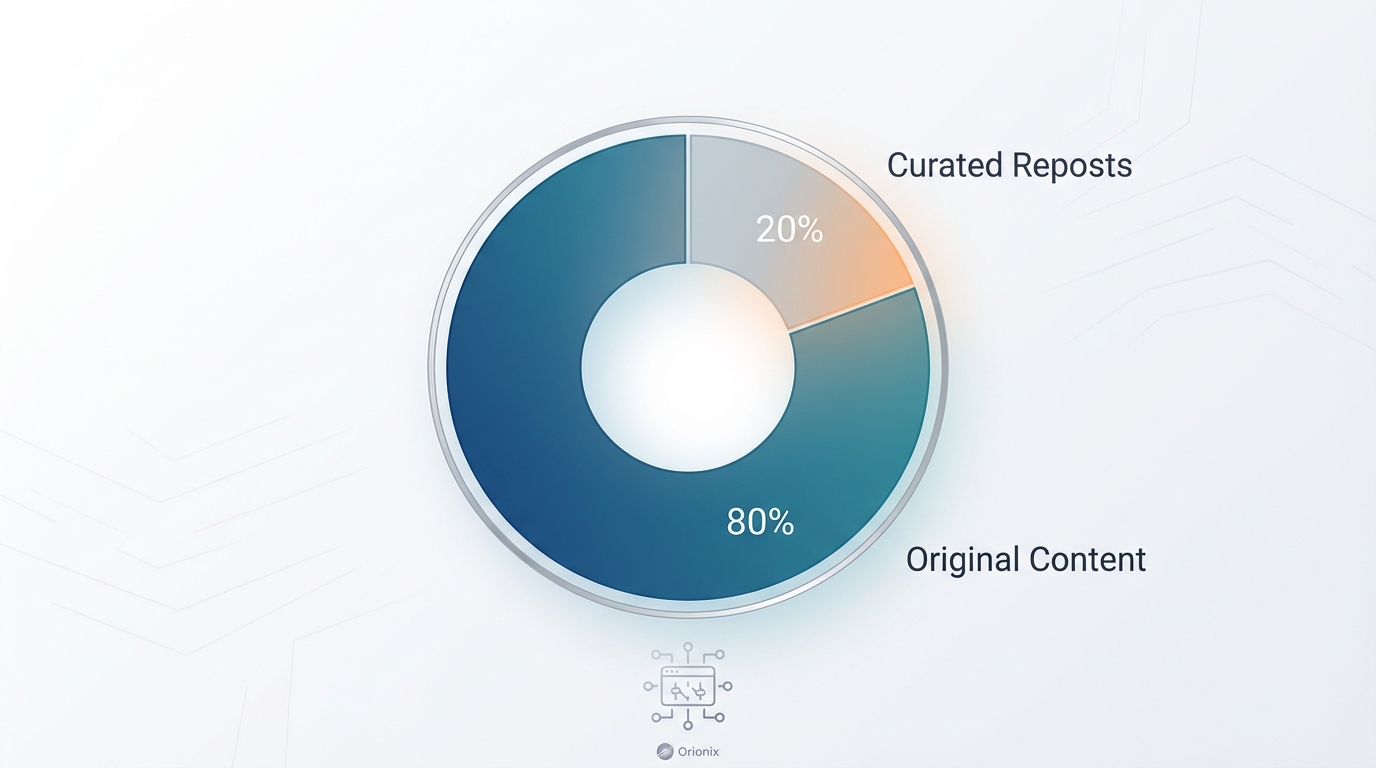
For effective social media marketing, follow the 80/20 rule: 80% original content and 20% curated reposts. Repost 2-3 times weekly, ensuring content adds value to your audience. Consider the best times to post on Instagram based on your audience’s activity patterns. Balance reposts with original content to maintain authenticity while leveraging user-generated content to build community engagement and trust.
Can you repost on Instagram after deactivating and reactivating your account?
Yes, you can repost on Instagram after reactivating your account. When you deactivate Instagram temporarily, your account is hidden but not deleted. Once you log back in to reactivate, all your features return to normal, including the ability to repost content. This differs from permanently deleting an Instagram account, which removes all data and functionality completely.
Understanding How to Repost on Instagram: Your Complete Guide
If you’re wondering how do you repost on Instagram, you’re not alone. Instagram remains one of the most powerful social media platforms for content sharing, yet it surprisingly lacks a native repost feature like other social media platforms. Whether you’re managing multiple accounts for social media marketing or simply want to share content you love, understanding the various methods for reposting is essential for your digital marketing strategy.
Reposting on Instagram has become a crucial component of social media marketing, allowing brands and creators to amplify content, build relationships, and engage with their community. This comprehensive guide will walk you through every method available, from built-in features to third-party tools, ensuring you can confidently share content while respecting copyright and maintaining authenticity.
The ability to repost effectively can significantly impact your content strategy, especially when you understand the best content ideas that work and how to leverage them across different social media platforms. Let’s explore the complete landscape of Instagram reposting techniques. 📱
Why Reposting Matters for Social Media Marketing

Before diving into the technical aspects of how do you repost on Instagram, it’s important to understand why this practice has become so vital for digital marketing professionals and content creators alike.
Building Community and Engagement
Reposting user-generated content (UGC) strengthens your relationship with followers and customers. When you share content from your community, you’re acknowledging their contribution and fostering loyalty. This strategy is particularly effective for brands looking to build authentic connections on social media platforms.
- Increases brand trust and authenticity 💯
- Encourages more user-generated content creation
- Reduces content creation workload while maintaining posting frequency
- Demonstrates social proof to potential customers
- Builds stronger relationships with brand advocates
Content Curation and Value Delivery
Not every post needs to be original. Strategic reposting allows you to curate valuable content for your audience, positioning your brand as a trusted resource. This approach aligns perfectly with modern social media marketing strategies where providing value trumps constant self-promotion.
Understanding the best time to post on Instagram combined with strategic reposting can maximize your content’s reach and engagement rates significantly.
Method 1: Using Instagram’s Built-In Sharing Features
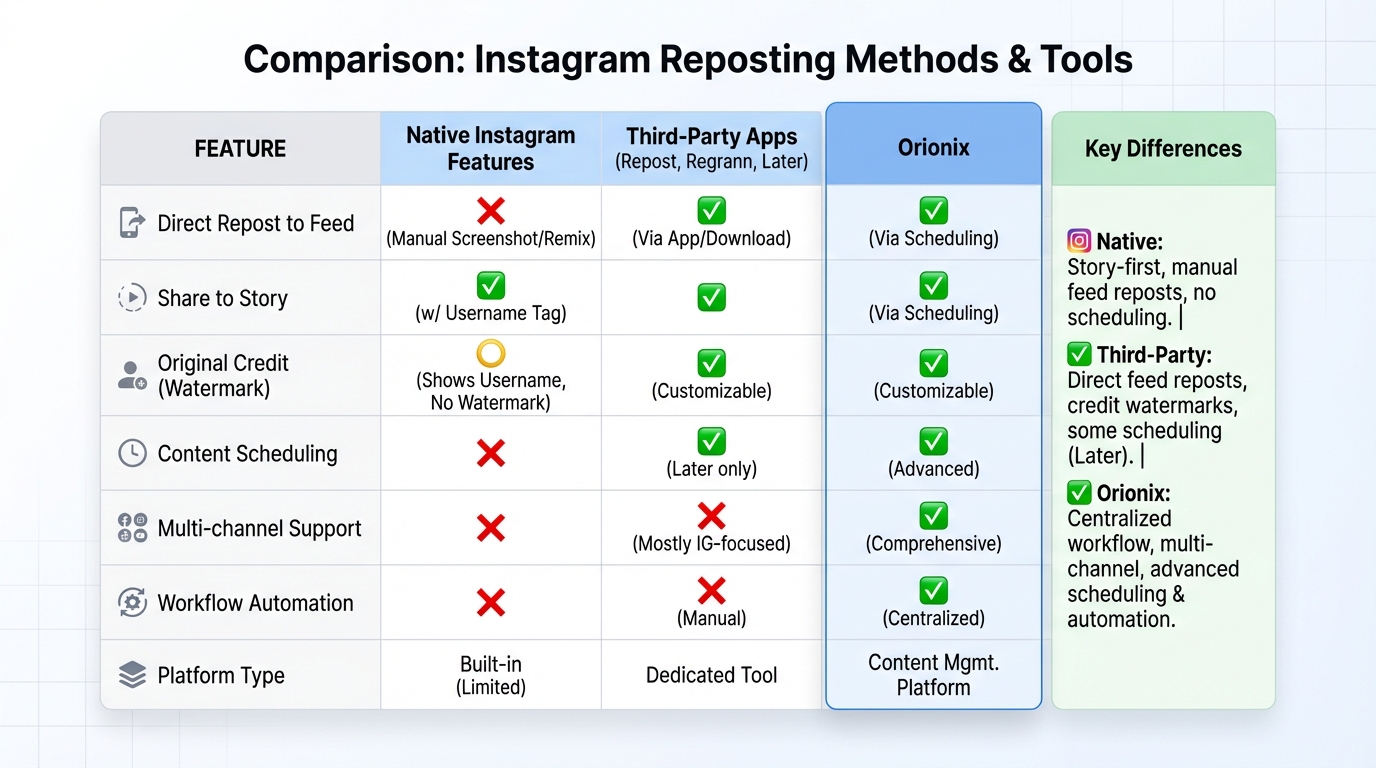
Instagram does offer some native sharing capabilities, though they’re limited compared to dedicated reposting apps. Here’s how to leverage Instagram’s built-in features for sharing content.
Sharing to Your Instagram Stories
The easiest way to repost content is through Instagram Stories. This method works seamlessly and requires no third-party apps, making it the preferred choice for quick sharing.
| Step | Action | Important Notes |
|---|---|---|
| 1 | Find the post you want to share | Must be a public post from an account that allows sharing |
| 2 | Tap the paper airplane icon below the post | This is the « Share » button |
| 3 | Select « Add post to your story » | Only available if the original poster allows sharing |
| 4 | Customize with stickers, text, or drawings | Add your own commentary or branding |
| 5 | Share to your story | Post appears with a link to the original |
Direct Messaging Method
While not technically a « repost, » you can share posts through Instagram Direct Messages. This works well for private sharing or when you want to discuss content with specific followers before deciding whether to repost publicly.
Simply tap the paper airplane icon and select the accounts or groups you want to share with. This method is excellent for content collaboration and team discussions in social media marketing environments. 💬
Method 2: Screenshot and Manual Reposting
One of the oldest methods for reposting content involves taking screenshots and manually uploading them. While this approach seems straightforward, it comes with important considerations for digital marketing professionals.
The Screenshot Process
- Take a screenshot of the post you want to share
- Crop the image to remove unnecessary elements
- Create a new Instagram post with the screenshot
- Write a caption that credits the original creator
- Tag the original account in both the caption and photo
Important Considerations for Screenshots
This method requires careful attention to copyright and attribution. Always obtain permission before reposting someone’s content, especially for commercial purposes or social media marketing campaigns.
- Image quality may be reduced through screenshots 📸
- Manual crediting is essential for ethical reposting
- This method doesn’t work for video content
- Time-consuming compared to automated solutions
- Risk of appearing unprofessional without proper attribution
For content creators managing multiple social media platforms, manual reposting can become time-intensive and inefficient.
Method 3: Third-Party Reposting Apps
The most efficient way to repost on Instagram involves using dedicated third-party applications. These tools streamline the process while maintaining proper attribution and image quality.
Popular Reposting Apps
| App Name | Key Features | Best For | Cost |
|---|---|---|---|
| Repost for Instagram | Automatic attribution, maintains quality, easy interface | Individual users and small businesses | Free with ads, premium available |
| Regrann | Schedule posts, analytics, bulk reposting | Social media marketing professionals | Free and paid tiers |
| InstaRepost | Video support, caption editing, watermark options | Content creators and influencers | Free with premium features |
| Repost Story | Story-focused, anonymous viewing, download options | Story reposting specialists | Free with in-app purchases |
How to Use Reposting Apps
Most reposting applications follow a similar workflow that makes the process quick and efficient for digital marketing teams:
- Download and install your chosen reposting app from the App Store or Google Play
- Open Instagram and find the post you want to repost
- Tap the three dots (•••) in the upper right corner of the post
- Select « Copy Link » or « Share to… » depending on your device
- Open the reposting app, which will automatically detect the copied link
- Customize the caption and attribution settings
- Post directly to Instagram or save for later scheduling
These apps typically add a small watermark crediting the original creator, ensuring ethical reposting practices that align with social media marketing best practices. ✅
Method 4: Using Instagram’s Collaboration Feature
Instagram introduced the Collaboration feature (Collab posts) which allows multiple accounts to co-author a single post. This innovative approach to content sharing represents Instagram’s most official reposting method.
How Collab Posts Work
Collab posts appear on both accounts’ feeds and share the same likes, comments, and views. This feature is particularly powerful for brand partnerships and influencer marketing campaigns within your social media marketing strategy.
- Both accounts appear as authors on the post
- Engagement metrics are combined across both profiles
- Followers of both accounts can see the post
- Perfect for brand collaborations and partnerships 🤝
- Requires acceptance from the collaborating account
Creating a Collab Post
- Create your post as normal (photo, carousel, or Reel)
- Before sharing, tap « Tag People »
- Select « Invite Collaborator »
- Search for and select the account you want to collaborate with
- Post the content (it will be pending until the other account accepts)
- Once accepted, the post appears on both profiles simultaneously
This method is ideal for social media marketing professionals managing campaigns that involve multiple stakeholders or brand partnerships.
Best Practices for Ethical Reposting
Understanding how do you repost on Instagram is only part of the equation. Ethical reposting practices protect you legally and maintain your reputation across social media platforms.
Always Credit the Original Creator
Proper attribution isn’t just courteous—it’s essential for maintaining trust and avoiding copyright issues. Your caption should clearly identify the original creator, and you should tag them in the post itself.
| Do This | Don’t Do This |
|---|---|
| Tag the creator in the caption and photo | Repost without any attribution |
| Use phrases like « 📸 by @username » or « Repost from @username » | Claim the content as your own |
| Ask permission before reposting | Assume permission is granted |
| Link to the original post when possible | Remove watermarks or creator signatures |
| Respect if someone asks you to remove their content | Ignore takedown requests |
Obtain Permission When Necessary
For commercial use or social media marketing campaigns, always request explicit permission before reposting. Send a direct message explaining how you plan to use their content and wait for confirmation before proceeding.
This practice is especially important for businesses engaged in digital marketing, where copyright violations can result in legal consequences and brand damage. 🔒
Respect Privacy Settings and Preferences
Not all content is meant to be shared widely. Private accounts, sensitive content, or posts explicitly marked as « do not repost » should be respected. Some creators include reposting guidelines in their bio or highlights.
- Never repost from private accounts without permission
- Check the creator’s bio for reposting policies
- Respect content marked with « © » or « do not repost » warnings
- Consider the context and sensitivity of the content
- Remove reposts if requested by the original creator
Reposting Instagram Reels and Videos
Video content requires special consideration when reposting. Instagram Reels have become increasingly important for social media marketing, making it crucial to understand how to share them properly.
Reposting Reels to Your Story
Instagram allows you to share Reels directly to your Story, similar to regular posts. This feature maintains video quality and provides proper attribution automatically.
- Open the Reel you want to share
- Tap the paper airplane icon
- Select « Add Reel to your story »
- Customize with stickers or text if desired
- Share to your Story
The original Reel will appear in your Story with the creator’s username visible, and viewers can tap to watch the full Reel. This method drives engagement back to the original creator while sharing valuable content with your audience. 🎥
Downloading and Reuploading Videos
While technically possible, downloading and reuploading Instagram videos as new posts is generally discouraged. This practice can violate copyright and diminishes the original creator’s engagement metrics.
If you must repost a video as a new post (with permission), use a reputable video downloading tool and ensure prominent attribution in your caption. For professional Instagram how-to videos, proper crediting is essential for maintaining industry relationships.
Strategic Reposting for Business Growth
For businesses and digital marketing professionals, strategic reposting can amplify your content strategy and drive significant results when executed properly.
User-Generated Content Campaigns
Encouraging customers to create content featuring your products or services provides authentic material for reposting. Create a branded hashtag and actively monitor it for reposting opportunities.
- Launch contests encouraging user submissions 🏆
- Feature customer photos and testimonials
- Create a dedicated UGC highlight on your profile
- Reward featured creators with shoutouts or discounts
- Build a library of authentic social proof
Timing Your Reposts for Maximum Impact
Understanding the best times to post on Instagram applies equally to reposts. Schedule your shared content during peak engagement hours to maximize visibility and interaction.
| Industry | Best Days | Best Times (EST) |
|---|---|---|
| B2B/Professional Services | Tuesday-Thursday | 9 AM – 12 PM |
| E-commerce/Retail | Wednesday-Friday | 12 PM – 3 PM |
| Food & Beverage | Thursday-Sunday | 11 AM – 1 PM, 7 PM – 9 PM |
| Entertainment/Media | Friday-Sunday | 6 PM – 10 PM |
Balancing Original and Reposted Content
While reposting provides valuable content, maintaining a healthy balance with original posts is crucial for brand identity. A good rule of thumb for social media marketing is the 80/20 rule: 80% original content, 20% curated/reposted content.
This balance ensures your profile maintains authenticity while leveraging the community-building benefits of reposting. For comprehensive strategies, explore content ideas that work across different social media platforms.
Common Reposting Mistakes to Avoid
Even experienced social media marketing professionals can fall into common traps when reposting content. Avoiding these mistakes protects your brand reputation and maintains positive relationships within your community.
Failing to Credit Properly
The most serious mistake is inadequate attribution. Simply writing « credit to owner » or using vague language doesn’t constitute proper crediting. Always use the creator’s actual username and tag them visibly. 🚫
Ignoring Image Quality
Reposting low-quality screenshots or heavily compressed images reflects poorly on your brand. Use apps that maintain original quality or request high-resolution files directly from creators for important posts.
Over-Reposting Without Adding Value
Simply sharing content without commentary or context provides minimal value to your audience. Add your perspective, insights, or questions to encourage engagement and demonstrate thought leadership in your industry.
- Write meaningful captions that add context
- Ask questions to encourage discussion
- Explain why you’re sharing this particular content
- Connect the repost to your brand’s values or message
- Use relevant hashtags to increase discoverability
Reposting Competitor Content Inappropriately
While curating industry content is valuable, reposting direct competitors requires careful consideration. Ensure your reposting strategy aligns with your digital marketing goals and doesn’t inadvertently promote competitors.
Advanced Reposting Strategies for Digital Marketing
Taking your reposting strategy to the next level involves sophisticated techniques that professional social media marketers use to maximize impact.
Creating Repost-Worthy Original Content
The best reposting strategy starts with creating content others want to share. Design your posts with reposting in mind by making them visually appealing, informative, and easy to credit.
- Include your logo or watermark subtly in images
- Create shareable infographics and data visualizations
- Develop quote graphics with your branding
- Produce educational content that provides genuine value
- Make it easy for others to credit you with clear branding
Building Reposting Partnerships
Establish reciprocal relationships with complementary brands or creators in your niche. These partnerships can expand your reach significantly when both parties commit to regularly sharing each other’s content.
Such collaborations work particularly well for niche industries where building community is essential for growth. Strategic partnerships amplify your message across multiple social media platforms simultaneously. 🤝
Tracking Repost Performance
Monitor which types of reposted content perform best with your audience. Use Instagram Insights to track engagement metrics and adjust your reposting strategy accordingly.
| Metric | What It Tells You | Action Items |
|---|---|---|
| Engagement Rate | How well reposts resonate with your audience | Repost more content similar to high-performing posts |
| Reach | How many unique accounts see your reposts | Optimize posting times and hashtag strategy |
| Saves | Content value and reference-worthiness | Focus on educational or inspirational content |
| Profile Visits | Interest in learning more about your brand | Ensure bio and highlights are optimized |
| Follower Growth | Overall impact on audience building | Correlate reposting frequency with growth trends |
Legal Considerations and Copyright Issues
Understanding the legal landscape of content sharing is crucial for businesses engaged in social media marketing. Copyright law applies to Instagram content just as it does to any other creative work.
Fair Use and Instagram
Fair use is a legal doctrine that permits limited use of copyrighted material without permission. However, fair use on social media platforms is complex and often doesn’t apply to simple reposting for commercial purposes.
- Fair use typically requires transformative content 📚
- Commercial use makes fair use claims more difficult
- Simply adding a caption doesn’t constitute transformation
- Commentary, criticism, or parody may qualify for fair use
- When in doubt, seek permission or legal advice
Terms of Service Compliance
Instagram’s Terms of Service grant the platform certain rights to user content but don’t necessarily grant those rights to other users. Always operate within Instagram’s guidelines to avoid account penalties or suspension.
For professionals managing social media marketing jobs, understanding these legal boundaries is essential for protecting both yourself and your clients.
Creating Reposting Agreements
For ongoing reposting relationships, consider creating simple written agreements that outline terms, attribution requirements, and usage rights. This protects both parties and prevents misunderstandings.
Tools and Platforms for Streamlined Reposting
Beyond mobile apps, several comprehensive platforms help digital marketing professionals manage reposting across multiple social media platforms efficiently.
Social Media Management Platforms
Professional tools like Hootsuite, Buffer, and Later offer reposting capabilities alongside scheduling, analytics, and team collaboration features. These platforms are essential for managing complex social media marketing campaigns.
For businesses looking to centralize their content strategy, Orionix offers a unified platform for planning, creating, and publishing content across various channels through a single dashboard, streamlining the entire content management process including strategic reposting.
Content Curation Tools
Tools like Feedly, Pocket, and Flipboard help discover content worth reposting. These platforms aggregate content from across the web, making it easier to find relevant posts for your audience.
- Set up keyword alerts for your industry
- Follow relevant creators and brands
- Save potential reposts for later scheduling
- Organize content by theme or campaign
- Discover trending topics in your niche 📱
Permission Management Systems
For larger organizations, implementing a system to track permissions and usage rights prevents legal issues. Spreadsheets or dedicated rights management software can document which content you have permission to repost and under what terms.
Reposting as Part of Your Content Calendar
Integrating reposting into your overall content strategy requires planning and organization. A well-structured content calendar ensures consistent posting while maintaining quality and variety.
Planning Your Repost Ratio
Determine what percentage of your content will be reposts versus original posts. This ratio should reflect your brand’s goals, resources, and audience preferences discovered through analytics.
| Day | Content Type | Source | Goal |
|---|---|---|---|
| Monday | Original Post | In-house creation | Brand awareness |
| Tuesday | User-Generated Content Repost | Customer submission | Community building |
| Wednesday | Original Post | In-house creation | Product showcase |
| Thursday | Industry Content Repost | Complementary brand | Thought leadership |
| Friday | Original Post | In-house creation | Engagement/Entertainment |
| Weekend | UGC Repost or Story Shares | Community content | Maintain presence |
Seasonal and Campaign-Based Reposting
Align your reposting strategy with seasonal trends, holidays, and marketing campaigns. During product launches or special events, increase reposting of customer reactions and reviews to build momentum.
Understanding optimal posting times for different content types helps maximize the impact of both original and reposted content throughout your campaigns.
Measuring Success: Analytics and ROI
To justify reposting as part of your digital marketing strategy, you need to measure its impact on your business goals and demonstrate return on investment.
Key Performance Indicators for Reposting
Track specific metrics that indicate whether your reposting strategy contributes to your overall social media marketing objectives:
- Engagement Rate: Compare reposted content vs. original content 📊
- Follower Growth: Measure correlation with reposting frequency
- Brand Mentions: Track increase in tags and mentions
- Website Traffic: Monitor referrals from Instagram
- Conversion Rate: Track sales or leads from reposted content
- Community Sentiment: Assess audience response and feedback
A/B Testing Reposting Strategies
Experiment with different reposting approaches to identify what works best for your audience. Test variables like caption length, attribution style, posting times, and content types.
Document your findings and continuously refine your approach based on data. This analytical mindset is crucial for anyone pursuing entry-level social media marketing positions or advancing their career in digital marketing.
Calculating Reposting ROI
Determine the cost-effectiveness of reposting by comparing the time and resources invested against the results achieved. Consider factors like content creation time saved, engagement generated, and conversions attributed to reposted content.
Future Trends in Instagram Content Sharing
As Instagram continues evolving, staying ahead of trends ensures your reposting strategy remains effective and compliant with platform changes.
Enhanced Collaboration Features
Instagram regularly introduces new features that facilitate content sharing and collaboration. The Collab feature represents just the beginning of more sophisticated partnership tools that may emerge.
Improved Attribution and Rights Management
Expect Instagram to develop better systems for managing content rights and attribution as creator economy concerns grow. These improvements will likely make ethical reposting easier and more transparent. 🔮
Integration with E-commerce
As Instagram Shopping expands, reposting product-related content may integrate more seamlessly with purchasing options, creating new opportunities for social media marketing professionals to drive sales through strategic content sharing.
Staying informed about platform updates and industry trends helps you adapt your reposting strategy to leverage new features as they become available.
Conclusion: Mastering Instagram Reposting for Success
Understanding how do you repost on Instagram encompasses much more than simply sharing content. It requires strategic thinking, ethical practices, proper attribution, and continuous optimization based on performance data.
Whether you’re using Instagram’s built-in features, third-party apps, or collaboration tools, the key to successful reposting lies in adding value for your audience while respecting content creators. By balancing original content with strategic reposts, you can build community, amplify your message, and achieve your social media marketing goals more efficiently.
Remember that reposting is ultimately about relationships—with your audience, with content creators, and with your broader industry community. Approach it with authenticity, generosity, and strategic intent, and you’ll find it becomes a powerful component of your overall digital marketing strategy. ✨
As you implement these reposting strategies, consider how a centralized content management approach can streamline your entire social media workflow. Visit Orionix to discover how our platform helps you plan, create, and publish content across all your channels from a single dashboard, making it easier to manage both original content and strategic reposts while maintaining consistency and quality across all your social media platforms. Take control of your content strategy today and transform how you approach social media marketing! 🚀
Article created using IntentRank