
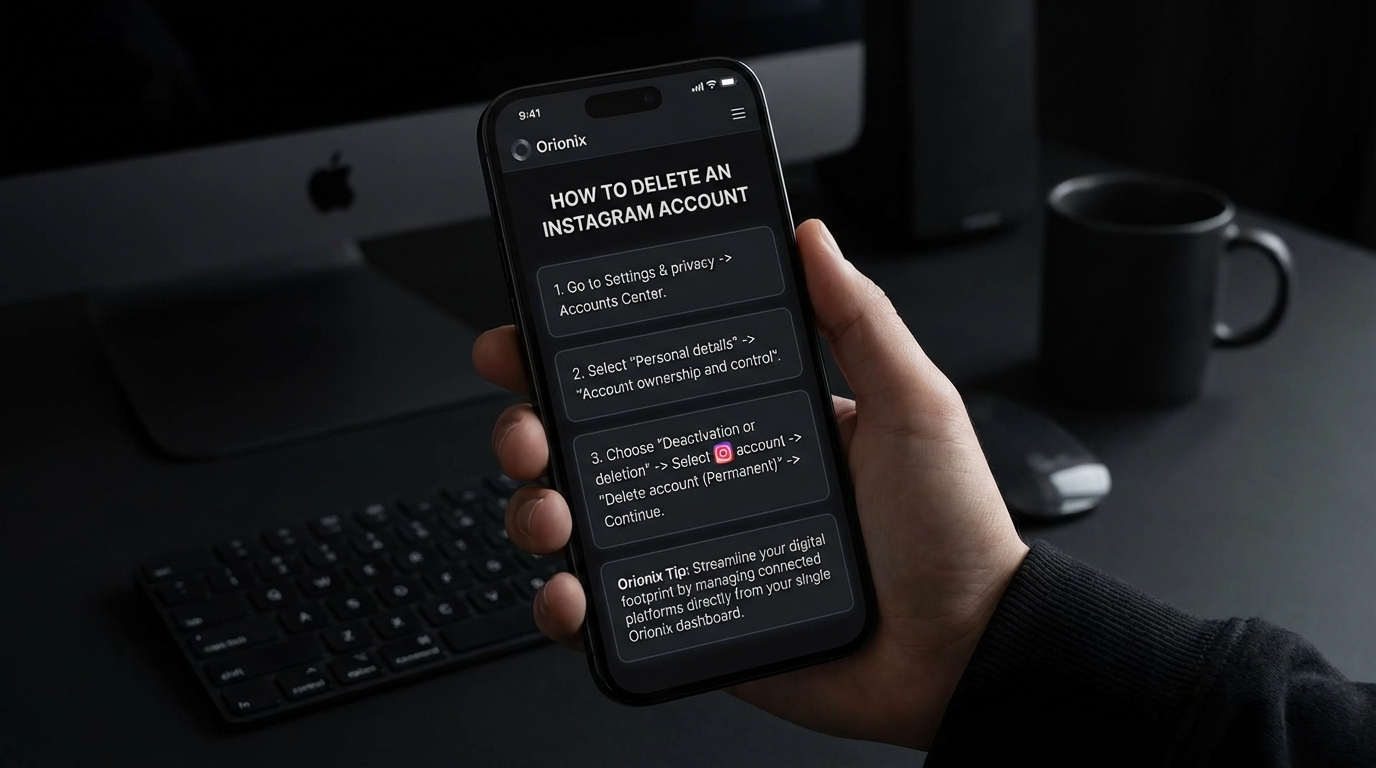
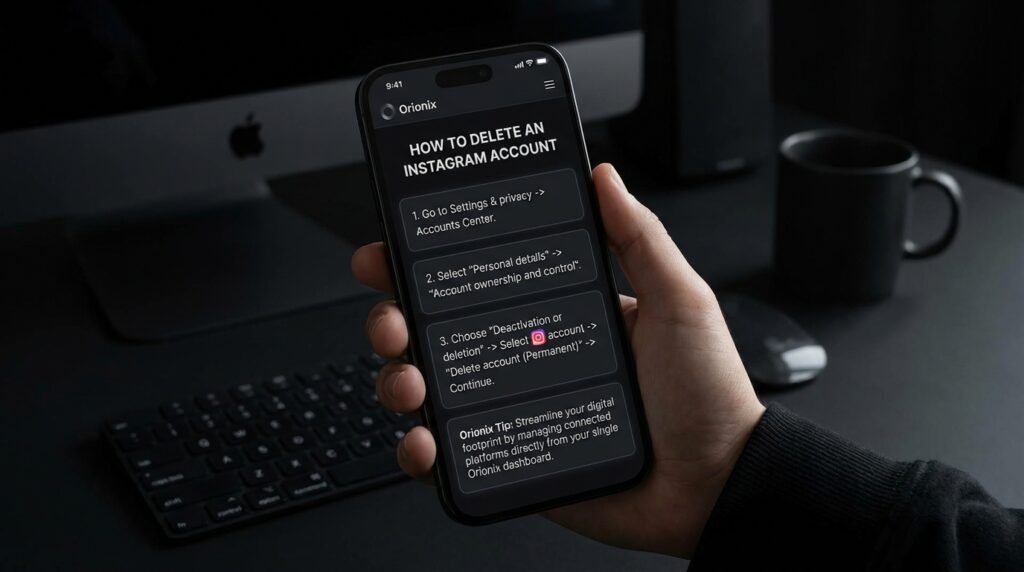
TL;DR: To delete an Instagram account permanently, go to Instagram’s Delete Your Account page while logged in through a web browser. Select a reason for deletion, re-enter your password, and click « Permanently delete my account. » Note that deleted accounts cannot be recovered, and the process isn’t available through the mobile app.
Frequently Asked Questions
How do you delete an Instagram account permanently?
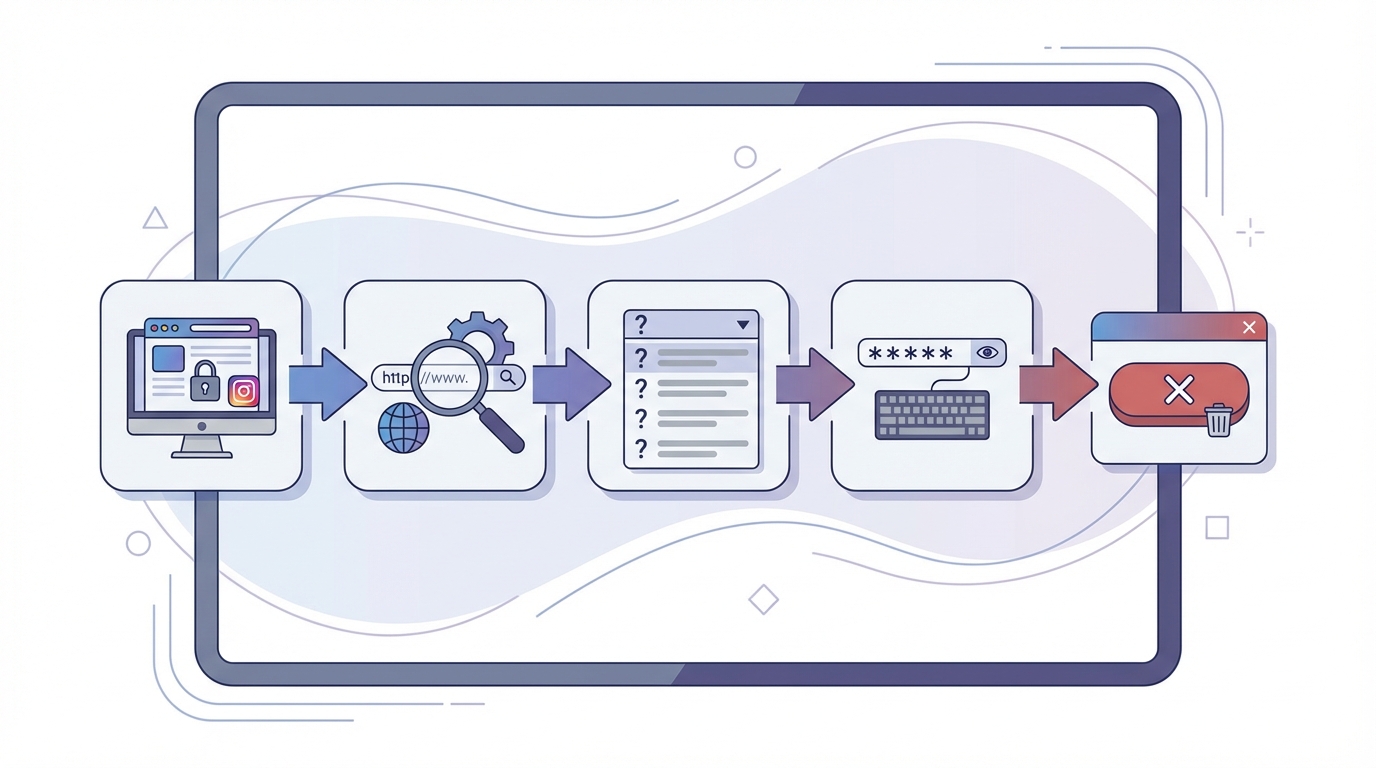
To permanently delete an Instagram account, visit instagram.com/accounts/remove/request/permanent/ from a web browser. Log in to your account, select a reason for deletion from the dropdown menu, re-enter your password, and click ‘Permanently delete my account.’ This action is irreversible, and all your content, followers, and data will be permanently removed within 30 days.
What’s the difference between deactivating and deleting an Instagram account?
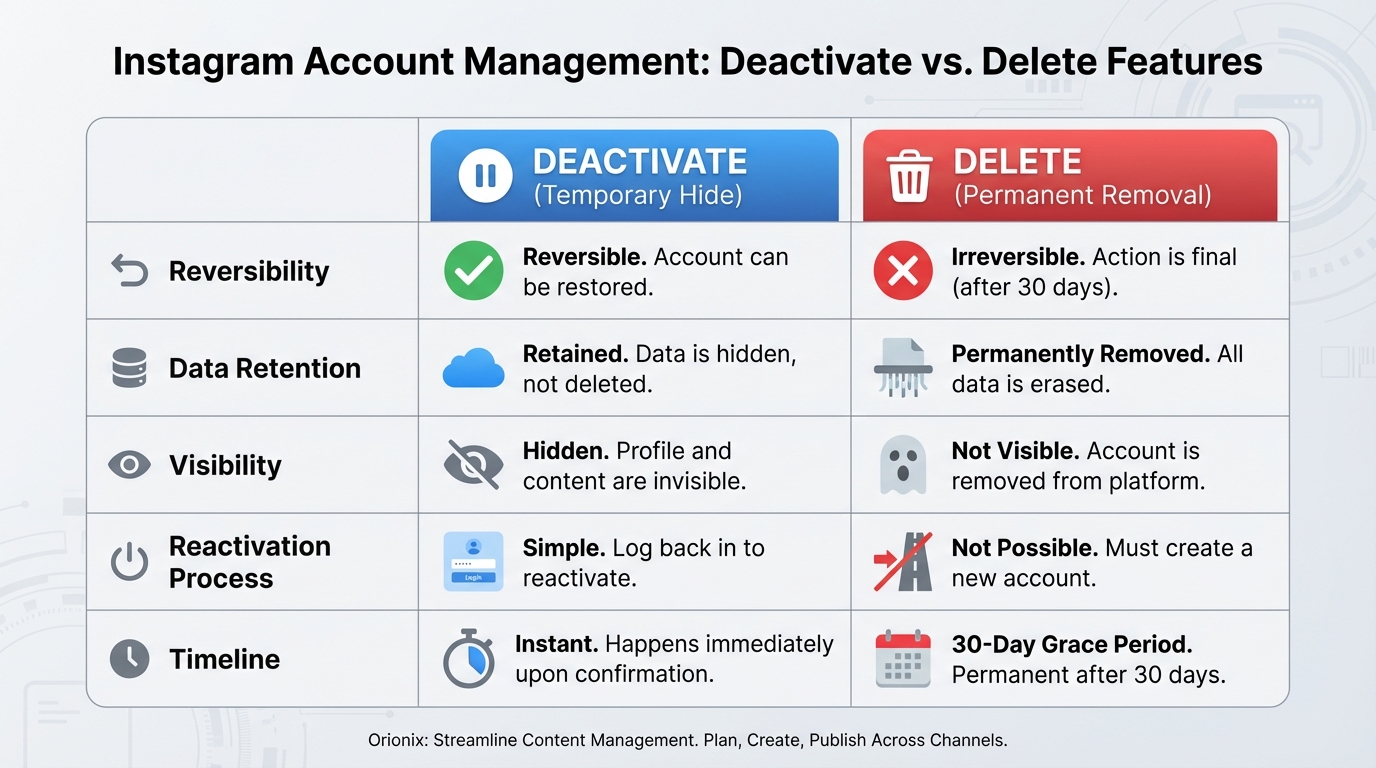
Deactivating an Instagram account temporarily hides your profile, photos, comments, and likes until you reactivate it by logging back in. Deleting permanently removes your account and all associated data forever. Deactivation is reversible and ideal for breaks from social media platforms, while deletion is final and cannot be undone after the 30-day grace period.
How to deactivate Instagram temporarily instead of deleting it?
To temporarily deactivate Instagram, log in through a web browser and go to your profile settings. Click ‘Edit Profile,’ scroll down, and select ‘Temporarily disable my account’ at the bottom right. Choose a reason from the dropdown, enter your password, and click ‘Temporarily Disable Account.’ Your profile will be hidden until you log back in to reactivate it.
Can you delete an Instagram account from the mobile app?
No, you cannot permanently delete an Instagram account directly from the mobile app. Instagram requires users to visit the deletion page through a mobile or desktop web browser at instagram.com/accounts/remove/request/permanent/. However, you can access account settings and deactivation options through the app, but permanent deletion must be done via browser.
How long does it take for Instagram to permanently delete your account?
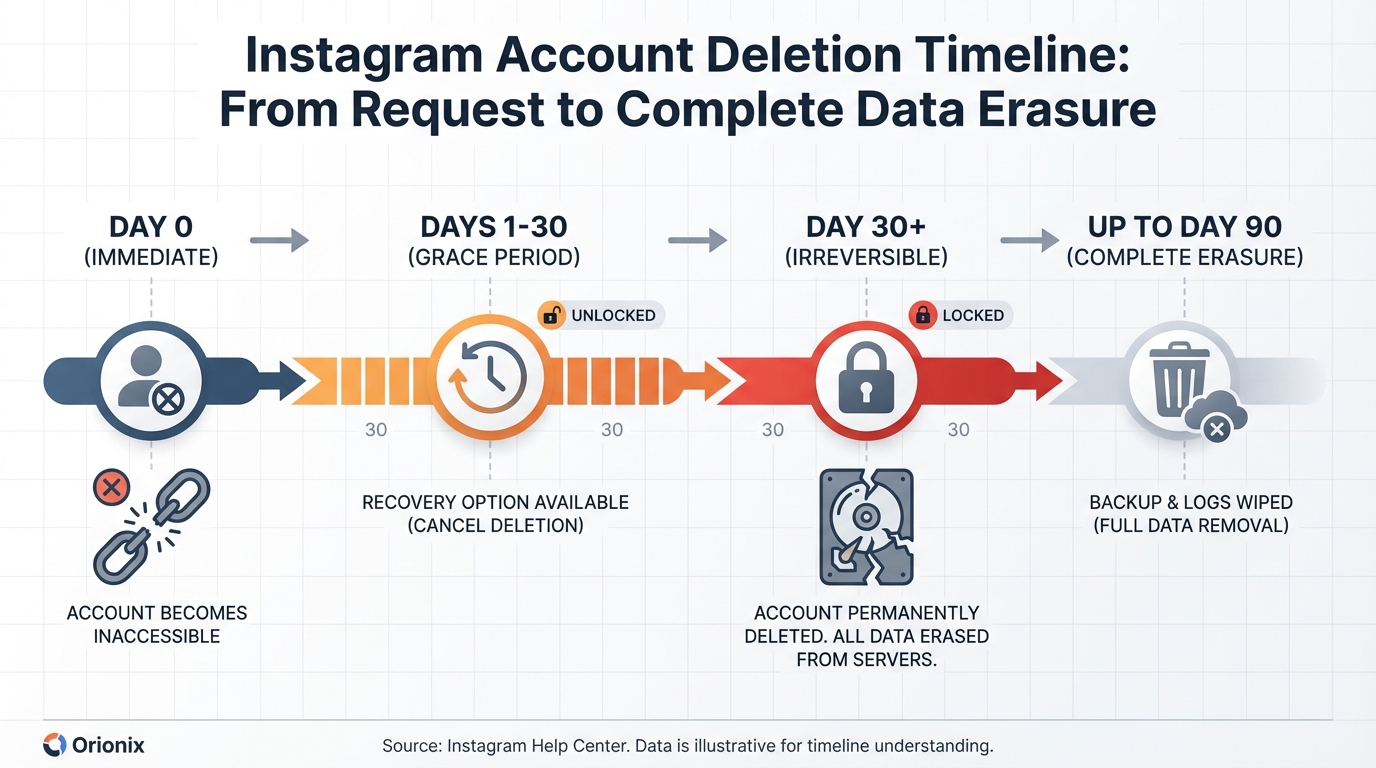
Instagram takes up to 90 days to completely delete your account and all associated data from their servers after you submit a deletion request. However, your account becomes immediately inaccessible to other users. During the first 30 days, you can cancel the deletion by simply logging back in. After 30 days, the deletion becomes irreversible.
What happens to your content when you delete your Instagram account?
When you delete your Instagram account, all your content including photos, videos, comments, likes, followers, and direct messages are permanently removed. Your username becomes available for others to use, and you cannot recover any data once the deletion is complete. If you manage social media marketing campaigns, consider downloading your data before deletion to preserve important content.
Should businesses delete or deactivate Instagram for social media marketing breaks?
Businesses should typically deactivate rather than delete their Instagram accounts when taking breaks from social media marketing. Deactivation preserves your follower base, content history, engagement data, and insights about best times to post on Instagram. Using content management platforms like Orionix can help schedule posts in advance, reducing the need for breaks while maintaining consistent social media presence.
Can you recover a deleted Instagram account after 30 days?
No, you cannot recover a deleted Instagram account after the 30-day grace period expires. Within those first 30 days, you can cancel deletion by logging back into your account. After 30 days, all data including followers, posts, and username are permanently erased from Instagram’s servers and cannot be restored under any circumstances.
Understanding How to Delete an Instagram Account: A Complete Guide
If you’re wondering how do you delete an Instagram account, you’re not alone. Every day, thousands of users decide to permanently remove their presence from this social media platform for various reasons—whether it’s to focus on other social media platforms, reduce digital distractions, or simply take a break from the demands of social media marketing. Understanding the difference between temporarily deactivating and permanently deleting your account is crucial before making this important decision. 📱
This comprehensive guide will walk you through everything you need to know about removing your Instagram presence, including the step-by-step process, what happens to your content, and important considerations before taking this irreversible action. Whether you’re a content creator, digital marketing professional, or simply someone looking to disconnect, this article provides the complete roadmap you need.
Before we dive into the deletion process, it’s essential to understand that Instagram, like other social media platforms, offers two distinct options: temporary deactivation and permanent deletion. Each serves different purposes and has different consequences for your account, followers, and content history. 🔍
The Difference Between Deactivation and Permanent Deletion
Many users confuse these two options, but understanding the distinction is critical for making the right choice. Let’s break down what each option means for your Instagram presence and your digital marketing efforts.
Temporary Deactivation: A Reversible Break
When you choose to deactivate Instagram, you’re essentially putting your account on pause. This option is perfect for those who need a temporary break from social media and might want to return later. Here’s what happens when you deactivate:
- Your profile, photos, comments, and likes become hidden from other users
- Your username remains reserved and cannot be claimed by others
- You can reactivate anytime by simply logging back in
- All your content, followers, and data remain intact and ready to restore
- Your account won’t appear in search results or to other users
This reversible option is ideal for social media managers taking a break or businesses testing different marketing digital marketing strategies across various platforms. It allows flexibility without losing years of content and connections. ⏸️
Permanent Deletion: The Final Goodbye
Permanent deletion is exactly what it sounds like—a complete and irreversible removal of your Instagram account. This option should only be chosen when you’re absolutely certain you won’t need the account again. Understanding how can you delete an Instagram account permanently involves recognizing these consequences:
- All photos, videos, comments, likes, and followers are permanently erased
- Your username becomes available for others to claim after deletion
- You cannot recover the account or any of its content after 30 days
- All direct messages and conversation history disappear completely
- Any connected apps or services lose access to your Instagram data
For businesses engaged in social media marketing, permanent deletion means losing valuable insights, customer connections, and potentially years of brand-building efforts. Consider this carefully before proceeding. ⚠️
| Feature | Temporary Deactivation | Permanent Deletion |
|---|---|---|
| Reversibility | ✅ Fully reversible | ❌ Irreversible after 30 days |
| Content Preservation | ✅ All content saved | ❌ All content deleted |
| Username Retention | ✅ Username reserved | ❌ Username becomes available |
| Reactivation Time | Instant upon login | Not possible |
| Follower Retention | ✅ All followers preserved | ❌ All followers lost |
| Data Recovery | ✅ Automatic upon reactivation | ❌ No recovery possible |
How to Deactivate Instagram Temporarily
If you’re not ready for permanent deletion, learning how to deactivate Instagram temporarily is your best option. This process is straightforward but can only be completed through a web browser—not the mobile app. Here’s the complete step-by-step guide. 🖥️
Step-by-Step Deactivation Process
- Open a web browser: Navigate to Instagram.com and log into your account using your credentials
- Access your profile: Click on your profile picture in the top right corner
- Go to Settings: Select « Settings » from the dropdown menu
- Find Account Center: Look for « Accounts Center » or « Edit Profile » depending on your account type
- Select deactivation option: Choose « Temporarily deactivate my account » at the bottom of the page
- Provide a reason: Select why you’re deactivating from the dropdown menu
- Re-enter password: Confirm your identity by entering your password
- Confirm deactivation: Click « Temporarily Deactivate Account » to complete the process
Once deactivated, your account disappears immediately. You can reactivate at any time by simply logging back in through the app or website. This makes it perfect for those managing multiple social media platforms who need occasional breaks. 🔄
Important Deactivation Considerations
Before deactivating, keep these important points in mind for your social media and digital marketing strategy:
- You can only deactivate your account once per week
- Deactivation doesn’t affect linked Facebook or other social media accounts
- Your Instagram data remains on their servers during deactivation
- Business accounts lose access to insights and analytics during deactivation
- Scheduled posts and automated marketing campaigns will not run while deactivated
For businesses tracking the best times to post on Instagram, deactivation means losing momentum and potentially affecting your engagement rates when you return. Plan accordingly. 📊
How Do You Delete an Instagram Account Permanently
Now let’s address the main question: how can you delete an Instagram account permanently? This process is more involved than deactivation and requires careful consideration. Once completed, there’s a 30-day grace period before deletion becomes final. ⏰
Complete Permanent Deletion Steps
Follow these detailed instructions to permanently delete your Instagram account. Remember, this action cannot be undone after the grace period expires:
- Visit the deletion page: Go directly to instagram.com/accounts/remove/request/permanent/ (this page isn’t accessible through the app)
- Log in if needed: Enter your credentials if you’re not already signed in
- Select deletion reason: Choose from the dropdown menu why you’re deleting your account
- Re-enter password: Confirm your identity by typing your password again
- Review the warning: Read the information about what will be permanently lost
- Click « Permanently delete my account »: Confirm your final decision
- Wait 30 days: Your account enters a grace period where you can still cancel the deletion
- Avoid logging in: Don’t log in during the 30-day period or the deletion will be cancelled
After 30 days without logging in, your account and all associated data are permanently deleted. This includes all photos, videos, followers, comments, and any insights from your social media marketing efforts. 🗑️
What Happens During the 30-Day Grace Period
Instagram provides a 30-day window before permanent deletion takes effect. Understanding this grace period is crucial for anyone involved in marketing digital marketing or managing business accounts:
- Your account becomes immediately invisible to other users
- Content cannot be accessed by you or anyone else
- Logging in during this period cancels the deletion request
- After 30 days, deletion becomes irreversible and complete
- Instagram may retain some data for legal or security purposes
For businesses running campaigns across multiple social media platforms, this grace period offers a final chance to reconsider before losing valuable customer data and marketing insights. 💭
Before You Delete: Critical Considerations
Before taking the irreversible step of deletion, consider these important factors that could impact your digital presence and social media marketing strategy. Making an informed decision now can prevent regret later. 🤔
Downloading Your Instagram Data
Instagram allows you to download a complete copy of your data before deletion. This is essential for preserving memories, content, and business insights. Here’s what you can download:
- All photos and videos you’ve posted
- Stories and highlights archives
- Direct message history and conversations
- Comments, likes, and engagement data
- Profile information and account settings
- Search history and activity logs
To download your data, go to Settings > Security > Download Data. Instagram will email you a link when your archive is ready, typically within 48 hours. This is particularly valuable for those tracking the best time to post on Instagram and analyzing historical performance. 📥
Impact on Your Digital Marketing Strategy
Deleting your Instagram account has significant implications for your overall social media and marketing approach. Consider these factors before proceeding:
| Marketing Aspect | Impact of Deletion | Alternative Solution |
|---|---|---|
| Brand Visibility | Complete loss on Instagram platform | Focus on other social media platforms |
| Customer Engagement | Loss of direct communication channel | Redirect to email or other platforms |
| Content Strategy | Years of content permanently lost | Download and repurpose on other channels |
| Follower Base | Complete loss of Instagram audience | Build presence on alternative platforms |
| Analytics Data | Historical insights permanently deleted | Export data before deletion |
For professionals in social media marketing jobs, losing access to Instagram analytics and historical data can impact portfolio development and case studies. Plan accordingly. 📈
Alternatives to Complete Deletion
Before permanently deleting your account, consider these alternatives that might better serve your needs while maintaining your digital presence:
- Temporary deactivation: Take a break without losing everything permanently
- Privacy settings adjustment: Make your account private and limit interactions
- Unfollowing accounts: Clean up your feed by unfollowing on Instagram accounts that don’t serve you
- Blocking specific users: Learn how to block someone on Instagram instead of deleting entirely
- Reducing posting frequency: Stay present without the pressure of constant content creation
- Limiting app usage: Use screen time controls to reduce Instagram consumption
These alternatives allow you to maintain your presence for potential future use while addressing current concerns about social media and mental health or time management. 🎯
What Happens After You Delete Your Account
Understanding the aftermath of deletion helps set realistic expectations and prepare for the transition away from Instagram. Here’s what you need to know about life after deletion. 🌅
Immediate Effects of Account Deletion
Once you confirm deletion, several things happen immediately across social media platforms and connected services:
- Your profile becomes immediately inaccessible to all users
- All tags of you in other people’s photos remain, but your profile link breaks
- Direct messages sent to others remain in their inboxes, but show as « Instagram User »
- Comments on other posts remain visible but appear without your username
- Any connected third-party apps lose access to your Instagram data
- Cross-posting to Facebook or other platforms stops immediately
For those who previously used strategies to gain free Instagram followers, all that growth disappears permanently with deletion. 📉
Long-Term Implications
Beyond the immediate effects, consider these long-term implications for your digital presence and social media marketing efforts:
- Username availability: Your username becomes available for others to claim after deletion completes
- SEO impact: Any search engine results linking to your Instagram profile will lead to dead links
- Brand consistency: Loss of brand presence on one of the major social media platforms
- Network effects: Connections with followers and customers are permanently severed
- Content portfolio: Loss of visual portfolio for creators and businesses
- Marketing insights: No access to historical data about engagement patterns or optimal posting times
Understanding these implications is crucial for anyone working in marketing digital marketing or managing brand presence across multiple channels. 🔍
Rebuilding Your Digital Presence After Deletion
If you’ve deleted your Instagram account and later regret the decision, you’ll need to start completely from scratch. Here’s how to approach rebuilding your presence on Instagram or transitioning to other social media platforms. 🏗️
Creating a New Instagram Account
After permanent deletion, creating a new account means starting over entirely. There’s no way to recover your old content, followers, or data. If you decide to return to Instagram:
- Choose a new username (your old one may or may not be available)
- Rebuild your follower base from zero
- Re-upload content if you downloaded your data before deletion
- Reconnect with friends, customers, and business contacts manually
- Reestablish your social media marketing strategy from the ground up
- Learn from past experiences about the best times to post on Instagram for your audience
This fresh start can be liberating but requires significant effort to rebuild what was lost. Consider whether this aligns with your long-term goals. 🎯
Focusing on Alternative Social Media Platforms
Many users who delete Instagram find success by redirecting their energy to other social media platforms for content creators. Consider these alternatives:
| Platform | Best For | Key Advantage |
|---|---|---|
| TikTok | Short-form video content | Viral potential and younger demographics |
| YouTube | Long-form video content | Monetization opportunities and SEO benefits |
| Professional networking | B2B marketing and career development | |
| Visual discovery | High-intent traffic and evergreen content | |
| Twitter/X | Real-time updates | News, trends, and direct engagement |
Diversifying across multiple platforms reduces dependence on any single channel and creates a more resilient digital marketing strategy. 🌐
Common Mistakes to Avoid When Deleting Instagram
Many users make critical errors during the deletion process that lead to regret or complications. Avoid these common mistakes to ensure a smooth transition away from Instagram. ⚠️
Not Downloading Your Data First
The most common regret after deletion is losing irreplaceable photos, videos, and memories. Before deleting, always download your complete Instagram archive. This includes:
- Personal photos and videos you can’t replace
- Business content you might want to repurpose
- Customer interactions and testimonials
- Analytics data showing your best-performing content
- Direct message conversations with important contacts
This data can be valuable for future reference, even if you never return to Instagram. It’s particularly important for those tracking metrics like best time to post on Instagram for business purposes. 💾
Deleting When You Should Deactivate
Many users rush into permanent deletion when temporary deactivation would better serve their needs. Consider deactivation if:
- You’re feeling overwhelmed but might want to return
- You’re testing life without social media and want flexibility
- You need a break for mental health but don’t want to lose everything
- You’re uncertain about your long-term social media strategy
- You want to preserve your username and content for future use
Remember, you can always permanently delete later, but you can’t undo permanent deletion. Taking the reversible option first is often the wiser choice. 🤷
Not Informing Your Audience
If you have a significant following or use Instagram for business, disappearing without notice can damage relationships and brand reputation. Before deletion:
- Post an announcement about your departure
- Provide alternative ways to stay connected (email, other platforms)
- Update your bio with new contact information
- Give followers time to find you elsewhere before deleting
- Consider the impact on ongoing campaigns or partnerships
This professional approach maintains relationships and ensures your audience can follow you to other social media platforms where you remain active. 📢
Managing Multiple Accounts and Business Considerations
For those managing multiple Instagram accounts or business profiles, the deletion process requires additional considerations. Understanding how to handle business accounts differently is crucial for maintaining your digital marketing presence. 🏢
Deleting Business vs. Personal Accounts
Business accounts have additional considerations that personal accounts don’t face. Before deleting a business profile, consider:
- Customer relationships: You’ll lose direct communication with customers who reach out via Instagram
- Brand reputation: Sudden disappearance may concern customers or partners
- Marketing investments: All paid advertising history and insights disappear
- Integration issues: Connected scheduling tools and analytics platforms lose data
- Team access: All team members lose access to the account and its data
For businesses engaged in entry-level social media marketing or established campaigns, deletion should be a strategic decision, not an impulsive one. 📊
Handling Multiple Accounts
If you manage several Instagram accounts, you can delete them individually without affecting others. Here’s what you need to know:
| Scenario | Process | Consideration |
|---|---|---|
| Deleting one of multiple accounts | Delete each account separately through its individual settings | Other accounts remain unaffected |
| Deleting all accounts | Must delete each account individually; no bulk option available | Time-consuming for many accounts |
| Business account with personal backup | Consider which account holds more value before deletion | Business accounts have more data to preserve |
| Linked Facebook accounts | Deleting Instagram doesn’t affect Facebook; they’re separate | Cross-posting settings will need updating |
Each account requires its own deletion process, so plan accordingly if you’re managing multiple profiles for different purposes or clients. 🔄
The Future of Your Social Media Strategy Without Instagram
Deleting Instagram doesn’t mean abandoning social media entirely. Many successful brands and creators thrive without Instagram by focusing their efforts strategically on other platforms and channels. 🚀
Diversifying Your Platform Presence
Smart digital marketers know that relying on a single platform is risky. After deleting Instagram, consider building a more diversified presence:
- Invest in owned media like email lists and websites that you fully control
- Explore emerging social media platforms that align with your audience
- Focus on platforms where your target audience is most active
- Build a content strategy that works across multiple channels
- Create platform-specific content rather than cross-posting identical material
This approach protects you from algorithm changes and platform volatility while reaching audiences where they prefer to engage. Understanding what includes social media helps you make informed decisions about where to invest your time. 🎯
Leveraging Content Management Tools
Managing multiple social media platforms efficiently requires the right tools. After leaving Instagram, streamline your workflow with platforms that help you maintain consistency across channels:
- Centralized content calendars for planning across all platforms
- Scheduling tools that work with your chosen social networks
- Analytics dashboards that track performance across multiple channels
- Content creation tools that adapt assets for different platform requirements
- Collaboration features for teams managing social media marketing together
These tools become even more valuable when you’re focusing on multiple platforms simultaneously without Instagram in the mix. 🛠️
Measuring Success Beyond Instagram Metrics
Without Instagram, you’ll need to redefine what success looks like for your social media and digital marketing efforts. Focus on these alternative metrics:
- Website traffic: Direct traffic to your owned properties rather than platform profiles
- Email list growth: Build an audience you control completely
- Engagement quality: Prioritize meaningful interactions over vanity metrics
- Conversion rates: Focus on actions that drive business results
- Customer retention: Measure long-term relationship building, not just follower counts
- Revenue impact: Track how social media efforts translate to actual business outcomes
This shift often leads to more sustainable and profitable marketing digital marketing strategies that don’t depend on any single platform’s algorithm. 📈
Legal and Privacy Considerations
When deleting your Instagram account, understanding the legal and privacy implications ensures you’re making an informed decision that protects your interests. 🔒
What Instagram Retains After Deletion
Even after permanent deletion, Instagram may retain certain information for legal, security, or operational purposes:
- Backup copies in their servers for a limited time
- Information required for legal compliance or investigations
- Aggregated, anonymized data used for analytics
- Content that was shared or saved by other users
- Records of violations or account actions
Understanding these retention policies helps you make informed decisions about what truly happens to your data after deletion. 📋
GDPR and Data Rights
If you’re in the European Union or other regions with strong data protection laws, you have additional rights regarding your Instagram data:
- Right to access all data Instagram holds about you
- Right to data portability (downloading your information)
- Right to deletion (being forgotten)
- Right to object to certain data processing
- Right to lodge complaints with data protection authorities
These rights apply regardless of whether you’re deleting your account or just want to understand what data exists. 🌍
Recovery Options and Last-Minute Changes of Heart
If you’ve started the deletion process but have second thoughts, understanding your options can help you make the best decision for your situation. ⏱️
Canceling a Deletion Request
During the 30-day grace period after requesting permanent deletion, you can cancel the request by simply logging back into your account. Here’s what happens:
- Logging in automatically cancels the deletion request
- Your account is immediately restored with all content intact
- No data is lost if you change your mind within 30 days
- You can start fresh with a new perspective on using the platform
- Consider adjusting your usage habits rather than deleting entirely
This safety net provides peace of mind and allows you to test life without Instagram before committing to permanent deletion. 🛡️
What If You Miss the 30-Day Window
Unfortunately, if 30 days pass without logging in, your account deletion becomes permanent and irreversible. At this point:
- All content is permanently deleted and cannot be recovered
- Your username may or may not be available for a new account
- You must start completely from scratch if you want to return
- No support team can restore your deleted account
- All follower relationships and engagement history are lost forever
This finality underscores the importance of being absolutely certain before initiating permanent deletion. ⚠️
Streamline Your Social Media Management with Orionix
Whether you’re deleting Instagram, managing multiple social media platforms, or looking to optimize your content strategy, having the right tools makes all the difference. Navigating the complex world of social media marketing requires efficiency, organization, and strategic planning. 🎯
If you’re reconsidering your Instagram presence or looking to better manage your content across various social media platforms, Orionix offers a centralized solution that simplifies the entire process. Instead of juggling multiple platforms and tools, you can plan, create, and publish content across all your channels through a single, intuitive dashboard.
For social media managers, content marketers, and digital marketing professionals who need to maintain consistent presence across multiple platforms, Orionix provides the infrastructure to succeed without the overwhelm. Whether you’re tracking the best times to post on Instagram, managing content calendars, or coordinating campaigns across different social media and digital channels, having a unified platform streamlines your workflow significantly.
Ready to take control of your social media strategy with tools that actually work for you? Visit Orionix to discover how our platform can transform your content management approach and help you build a more sustainable, efficient social media marketing strategy across all the platforms that matter to your business. 🚀
Article created using IntentRank