
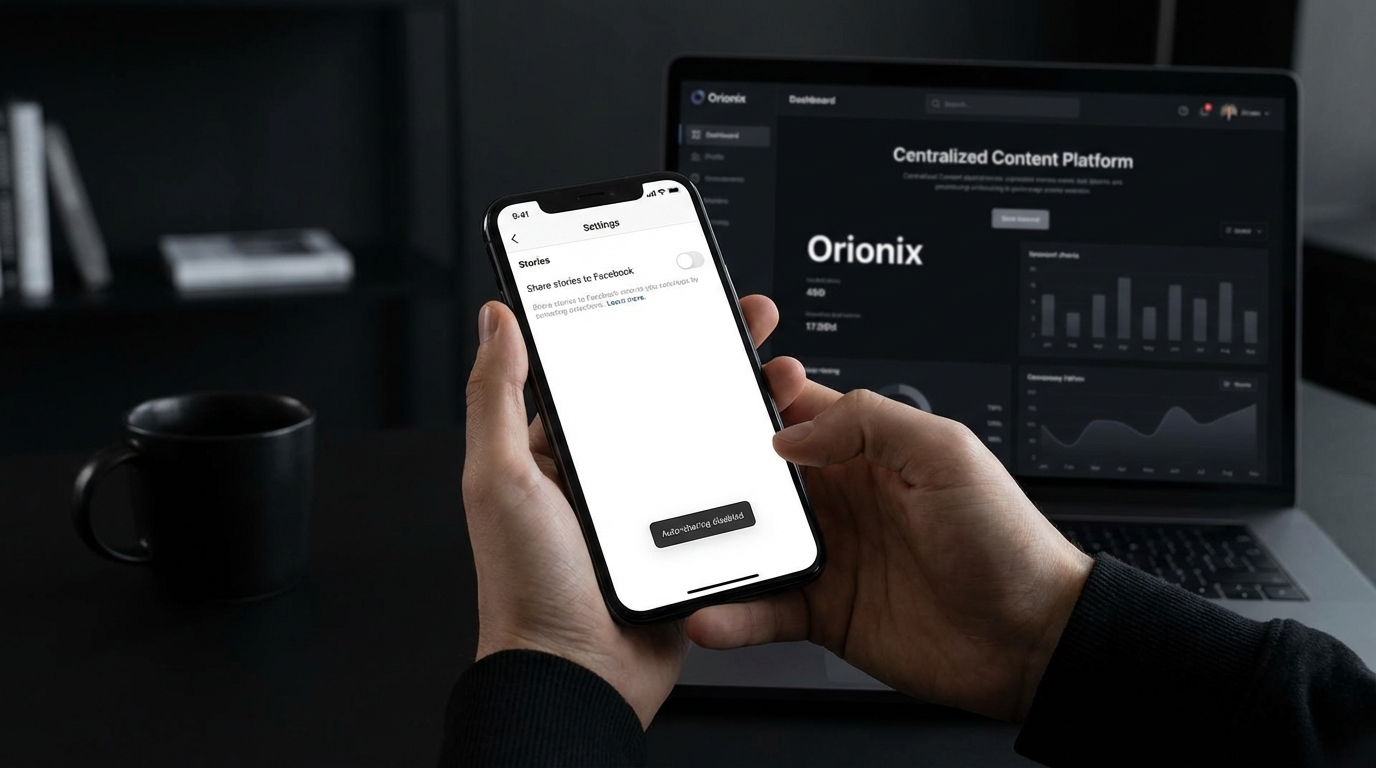
TL;DR: To stop sharing Instagram stories to Facebook, open Instagram and go to your profile settings. Tap « Sharing to other apps » or « Story sharing, » then toggle off the Facebook option. Alternatively, before posting a story, tap the Facebook icon at the bottom to disable cross-posting. This prevents automatic sharing while keeping accounts connected.
Frequently Asked Questions
How to stop sharing Instagram stories to Facebook?
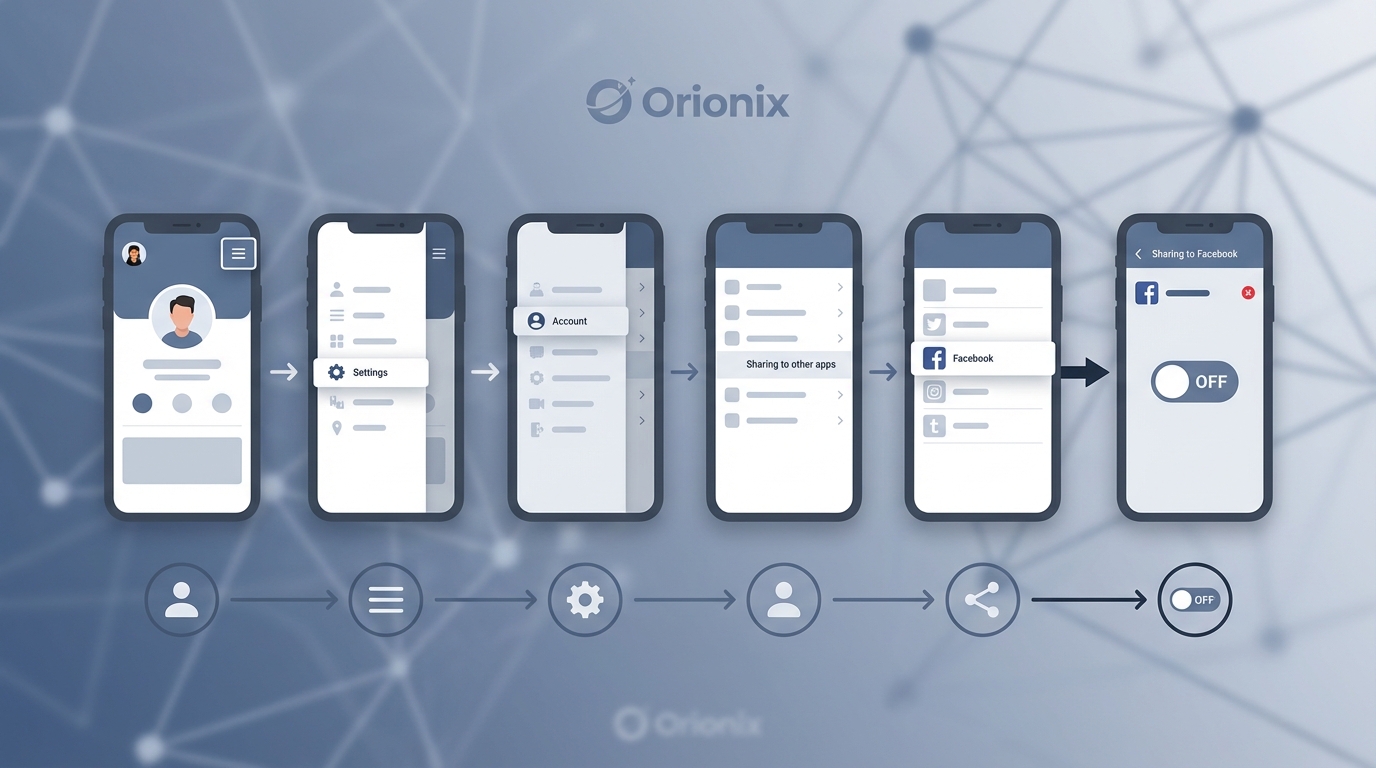
To stop sharing Instagram stories to Facebook, open Instagram and go to your profile. Tap the three-line menu, select Settings, then Account, and choose Sharing to other apps. Find Facebook and toggle off the option to share stories. You can also disable this before posting by tapping the Facebook icon at the bottom of the story preview screen to turn off automatic sharing.
Why are my Instagram stories automatically posting to Facebook?
Your Instagram stories automatically post to Facebook because you’ve enabled the cross-posting feature in your account settings. This happens when you’ve linked your Instagram and Facebook accounts and activated the automatic sharing option. Instagram remembers this preference for future stories until you manually disable it in your sharing settings or toggle it off before posting each story.
Can I stop sharing Instagram stories to Facebook without unlinking accounts?
Yes, you can stop sharing Instagram stories to Facebook without unlinking your accounts. Simply go to Instagram Settings, navigate to Account, then Sharing to other apps, and toggle off the Facebook story sharing option. This keeps your accounts connected for other features while preventing automatic story cross-posting. You maintain the flexibility to manually share specific stories when desired.
How do I manage social media platforms from one dashboard?
You can manage multiple social media platforms from one dashboard using centralized content management tools like Orionix. These platforms allow you to plan, create, schedule, and publish content across Instagram, Facebook, and other channels simultaneously. This streamlines your social media marketing workflow, saves time, and ensures consistent posting across all platforms without switching between multiple apps or accounts.
What happens when I unlink Instagram from Facebook?
When you unlink Instagram from Facebook, you’ll lose the ability to automatically cross-post stories and posts between platforms. Your existing Facebook and Instagram content remains intact, but you’ll need to manually share content to each platform separately. You’ll also lose access to unified insights, ad management features, and the ability to log in to Instagram using your Facebook credentials if you were using that option.
Does stopping Instagram story sharing affect my Facebook page?
Stopping Instagram story sharing does not negatively affect your Facebook page. Your existing Facebook content, followers, and page performance remain unchanged. You’ll simply stop receiving automatic story posts from Instagram. This gives you more control over what appears on each platform, allowing you to tailor content specifically for each audience and optimize your social media marketing strategy independently.
Can I selectively share some Instagram stories to Facebook?
Yes, you can selectively share Instagram stories to Facebook by turning off automatic sharing in your settings and manually choosing which stories to cross-post. Before posting each story, tap the Facebook icon at the bottom of the preview screen to enable or disable sharing for that specific story. This approach gives you complete control over your content strategy across both social media platforms.
What are the best times to post on Instagram for maximum engagement?
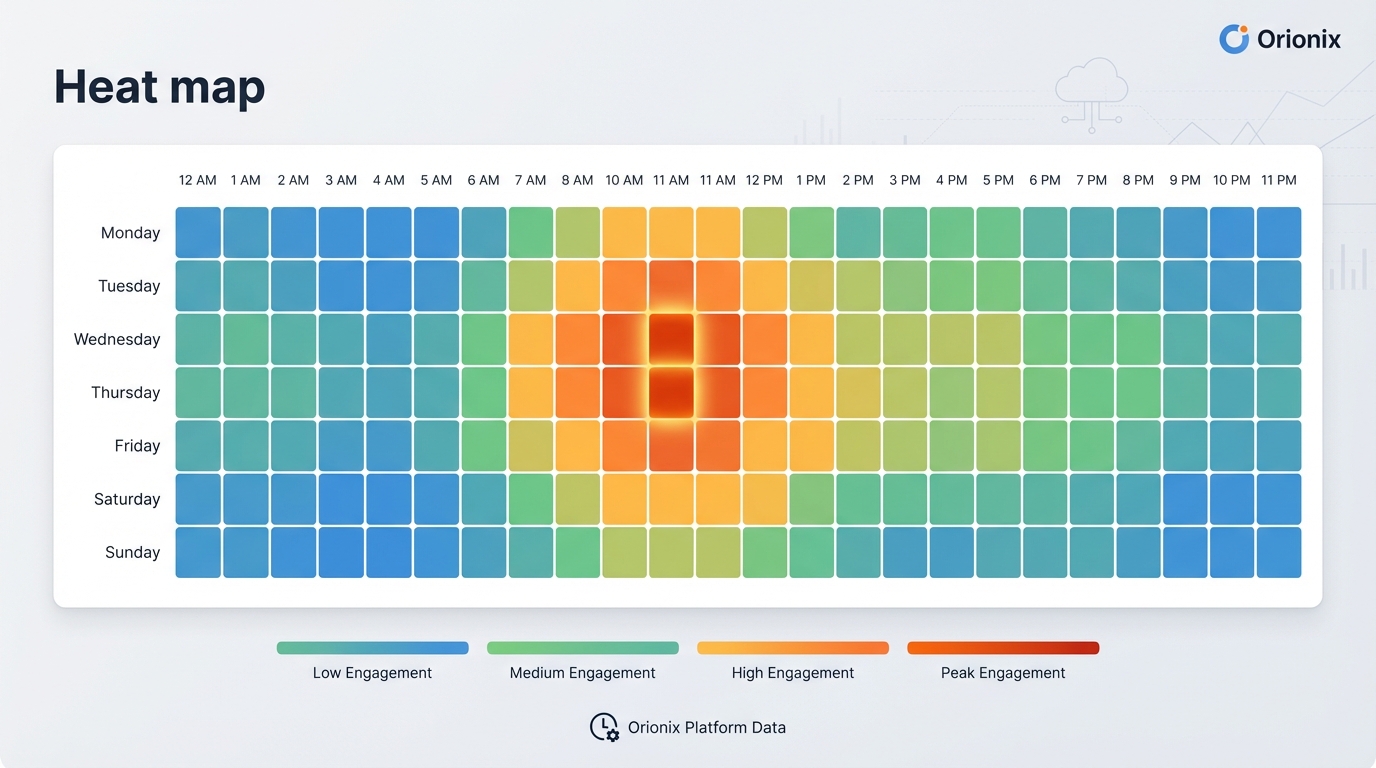
The best times to post on Instagram are typically Tuesday through Friday between 9 AM and 1 PM, with peak engagement around 11 AM. However, optimal posting times vary based on your specific audience demographics, location, and industry. Use Instagram Insights or social media management platforms to analyze when your followers are most active and adjust your posting schedule accordingly for maximum reach and engagement.
Introduction: Taking Control of Your Instagram Story Sharing
If you’ve been wondering how to stop sharing Instagram stories to Facebook, you’re not alone. Many users find that automatic cross-posting between social media platforms doesn’t always align with their content strategy or privacy preferences. Whether you’re managing multiple brands, maintaining separate personal and professional identities, or simply want more control over where your content appears, understanding how to disable this feature is essential for effective social media marketing.
Instagram’s integration with Facebook has made it incredibly easy to share content across both platforms simultaneously. However, this convenience doesn’t work for everyone. Different audiences on various social media platforms often require tailored content approaches, and what resonates on Instagram might not be appropriate for your Facebook followers.
In this comprehensive guide, we’ll walk you through the exact steps to stop automatic story sharing, explore why you might want to separate your content, and provide strategic insights for managing your presence across multiple social media and content channels effectively. 📱
Understanding Instagram and Facebook Story Integration
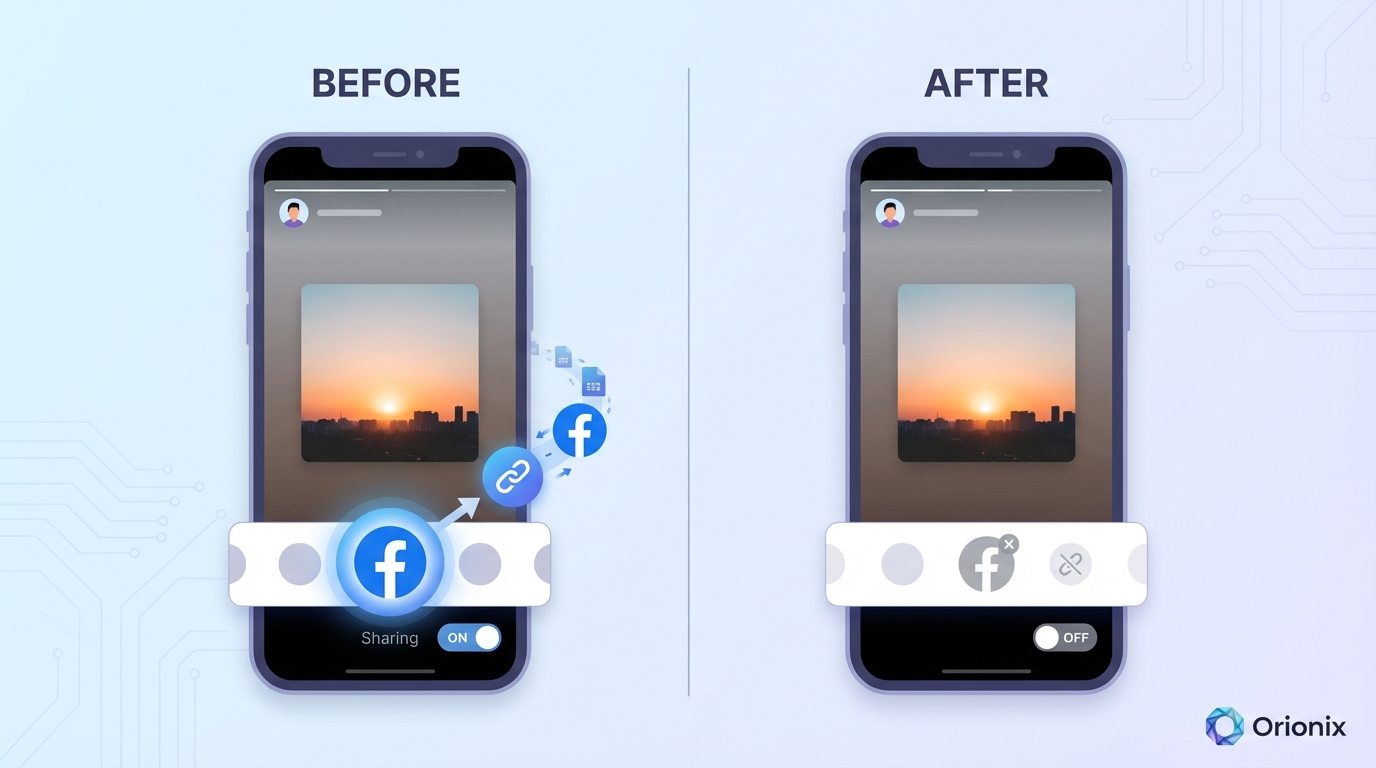
Since Facebook acquired Instagram, the two platforms have become increasingly interconnected. This integration allows users to share their Instagram Stories directly to Facebook Stories with just a toggle switch, creating a seamless cross-posting experience.
Why the Integration Exists
Facebook designed this feature to help users maximize their reach across both platforms simultaneously. For casual users and some businesses, this automation saves time and ensures consistent messaging across social media platforms. However, for digital marketing professionals and brand strategists, this one-size-fits-all approach often conflicts with sophisticated content strategies.
The automatic sharing feature serves several purposes:
- Increases content visibility across Meta’s ecosystem
- Reduces the time needed to post on multiple platforms
- Encourages users to remain active on both networks
- Simplifies content distribution for casual users
When Automatic Sharing Becomes Problematic
While convenient, automatic story sharing can create challenges for strategic social media marketing efforts. Different platforms attract different demographics and engagement patterns, including variations in the best time to post on Instagram versus Facebook.
Consider these scenarios where automatic sharing might not serve your goals:
- Your Instagram audience skews younger while Facebook followers are older
- You’re running platform-specific campaigns or promotions
- Your brand voice differs between professional and personal accounts
- You’re testing content performance on individual platforms
How to Stop Sharing Instagram Stories to Facebook: Step-by-Step Guide
Disabling automatic story sharing is straightforward once you know where to look. Follow these detailed instructions to take control of your cross-platform posting. ✅
Method 1: Disable Sharing Before Posting a Story
The quickest way to prevent a specific story from appearing on Facebook is to disable sharing before you post:
- Open the Instagram app and create your story as usual
- Before posting, look for the sharing options at the bottom of the screen
- Find the « Share to Facebook » toggle switch
- Tap the toggle to turn it off (it should no longer be blue/highlighted)
- Post your story as normal—it will only appear on Instagram
This method gives you story-by-story control, allowing you to selectively choose which content appears on both platforms. It’s ideal for content marketers who want flexibility in their posting strategy.
Method 2: Disable Automatic Sharing in Settings
To permanently disable the automatic sharing feature for all future stories, you’ll need to adjust your account settings:
- Open Instagram and navigate to your profile
- Tap the three horizontal lines (menu icon) in the top right corner
- Select « Settings and privacy » from the menu
- Tap « Sharing and remixes »
- Select « Story sharing »
- Find the « Share to Facebook » option
- Toggle off the switch next to « Share your story to Facebook »
Once disabled, your Instagram Stories will no longer automatically post to Facebook. You’ll need to manually enable this feature again if you want to resume automatic sharing in the future.
Method 3: Disconnect Your Facebook Account
For the most comprehensive solution, you can completely disconnect your Instagram and Facebook accounts:
- Go to your Instagram profile and access Settings
- Navigate to « Accounts Center » or « Account settings »
- Select « Accounts » to see connected accounts
- Find your Facebook account in the list
- Tap on it and select « Remove from Accounts Center »
- Confirm your decision to disconnect the accounts
This method ensures complete separation between your Instagram and Facebook presence, giving you maximum control over your content distribution strategy across different social media platforms.
Strategic Reasons to Separate Your Instagram and Facebook Stories
Understanding when and why to disable automatic sharing can significantly improve your digital marketing effectiveness. Let’s explore the strategic considerations that social media managers should evaluate. 🎯
Audience Segmentation and Targeting
Different social media platforms attract distinct demographic groups with unique preferences and behaviors. Your Instagram followers might respond enthusiastically to behind-the-scenes content, while your Facebook audience prefers polished, informative posts.
Research shows that the best times to post on Instagram often differ significantly from optimal Facebook posting schedules, reflecting different user behavior patterns on each platform. By separating your stories, you can optimize timing for each audience independently.
| Factor | ||
|---|---|---|
| Primary Age Group | 18-34 years | 25-54 years |
| Content Preference | Visual, authentic, trendy | Informative, longer-form, community-focused |
| Engagement Style | Quick interactions, stories, reels | Comments, shares, discussions |
| Best Content Type | High-quality visuals, short videos | Articles, longer videos, events |
Content Strategy Customization
Sophisticated social media marketing requires platform-specific content strategies. What works on Instagram—trendy filters, casual language, story stickers—might not resonate with your Facebook community.
Small business owners particularly benefit from tailored approaches. For instance, mastering social media marketing for small business involves understanding how each platform serves different purposes in your overall marketing funnel.
Privacy and Professional Boundaries
Many users maintain different levels of privacy across platforms. Your Instagram might be more personal and casual, while your Facebook presence remains strictly professional. Automatic sharing can blur these boundaries in unwanted ways.
This consideration becomes especially important when you’re trying to gain followers on Instagram for free through authentic, platform-specific engagement rather than generic cross-posting.
Optimizing Your Multi-Platform Content Strategy
Once you’ve disabled automatic sharing, you’ll need a systematic approach to managing content across multiple social media platforms efficiently. Here’s how to maintain an effective presence without the automatic sharing crutch. 💼
Creating Platform-Specific Content Calendars
Develop separate content calendars for Instagram and Facebook that account for each platform’s unique characteristics. Consider the best time to post on Instagram for your specific audience, which typically differs from Facebook’s optimal posting windows.
Your content calendar should include:
- Platform-specific posting schedules based on audience activity
- Tailored content formats for each platform’s strengths
- Distinct messaging that resonates with each audience
- Performance tracking metrics unique to each platform
Leveraging Content Management Tools
Managing multiple social media and content channels manually can become overwhelming. Professional social media managers often rely on centralized platforms to streamline their workflow without resorting to automatic cross-posting.
Tools like Hootsuite for social media management allow you to plan, create, and schedule platform-specific content from a single dashboard. This approach gives you the efficiency of automation while maintaining the customization that effective marketing digital marketing strategies require.
A comprehensive social media and content management platform enables you to:
- Schedule unique content for each platform at optimal times
- Preview how posts will appear on different networks
- Track performance metrics across all channels
- Collaborate with team members on platform-specific campaigns
Repurposing Content Strategically
Disabling automatic sharing doesn’t mean creating entirely different content for each platform from scratch. Smart content marketers repurpose core content with platform-appropriate modifications.
For example, an Instagram Story highlighting a product launch can be transformed for Facebook by adding more context, including a link to your website, and adjusting the tone to match your Facebook audience’s preferences.
Common Mistakes to Avoid When Managing Cross-Platform Content
Even after disabling automatic sharing, many users make strategic errors that undermine their social media marketing effectiveness. Avoid these common pitfalls to maximize your results. ⚠️
Inconsistent Branding Across Platforms
While your content should be platform-specific, your core brand identity must remain consistent. Your visual style, brand voice, and key messaging should be recognizable whether someone encounters you on Instagram, Facebook, or any other social media platforms.
Neglecting Platform-Specific Features
Each platform offers unique features that can enhance engagement. On Instagram, this includes features like adding your own audio to Instagram Reels, while Facebook offers event creation, groups, and longer-form content options.
Failing to leverage these distinctive features means missing opportunities to connect with your audience in meaningful ways.
Ignoring Analytics and Performance Data
One of the primary benefits of separating your Instagram and Facebook stories is the ability to track performance independently. Monitor which content types perform best on each platform and adjust your strategy accordingly.
Key metrics to track include:
- Reach and impressions per platform
- Engagement rates (likes, comments, shares, story replies)
- Click-through rates on links and calls-to-action
- Follower growth rates on each platform
- Conversion rates from platform-specific campaigns
Advanced Instagram Privacy and Account Management
Beyond story sharing settings, Instagram offers numerous privacy and account management options that complement your cross-platform strategy. Understanding these features helps you maintain better control over your digital presence. 🔒
Managing Follower Interactions
As you build separate audiences on different platforms, you’ll need tools to manage interactions effectively. Instagram provides several options:
The restrict feature on Instagram allows you to limit someone’s interactions without completely blocking them. This can be useful when managing professional boundaries while maintaining connections.
If you need more decisive action, knowing how to block someone on Instagram helps you maintain a healthy online environment. Similarly, understanding how to unfollow on Instagram strategically can help curate your feed and maintain focus on relevant content.
Account Deactivation and Deletion Options
Sometimes, managing multiple platforms becomes overwhelming, and you might consider consolidating your presence. Instagram offers two primary options for stepping back:
If you need a temporary break, learning how to deactivate Instagram allows you to pause your account without losing your content or followers. This can be useful during strategic pivots or personal breaks from social media.
For a permanent solution, understanding how to close your Instagram account and how to delete an Instagram account completely ensures you can make informed decisions about your digital presence.
Privacy and Profile Visibility
Many users wonder about Instagram’s tracking capabilities, particularly questions like « can you see who views your Instagram » or « can you see if someone views your Instagram profile. » Understanding these privacy features helps you set appropriate expectations and boundaries.
Currently, Instagram doesn’t allow users to see who views their profile or regular posts, though story views are visible. This asymmetry in visibility affects how you should approach content strategy across different content types.
Building Your Audience Without Cross-Platform Dependency
Once you’ve separated your Instagram and Facebook stories, focus on building authentic, engaged audiences on each platform independently. This approach typically yields better long-term results than relying on automatic cross-posting. 📈
Organic Growth Strategies for Instagram
Growing your Instagram presence without depending on Facebook requires consistent effort and strategic planning. Focus on creating high-quality, engaging content that resonates specifically with Instagram users.
Many businesses explore options to increase Instagram views through various methods. While some seek shortcuts through free Instagram followers websites, the most sustainable approach involves authentic engagement and value-driven content.
Effective organic growth strategies include:
- Posting consistently at the best times to post on Instagram for your audience
- Using relevant hashtags strategically to increase discoverability
- Engaging authentically with your community through comments and DMs
- Creating shareable content that encourages followers to tag friends
- Collaborating with complementary brands or influencers in your niche
Content Quality Over Quantity
Without the crutch of automatic cross-posting, you might worry about maintaining posting frequency. However, platform-specific quality content typically outperforms high-volume generic posts.
Focus on creating stories that leverage Instagram’s unique features—polls, questions, countdowns, and interactive stickers—rather than simply duplicating content across platforms.
Leveraging Instagram-Specific Features
Instagram continues to evolve with new features designed to increase engagement. Stay current with these updates and incorporate them into your strategy before your competitors do.
Recent features worth exploring include Instagram Reels, Guides, and enhanced shopping capabilities. Each offers unique opportunities to connect with your audience in ways that wouldn’t translate effectively to Facebook anyway.
Professional Tools for Multi-Platform Management
As your social media presence grows across multiple platforms, professional management tools become essential for maintaining efficiency and consistency. Here’s what to look for in a comprehensive solution. 🛠️
Essential Features for Social Media Managers
Whether you’re a solo entrepreneur or part of a larger marketing team, the right tools can dramatically improve your workflow. Look for platforms that offer:
- Unified dashboards that display all your social media platforms in one view
- Advanced scheduling capabilities with timezone optimization
- Platform-specific content customization before publishing
- Comprehensive analytics and reporting across all channels
- Team collaboration features for approval workflows
Tools designed for social media influencers often include additional features like sponsored content tracking and partnership management that can benefit businesses of all sizes.
Industry-Specific Solutions
Different industries have unique social media marketing needs. For example, social media marketing for plumbers requires different content strategies and posting schedules than retail or technology businesses.
Consider how your industry-specific needs align with available tools. Some platforms offer templates, content libraries, or industry-specific analytics that can accelerate your success.
Building Your Social Media Marketing Career
For those looking to advance professionally in this field, understanding cross-platform strategy is crucial. Whether you’re crafting a social media marketing cover letter or pursuing certifications like the Hootsuite Social Marketing Certification, demonstrating sophisticated platform management skills sets you apart from competitors.
Creating Platform-Specific Visual Content
Visual content drives engagement on both Instagram and Facebook, but each platform has distinct preferences and technical requirements. Optimizing your visuals for each platform separately yields significantly better results. 🎨
Instagram Visual Best Practices
Instagram prioritizes high-quality, visually striking content. Stories should be vertical (9:16 aspect ratio), vibrant, and designed for mobile viewing. Use Instagram’s native creative tools to add text, stickers, and effects that feel authentic to the platform.
When creating signs for social media posts, ensure they’re optimized for quick consumption. Instagram users scroll rapidly, so your message needs to be immediately clear and visually compelling.
Facebook Visual Requirements
Facebook stories can accommodate both horizontal and vertical content, and the platform’s older demographic often prefers more context and information in visuals. Text overlays should be clear and readable, with less reliance on trendy effects.
Facebook’s algorithm also considers factors like text-to-image ratio in ads, so if you’re running paid campaigns, keep text minimal and focused.
Cross-Platform Visual Adaptation
Rather than using identical visuals on both platforms, create variations that respect each platform’s culture and technical specifications. This might mean:
- Adjusting aspect ratios for optimal display
- Modifying text size and placement for readability
- Changing color schemes to match platform aesthetics
- Adding or removing elements based on audience preferences
Measuring Success Across Separated Platforms
Once you’ve disabled automatic sharing and implemented platform-specific strategies, measuring your success becomes both more complex and more valuable. Here’s how to track performance effectively. 📊
Key Performance Indicators by Platform
Different metrics matter more on different platforms. On Instagram, story completion rates, swipe-up actions (if available), and direct message responses indicate engagement. On Facebook, shares, comments, and link clicks might be more valuable.
| Metric Type | Instagram Priority | Facebook Priority |
|---|---|---|
| Engagement | Story replies, DMs, saves | Comments, shares, reactions |
| Reach | Story views, explore appearances | Post reach, share reach |
| Conversion | Link clicks, profile visits | Link clicks, event responses |
| Growth | Follower growth rate, profile visits | Page likes, follower growth |
A/B Testing Across Platforms
With separated content, you can conduct meaningful A/B tests to understand what resonates with each audience. Test variables like posting times, content formats, messaging styles, and calls-to-action independently on each platform.
This data-driven approach to digital marketing and social media marketing helps you continuously refine your strategy based on actual performance rather than assumptions.
ROI Calculation for Platform-Specific Efforts
Calculate return on investment separately for Instagram and Facebook to understand which platform delivers better results for your specific business goals. This might reveal that one platform deserves more resources while the other requires strategic adjustment.
Future-Proofing Your Social Media Strategy
Social media platforms constantly evolve, introducing new features and changing algorithms. Building a flexible, platform-aware strategy helps you adapt to these changes effectively. 🚀
Staying Current with Platform Updates
Both Instagram and Facebook regularly introduce new features, privacy settings, and algorithm changes. Subscribe to official platform blogs, follow social media marketing news sources, and participate in professional communities to stay informed.
Understanding upcoming changes allows you to adjust your strategy proactively rather than reactively, maintaining your competitive advantage.
Diversifying Your Social Media Presence
While Instagram and Facebook remain dominant, don’t put all your eggs in these two baskets. Explore emerging social media platforms where your target audience might be migrating. Early adoption can provide significant advantages.
A diversified presence across multiple social media and content channels protects your business from algorithm changes or platform decline on any single network.
Building Direct Audience Relationships
The most future-proof strategy involves building direct relationships with your audience that don’t depend entirely on social media platforms. This might include:
- Email marketing lists that you own and control
- Community forums or membership sites on your own domain
- Podcast or video content hosted on multiple platforms
- Regular website content that drives organic search traffic
Consider leveraging newsletter platforms to maintain direct communication with your audience regardless of social media algorithm changes.
Conclusion: Taking Control of Your Cross-Platform Strategy
Learning how to stop sharing Instagram stories to Facebook represents more than just a technical setting change—it’s a strategic decision that can significantly improve your social media marketing effectiveness. By separating your content across platforms, you gain the flexibility to tailor messages, optimize timing, and build authentic connections with distinct audiences.
The key takeaways for managing cross-platform content effectively include:
- Disable automatic sharing through Instagram’s story settings or account settings
- Develop platform-specific content strategies that respect each audience’s preferences
- Use professional management tools to maintain efficiency without sacrificing customization
- Track performance metrics independently to understand what works on each platform
- Stay flexible and adapt to platform changes and audience evolution
Whether you’re a small business owner managing your own accounts, a content marketer overseeing multiple brands, or a digital marketing professional building sophisticated campaigns, controlling where and how your content appears is essential for success in today’s complex social media landscape.
Remember that effective social media marketing isn’t about being everywhere at once—it’s about being strategic, authentic, and valuable to your specific audiences on each platform you choose to maintain.
Ready to streamline your multi-platform content management without sacrificing quality or customization? Visit Orionix to discover how our centralized platform helps you plan, create, and publish platform-specific content across all your channels from a single, powerful dashboard. Take control of your social media strategy today and see the difference that thoughtful, platform-optimized content can make for your brand. 🎯
Article created using IntentRank