
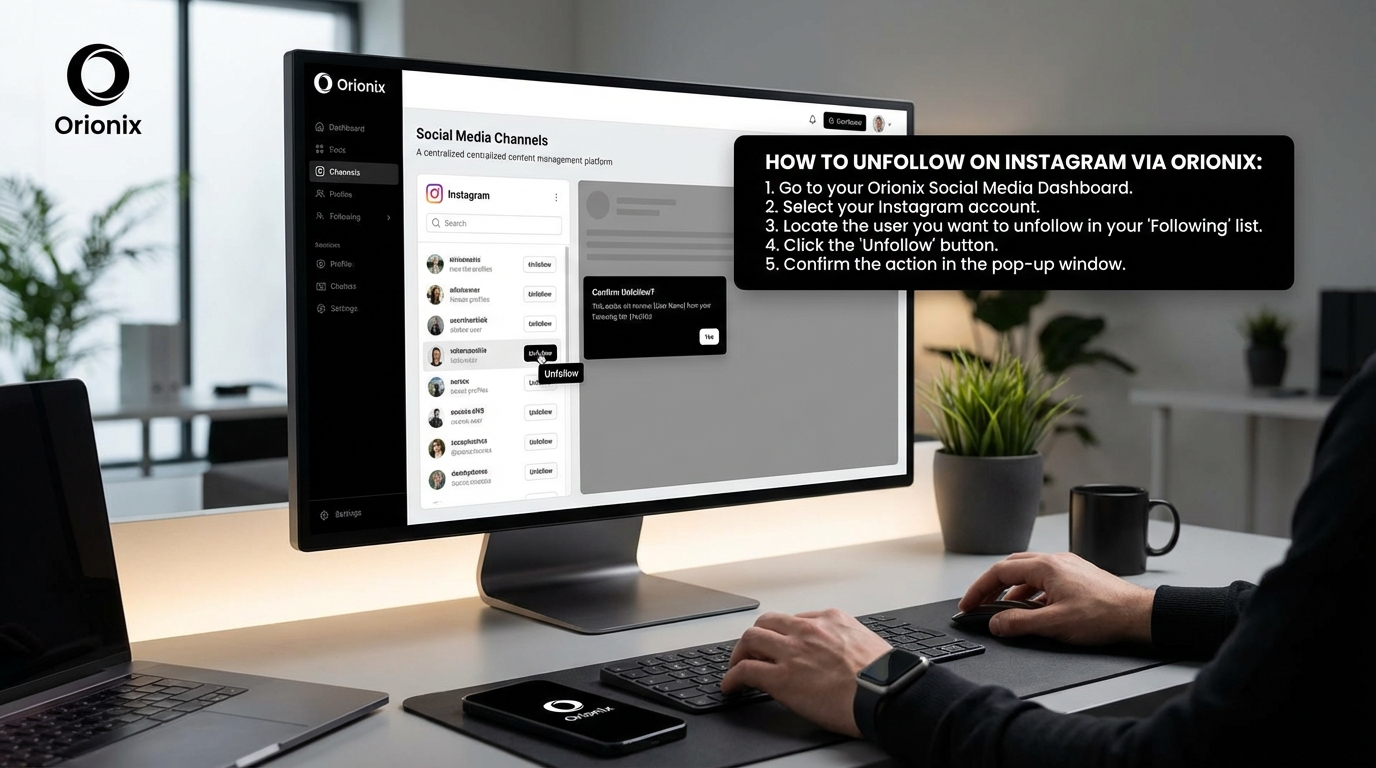
TL;DR: To unfollow on Instagram, go to the profile you want to unfollow, tap the « Following » button, and select « Unfollow » from the menu. Alternatively, access your following list through your profile settings, find the account, and tap « Following » to unfollow. This process works on both mobile and desktop versions of Instagram.
Frequently Asked Questions

How do you unfollow on Instagram quickly?
To unfollow someone on Instagram, go to their profile and tap the ‘Following’ button. A menu will appear with the ‘Unfollow’ option. Tap it to confirm. Alternatively, go to your profile, tap ‘Following,’ find the account, and tap ‘Following’ next to their name to unfollow. The process takes just a few seconds per account.
Can you unfollow multiple people on Instagram at once?
Instagram doesn’t offer a native bulk unfollow feature. You must unfollow accounts individually through each profile or your Following list. Third-party apps claim to offer mass unfollowing, but they violate Instagram’s terms of service and risk account suspension. Managing your follows through social media platforms like Orionix can help you track and organize your Instagram connections more efficiently.
How do you unfollow on Instagram without them knowing?
Instagram doesn’t send notifications when you unfollow someone, so they won’t receive an alert. However, they may notice if they check their followers list or use third-party tracking apps. Your profile simply disappears from their followers count. Unfollowing is private and discreet, making it a straightforward way to curate your feed without confrontation.
What’s the difference between unfollowing and blocking on Instagram?
Unfollowing removes someone’s content from your feed but allows them to still follow you and view your public posts. Blocking prevents all interaction—they can’t see your profile, posts, or stories, and any existing follows are removed. Unfollowing is ideal for managing content preferences, while blocking is for stopping unwanted contact on social media platforms.
How many accounts can you unfollow on Instagram per day?
Instagram limits unfollowing to approximately 200 accounts per day to prevent spam behavior. Exceeding this limit may trigger temporary action blocks lasting 24-48 hours. New accounts have stricter limits. To avoid restrictions, unfollow gradually throughout the day rather than all at once. These limits apply across all social media and digital marketing activities on the platform.
How do you unfollow inactive Instagram accounts?
Identify inactive accounts by checking when they last posted. Go to your Following list, tap on accounts that haven’t posted recently, and unfollow them individually. Some social media marketing tools can identify inactive followers, but use caution with third-party apps. Regular account maintenance helps optimize your feed and engagement rates for better Instagram performance.
Will unfollowing accounts help you gain followers on Instagram?
Unfollowing accounts doesn’t directly gain followers, but maintaining a balanced following-to-follower ratio can improve your profile’s credibility. A curated following list shows you’re selective and engaged, which may attract genuine followers. Focus on posting quality content at the best times to post on Instagram and using social media marketing strategies rather than relying solely on follow/unfollow tactics.
How is unfollowing different from deactivating your Instagram account?
Unfollowing removes specific accounts from your feed while keeping your profile active. Deactivating temporarily hides your entire profile, posts, and followers from Instagram until you reactivate. To deactivate Instagram, go to Settings > Account > Deactivate Account. Unfollowing is for feed management, while deactivation is a broader action affecting your entire social media presence on the platform.
Understanding How to Unfollow on Instagram: Your Complete Guide

If you’re wondering how do you unfollow on Instagram, you’re not alone. Managing your Instagram following list is crucial for maintaining a clean, engaging feed that aligns with your interests and goals. Whether you’re a social media manager optimizing your brand’s presence or an individual looking to declutter your feed, understanding the unfollowing process is essential for effective social media marketing.
According to Socinator’s comprehensive guide, unfollowing on Instagram means removing someone from your following list, which stops their posts and stories from appearing in your feed. This simple action helps you control what content you see daily and can significantly impact your engagement rates across social media platforms.
Many users focus solely on gaining followers, but here’s the truth: having thousands of followers doesn’t mean much if those people aren’t engaging with your content. Strategic unfollowing is about cleaning up your account to focus on meaningful interactions that drive real results. 📊
What Does Unfollowing on Instagram Actually Mean?

At its simplest level, unfollowing on Instagram is the act of removing an account from your following list. When you unfollow someone, their content—including posts, stories, and reels—no longer appears in your feed. This gives you complete control over your Instagram experience and helps you curate content that matters most to you.
Common Reasons People Unfollow Accounts
Based on insights from Socinator’s research, users typically unfollow accounts for these key reasons:
- Irrelevant content: The account no longer shares content that aligns with your interests or business goals
- Inactive accounts: Users who rarely post or have abandoned their profiles entirely
- Cluttered feeds: Too many posts from certain accounts making it hard to see content you care about
- One-sided connections: Accounts that don’t engage back, leading to unbalanced relationships
- Over-promotional content: Accounts that have become excessively commercial or spammy
Understanding these reasons helps you make informed decisions about your following list, similar to how you might strategize the best times to post on Instagram for maximum engagement.
Step-by-Step: How Do You Unfollow on Instagram?
According to Oreate AI’s simple guide, unfollowing someone on Instagram is straightforward. Here’s the complete process:
Method 1: Unfollowing from a User’s Profile
- Open the Instagram app on your device and navigate to the profile of the person you wish to unfollow
- Locate the ‘Following’ button at the top of their profile page, directly under their bio
- Tap the ‘Following’ button to reveal a menu with various options
- Select ‘Unfollow’ from the menu that appears
- Confirm the action and the button will change from ‘Following’ to ‘Follow’
This method works perfectly when you want to unfollow specific accounts while browsing Instagram. It’s quick, simple, and doesn’t require any third-party tools. ✅
Method 2: Unfollowing from Your Following List
As outlined in Oreate AI’s step-by-step guide, you can also unfollow multiple accounts from your following list:
- Tap your profile icon located at the bottom right corner of the app
- Navigate to ‘Following’ to see everyone you currently follow
- Scroll through the list and identify accounts you want to unfollow
- Tap ‘Following’ next to any account you’d like to remove—it will change to ‘Follow’
- Repeat as needed for each account you want to unfollow
This approach is particularly useful for digital marketing professionals conducting regular account audits to maintain optimal engagement rates.
| Method | Best For | Time Required | Difficulty |
|---|---|---|---|
| Profile-Based Unfollowing | Individual accounts | 5-10 seconds per account | Very Easy |
| Following List Method | Multiple accounts | 3-5 seconds per account | Very Easy |
| iOS Quick Unfollow | Fast batch unfollowing | 2-3 seconds per account | Easy |
| Third-Party Tools | Mass unfollowing (100+ accounts) | Varies by tool | Moderate |
Platform-Specific Tips
According to the research from Oreate AI, there are platform-specific shortcuts that can speed up the process:
- iOS users: Hold down on an account in your following list to access unfollow options more quickly without navigating to their profile
- Android users: Similar quick-unfollow functionality may be available depending on your device settings and Instagram version
These shortcuts can save significant time when managing large following lists, especially for social media marketing professionals handling multiple accounts. 🚀
Why Unfollowing Improves Your Instagram Engagement
Many Instagram users believe that following more people makes their account look better. However, Socinator’s engagement research reveals that following too many irrelevant accounts can actually lower the quality of your engagement and hurt your social media and content strategy.
The Algorithm Advantage
Instagram’s algorithm favors accounts that interact with relevant content. When you use strategic unfollowing to remove noise from your feed, your interactions become stronger and more focused. The algorithm rewards this behavior by showing your posts to more people, effectively increasing your organic reach without spending money to gain followers on Instagram for free.
Key Benefits of Strategic Unfollowing
| Benefit | Impact | Result |
|---|---|---|
| Cleaner Feed | More focused content consumption | Higher quality engagement on posts you care about |
| Better Algorithm Support | Increased relevance signals | Improved reach and visibility for your content |
| Higher Engagement Rate | Better ratio of active interactions | More likes, comments, and shares relative to follower count |
| Stronger Connections | Focus on reciprocal relationships | More meaningful community building |
Understanding Engagement Rate vs. Follower Count
According to Socinator’s insights, engagement rate measures how many people actively like, comment, and share your content—not your total follower count. Trimming inactive or irrelevant connections through strategic unfollowing helps boost this crucial metric that matters far more for successful digital marketing than vanity metrics.
By removing accounts that don’t interact back, you can focus on genuine relationships that lead to more meaningful engagement. This approach aligns perfectly with best practices for social media marketing across all major social media platforms. 💪
Advanced Unfollowing Strategies for Social Media Managers
For content marketers and social media managers, strategic unfollowing goes beyond simple account cleanup. It’s about optimizing your Instagram presence for maximum effectiveness across your entire marketing digital marketing strategy.
Bulk Unfollowing Considerations
When dealing with hundreds of accounts, Oreate AI’s guide mentions that third-party apps exist for mass unfollowing. However, these tools require extreme caution regarding privacy and security.
Using Third-Party Tools Safely
According to the research, apps like ‘Instagram Followers Analytics’ can track followers and identify who follows back versus who doesn’t engage. These tools help streamline your social media experience by providing insights into:
- Users who actively engage with your content
- Accounts that follow you back
- Inactive followers who haven’t engaged recently
- Ghost followers that inflate your numbers without providing value
Important safety considerations: Always check reviews and ensure third-party apps respect privacy guidelines before granting access to your account. Never share your password directly, and use apps that work through Instagram’s official API when possible.
Creating an Unfollowing Schedule
Just as you plan the best time to post on Instagram for optimal engagement, you should schedule regular unfollowing audits. Consider these timeframes:
- Weekly audits: Quick reviews of 10-20 accounts that may no longer be relevant
- Monthly deep dives: Comprehensive reviews of your entire following list
- Quarterly strategy reviews: Analyze overall engagement patterns and adjust your following strategy accordingly
This systematic approach helps maintain a healthy Instagram presence without overwhelming your schedule. For small business owners managing their own accounts, even monthly reviews can make a significant difference. 📅
If you’re looking for more comprehensive strategies to manage your Instagram presence, check out our guide on Instagram for Business Success, which covers advanced tactics for brand growth.
Balancing Unfollowing with Account Growth
While unfollowing helps clean up your feed, it’s equally important to balance this with strategic growth. The goal isn’t to follow fewer people indefinitely, but to maintain a curated list of accounts that genuinely add value to your Instagram experience and business objectives.
The Follow-Unfollow Strategy Debate
Many digital marketing professionals debate the effectiveness of the « follow-unfollow » strategy, where users follow accounts hoping for a follow-back, then unfollow if they don’t reciprocate. While this can temporarily boost numbers, it often leads to:
- Lower engagement rates over time
- Damage to your brand reputation
- Potential Instagram algorithm penalties
- Inauthentic community building
Instead, focus on organic growth strategies that attract genuine followers who care about your content. Our comprehensive guide on how to gain followers on Instagram for free provides ethical strategies that build lasting engagement.
Maintaining Authentic Connections
As noted in the Oreate AI research, unfollowing should be about curating your digital environment rather than manipulating follower counts. Consider these principles:
| Principle | Action | Benefit |
|---|---|---|
| Quality Over Quantity | Follow accounts that align with your interests and values | Higher engagement and more meaningful connections |
| Regular Curation | Periodically review and unfollow inactive or irrelevant accounts | Maintains a clean, focused feed |
| Reciprocal Engagement | Actively engage with accounts you follow | Builds genuine community relationships |
| Strategic Following | Follow accounts in your niche or target audience | Increases relevance for algorithm and networking opportunities |
Common Mistakes to Avoid When Unfollowing
Understanding what not to do is just as important as knowing the correct unfollowing process. Here are critical mistakes that can harm your Instagram presence and social media marketing efforts:
Unfollowing Too Quickly
Instagram has limits on how many accounts you can unfollow in a short period. Exceeding these limits can result in temporary action blocks or even permanent account restrictions. Best practices include:
- Unfollow no more than 200 accounts per day
- Space out unfollowing actions throughout the day
- Take breaks between unfollowing sessions
- Avoid automated tools that unfollow too aggressively
Neglecting Your Personal Brand
Before unfollowing accounts, consider how it might affect your professional relationships or brand perception. This is particularly important for brand strategists and content marketers who use Instagram for business networking.
If you’re concerned about someone noticing you’ve unfollowed them, remember that Instagram doesn’t send notifications when you unfollow someone. However, they may notice if they regularly check their follower list or use tracking apps.
Forgetting to Reassess Periodically
Your interests and business goals evolve over time. What was relevant six months ago might not be relevant today. Schedule regular reviews of your following list to ensure it continues to serve your current objectives. This approach works similarly to how you might regularly review and adjust the best times to post on Instagram based on changing audience behavior.
For more insights on managing your Instagram presence effectively, explore our guide on Social Media and Content Management, which covers comprehensive strategies across multiple platforms. 🎯
Alternatives to Unfollowing: Other Instagram Management Options
Sometimes unfollowing isn’t the only solution. Instagram offers several alternative features that help you manage your feed without severing connections entirely.
Muting Accounts
Muting allows you to hide someone’s posts and stories from your feed without unfollowing them. This is ideal for:
- Maintaining professional connections while reducing content clutter
- Temporarily hiding content from accounts you might want to follow again later
- Avoiding awkward situations with friends or colleagues
Using the Favorites Feature
Instagram’s Favorites feature lets you prioritize content from specific accounts, ensuring you see their posts first. This complements your unfollowing strategy by helping you focus on high-value connections without removing others entirely.
Creating Close Friends Lists
For managing story visibility, Close Friends lists help you share content with specific groups without broadcasting to your entire following. This feature works in reverse to unfollowing, allowing you to control who sees your content rather than what you see.
If you’re considering more drastic measures, our guides on how to close your Instagram account and how can you delete an Instagram account provide complete information on these options.
Integrating Unfollowing into Your Overall Social Media Strategy
Strategic unfollowing should be part of your broader social media marketing approach. For digital marketing professionals and small business owners, this means aligning your Instagram management with your overall content strategy across all social media platforms.
Cross-Platform Consistency
The principles of curating your following list apply across all social media sites. Whether you’re managing Instagram, Twitter, LinkedIn, or Facebook, maintaining relevant connections improves engagement and content visibility. Consider using a centralized platform to manage these activities efficiently.
Content Planning and Audience Alignment
Your following list should reflect your target audience and content themes. If you’re posting about digital marketing, following accounts in related niches helps you stay informed about industry trends while building a relevant network. This alignment ensures that when you post at the best time to post on Instagram, you’re reaching an audience genuinely interested in your content.
Analytics and Performance Tracking
Monitor how your unfollowing activities affect key metrics:
| Metric | What to Watch | Expected Impact |
|---|---|---|
| Engagement Rate | Likes and comments per post | Should increase as feed becomes more focused |
| Reach | Number of unique accounts seeing your content | May improve as algorithm recognizes better engagement |
| Story Views | Number of accounts viewing your stories | Should remain stable or increase with quality followers |
| Profile Visits | Accounts visiting your profile | Quality should improve even if quantity fluctuates |
For comprehensive analytics tracking and content management across multiple platforms, tools like those offered by Hootsuite for social media management can provide valuable insights into how your unfollowing strategy impacts overall performance. 📊
Conclusion: Master Your Instagram Experience Through Strategic Unfollowing
Understanding how do you unfollow on Instagram is essential for anyone serious about building an authentic, engaging presence on the platform. Whether you’re a social media manager optimizing brand accounts, a content marketer refining your digital marketing strategy, or a small business owner managing your own presence, strategic unfollowing helps you maintain a feed that serves your goals.
Remember these key takeaways:
- Unfollowing is about quality over quantity—focus on meaningful connections that drive real engagement
- Regular audits of your following list help maintain a clean, relevant feed that aligns with your interests and business objectives
- Strategic unfollowing improves your engagement rate, which matters far more than total follower count for successful social media marketing
- Use the right method for your needs—profile-based for individual accounts, following list method for batch unfollowing, or carefully vetted third-party tools for mass management
- Balance unfollowing with ethical growth strategies to build an authentic community around your content
By implementing these strategies, you’ll create a more focused Instagram experience that drives better results across all your social media platforms. The time you invest in curating your following list pays dividends through improved engagement, stronger community connections, and more effective content distribution. 🚀
Ready to take your social media management to the next level? Visit our website to discover how Orionix’s centralized platform can help you plan, create, and publish content across various channels through a single dashboard. Streamline your entire content management process and focus on what matters most—creating engaging content that resonates with your audience. Start optimizing your social media strategy today with tools designed for modern digital marketers who demand efficiency and results.
Article created using IntentRank