
TL;DR: To unfollow on Instagram, go to the profile you want to unfollow, tap the « Following » button, and select « Unfollow » from the menu. Alternatively, access your following list through your profile settings, find the account, and tap « Following » to unfollow. You can also bulk unfollow using third-party tools like Orionix for efficient account management.
Frequently Asked Questions
How do you unfollow someone on Instagram?
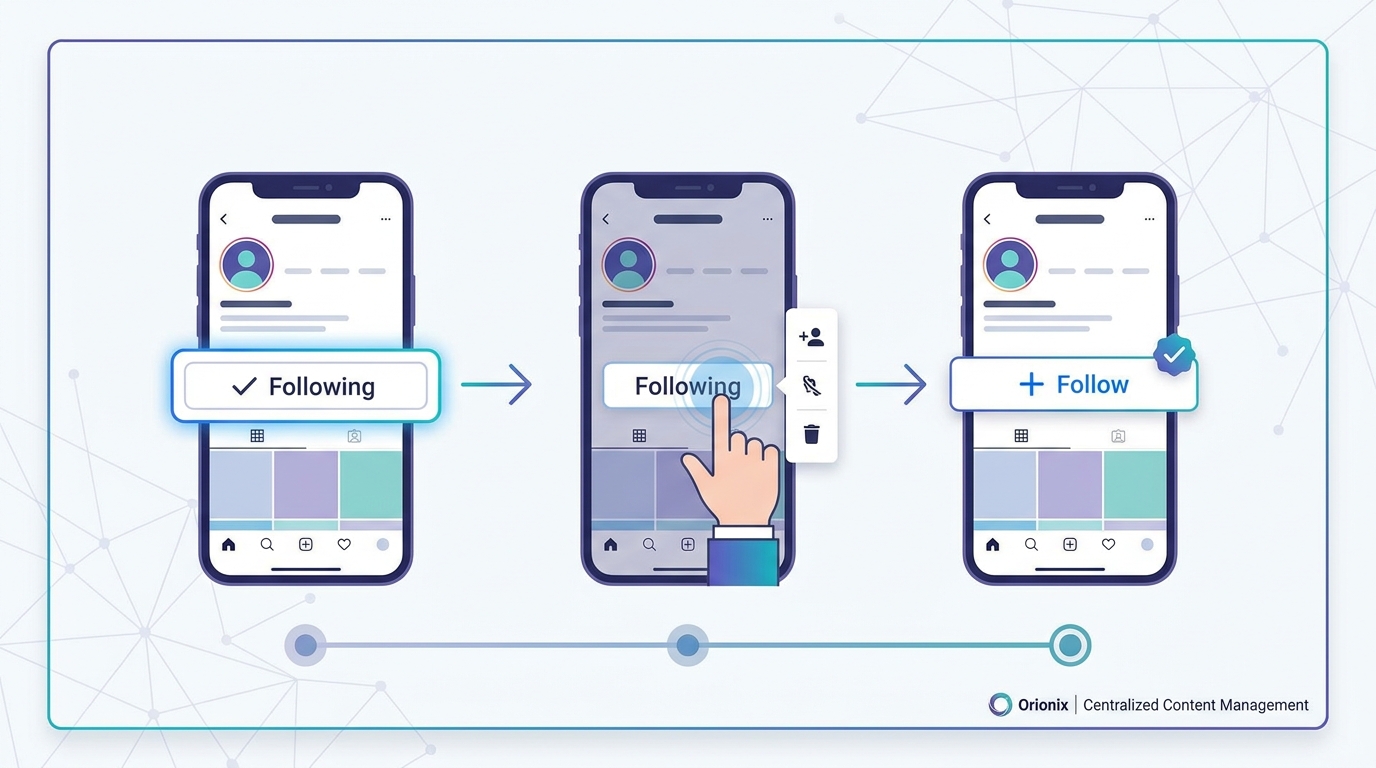
To unfollow someone on Instagram, open the app and navigate to their profile. Tap the ‘Following’ button below their bio, and it will change to ‘Follow,’ confirming you’ve unfollowed them. Alternatively, go to your profile, tap ‘Following,’ find the account, and tap ‘Following’ next to their name to unfollow. This action is immediate and the user won’t receive a notification.
Can you unfollow multiple accounts on Instagram at once?
Instagram doesn’t offer a native feature to unfollow multiple accounts simultaneously. You must unfollow each account individually through their profile or your Following list. However, third-party apps claim to offer bulk unfollowing, but use caution as they may violate Instagram’s terms of service and risk account suspension. For social media marketing efficiency, platforms like Orionix can help manage multiple accounts centrally.
Will someone know if I unfollow them on Instagram?
Instagram doesn’t send notifications when you unfollow someone. However, they may notice if they check their followers list or use third-party tracking apps. The person will simply see that you’re no longer following them if they look at their follower count or your profile. This makes unfollowing discreet, though mutual connections and engagement patterns might make it noticeable over time.
What’s the difference between unfollowing and blocking on Instagram?
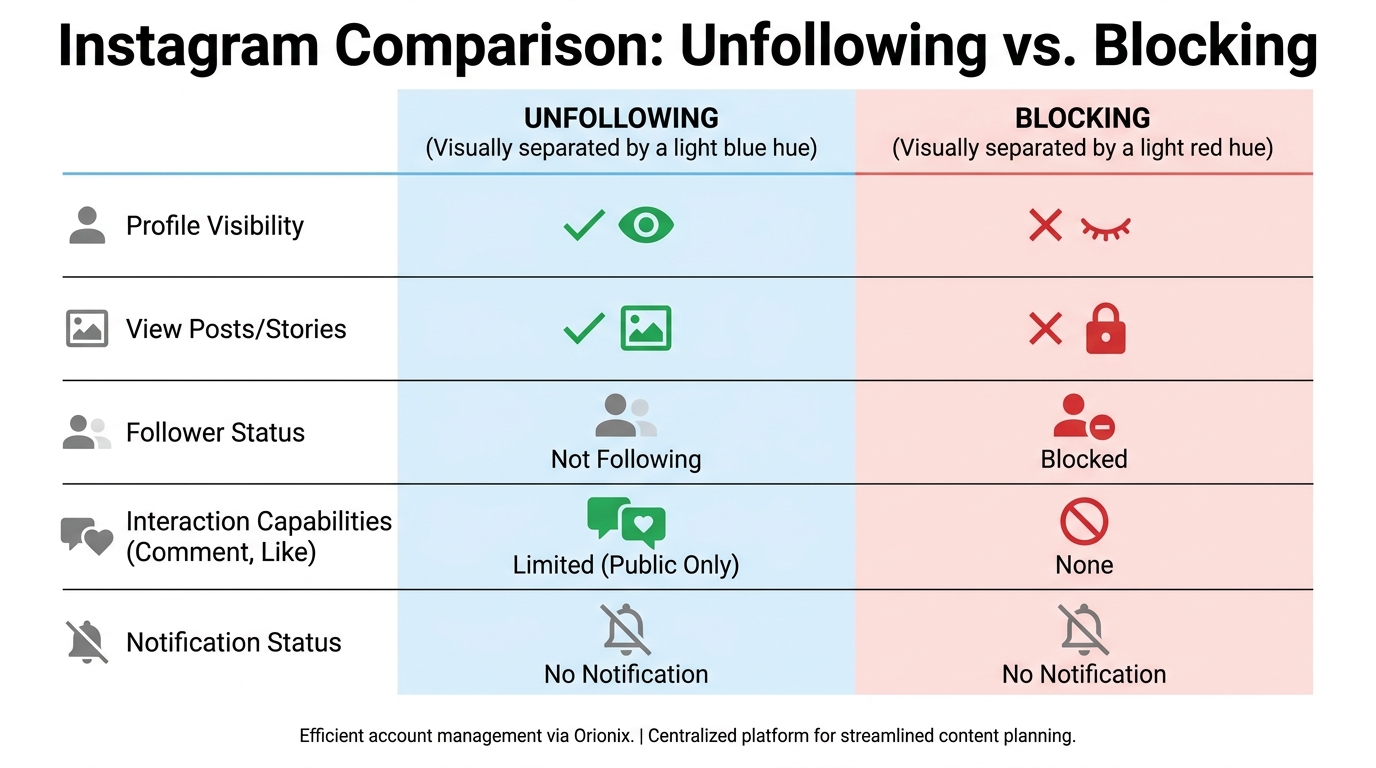
Unfollowing removes someone’s content from your feed but allows them to still follow you and view your public posts. Blocking prevents all interaction—they can’t see your profile, posts, or stories, and you automatically unfollow each other. Unfollowing is ideal for curating your feed, while blocking is for preventing unwanted contact. Both actions don’t trigger notifications to the other user.
How many accounts can you unfollow on Instagram per day?
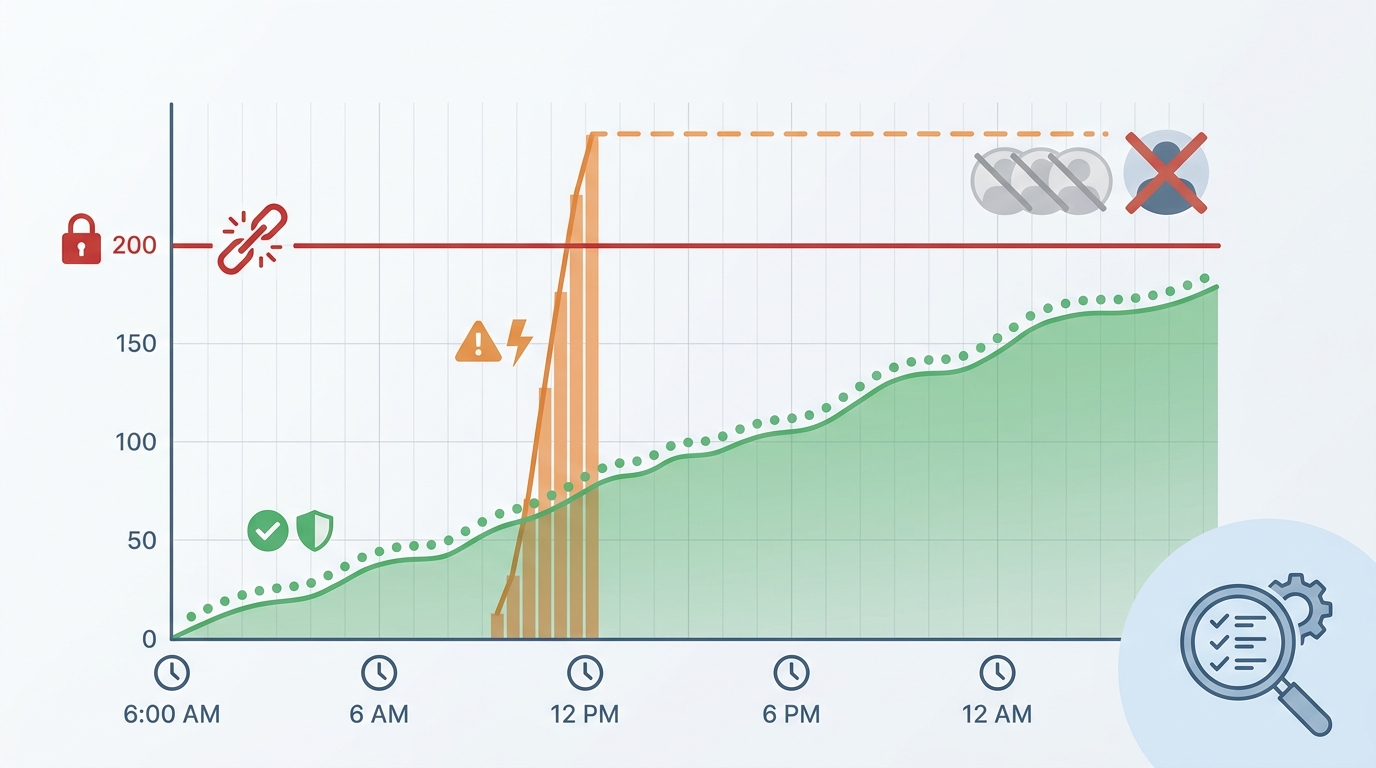
Instagram limits unfollowing to approximately 200 accounts per day to prevent spam behavior. Exceeding this limit may trigger temporary action blocks lasting several hours to days. The platform monitors patterns, so unfollowing too quickly can appear suspicious. For social media marketing professionals managing multiple accounts, it’s best to unfollow gradually and maintain authentic engagement patterns across social media platforms.
Does unfollowing accounts help your Instagram engagement?
Unfollowing inactive or irrelevant accounts can improve your engagement rate by creating a more focused follower-to-following ratio. A lower following count relative to followers signals credibility for social media marketing. It also declutters your feed, allowing you to engage meaningfully with content that matters. Strategic unfollowing, combined with posting at the best times to post on Instagram, enhances overall account performance and authenticity.
How do you see who you recently unfollowed on Instagram?
Instagram doesn’t provide a built-in feature to view your unfollowing history. Once you unfollow someone, there’s no native record within the app. To track this manually, you’d need to note accounts before unfollowing or use third-party apps that monitor following changes. For digital marketing professionals managing multiple social media platforms, centralized tools like Orionix can help track and organize account management activities more efficiently.
Should you unfollow accounts before deactivating Instagram?
Unfollowing accounts before deactivating Instagram isn’t necessary, as deactivation temporarily hides your profile without affecting your following list. When you reactivate, all connections remain intact. However, if you’re planning to delete your Instagram account permanently, unfollowing becomes irrelevant since all data is erased. Deactivation is reversible and ideal for breaks, while deletion is permanent and removes all content and connections completely.
Understanding How to Unfollow on Instagram: A Complete Guide
Managing your Instagram following list is essential for maintaining a curated feed that aligns with your interests and goals. Whether you’re decluttering your account, refining your content strategy, or simply trying to follow fewer accounts, knowing how to unfollow on Instagram is a fundamental skill for anyone using this popular social media platform. 📱
Instagram has evolved into one of the most powerful social media platforms for both personal use and digital marketing. With over a billion active users, maintaining a strategic following list can significantly impact your feed quality and engagement rates. This comprehensive guide will walk you through everything you need to know about unfollowing accounts on Instagram.
Understanding the unfollowing process is particularly important for those involved in social media marketing, as maintaining an optimal following-to-follower ratio can influence your account’s credibility and reach. Let’s dive into the various methods and best practices for managing your Instagram connections effectively. ✨
Why Unfollowing Matters for Your Instagram Strategy
Before we explore the technical steps, it’s important to understand why strategic unfollowing is crucial for your Instagram presence. Your following list directly impacts your feed content, engagement opportunities, and overall platform experience.
The Impact on Your Feed Quality
Every account you follow contributes to what appears in your Instagram feed. When you follow too many accounts—especially those that don’t align with your interests or business goals—your feed becomes cluttered with irrelevant content. This makes it harder to engage with posts that truly matter to you.
For businesses and content creators, a strategic following list ensures you stay updated with industry trends, competitors, and potential collaboration partners. This is particularly relevant for those working in marketing digital marketing roles where staying informed is essential. 🎯
Following-to-Follower Ratio Considerations
Your following-to-follower ratio can affect how others perceive your account. Accounts that follow significantly more people than follow them back may appear less authoritative or even spam-like. This perception can impact your credibility, especially in professional contexts.
- Accounts with balanced ratios tend to appear more established and trustworthy
- High following counts can suggest indiscriminate following behavior
- Strategic unfollowing helps maintain a professional appearance
- Influencers and brands typically maintain lower following counts relative to their followers
Step-by-Step Guide: How to Unfollow on Instagram
Now let’s get into the practical methods for unfollowing accounts on Instagram. There are several approaches depending on your device and specific needs.
Method 1: Unfollowing from a Profile
The most straightforward method to unfollow someone is directly from their profile page. This approach works identically on both iOS and Android devices.
- Open the Instagram app and navigate to the profile you want to unfollow
- Look for the « Following » button below their bio section
- Tap the « Following » button once
- Select « Unfollow » from the menu that appears
The button will change from « Following » to « Follow, » confirming that you’ve successfully unfollowed the account. This method is ideal when you’re browsing someone’s profile and decide you no longer want to see their content. 👤
Method 2: Unfollowing from Your Following List
When you need to unfollow multiple accounts or review your entire following list, accessing it from your profile is more efficient.
- Go to your Instagram profile by tapping your profile picture in the bottom right
- Tap the number next to « Following » at the top of your profile
- Scroll through your following list to find accounts you want to unfollow
- Tap the « Following » button next to each account name
- Confirm by selecting « Unfollow » from the popup menu
This method is particularly useful for conducting periodic audits of your following list, similar to how you might review your content strategy during the best times to post on Instagram. 📊
Method 3: Unfollowing from Your Feed
If you see a post in your feed from an account you want to unfollow, you can do so without visiting their profile.
- Locate a post from the account in your feed
- Tap the three dots (•••) in the top right corner of the post
- Select « Unfollow » from the menu options
This quick method saves time when you’re scrolling through your feed and encounter content that no longer interests you. It’s an efficient way to curate your feed in real-time. ⚡
Managing Bulk Unfollows and Account Cleanup
For users who need to unfollow large numbers of accounts, understanding Instagram’s limitations and best practices is essential to avoid account restrictions.
Instagram’s Unfollowing Limits
Instagram implements rate limits to prevent spam behavior and maintain platform integrity. While the exact numbers aren’t officially published, general guidelines suggest:
| Account Age | Recommended Daily Unfollow Limit | Risk Level |
|---|---|---|
| New accounts (less than 3 months) | 20-30 unfollows per day | Higher risk of restrictions |
| Established accounts (3-6 months) | 50-100 unfollows per day | Moderate risk |
| Mature accounts (over 6 months) | 100-200 unfollows per day | Lower risk with gradual unfollowing |
Exceeding these limits may result in temporary action blocks, where Instagram prevents you from following or unfollowing accounts for a period ranging from a few hours to several days. 🚫
Safe Unfollowing Strategies
To avoid triggering Instagram’s spam detection algorithms, follow these best practices when conducting mass unfollows:
- Space out your unfollows throughout the day rather than doing them all at once
- Take breaks between unfollowing sessions (wait 30-60 minutes)
- Mix unfollowing with other natural Instagram activities like posting, commenting, and browsing
- Start with smaller numbers and gradually increase as your account ages
- Avoid using third-party automation tools that violate Instagram’s Terms of Service
These strategies align with broader social media marketing best practices that emphasize authentic engagement over automated actions. Just as you would carefully plan the best time to post on Instagram for maximum engagement, you should also approach unfollowing strategically. 🎯
Third-Party Tools and Apps for Managing Followers
While Instagram’s native features work well for small-scale unfollowing, several third-party tools can help you identify accounts to unfollow more efficiently.
Follower Analysis Apps
Various apps help you analyze your following list by identifying inactive accounts, non-followers, and ghost followers. However, exercise caution when granting these apps access to your Instagram account.
Popular categories of follower management tools include:
- Non-follower identifiers: Show which accounts you follow that don’t follow you back
- Inactive account detectors: Identify accounts that haven’t posted in extended periods
- Engagement analyzers: Reveal accounts that never interact with your content
- Bulk management tools: Allow batch unfollowing within safe limits
When selecting tools to manage your Instagram presence, consider platforms like Orionix that offer centralized social media and content management capabilities across multiple platforms, helping you maintain a cohesive strategy. 💼
Important Safety Considerations
Before using any third-party tool, understand the potential risks:
- Only use apps with strong privacy policies and secure authentication
- Avoid tools that require your Instagram password (use official API connections only)
- Be aware that some apps may violate Instagram’s Terms of Service
- Excessive automation can lead to account suspension or permanent bans
- Read reviews and research tools thoroughly before granting access
Remember that Instagram regularly updates its policies and detection methods. What works safely today might trigger restrictions tomorrow, so always prioritize manual methods when possible. ⚠️
Strategic Unfollowing for Business and Creator Accounts
For those using Instagram for business or content creation, unfollowing should be part of a broader social media marketing strategy rather than a random cleanup task.
Audit Your Following List Regularly
Professional accounts should conduct quarterly reviews of their following list to ensure it aligns with current business objectives and industry focus. This practice is as important as analyzing engagement metrics or optimizing posting schedules.
During your audit, consider unfollowing:
- Accounts that no longer align with your brand values or niche
- Competitors you’ve finished researching
- Inactive accounts that haven’t posted in 6+ months
- Personal accounts if you’re maintaining a strictly professional presence
- Accounts that consistently post low-quality or irrelevant content
This strategic approach mirrors the careful planning required for effective social media marketing jobs, where every action should support broader business goals. 📈
Maintaining Industry Connections
While cleaning up your following list, be strategic about which accounts you keep. Your following list should include:
| Account Type | Why to Keep Following | Review Frequency |
|---|---|---|
| Industry leaders and influencers | Stay updated on trends and insights | Quarterly |
| Direct competitors | Monitor their content strategy and campaigns | Monthly |
| Potential collaboration partners | Identify partnership opportunities | Bi-annually |
| Engaged community members | Maintain relationships with active supporters | As needed |
| News and resource accounts | Access valuable industry information | Quarterly |
This curated approach ensures your feed remains a valuable resource for professional development and business intelligence. 🔍
Balancing Personal and Professional Following
Many users struggle with whether to maintain separate personal and professional accounts. If you use one account for both purposes, create a balanced following strategy:
- Follow industry accounts during business hours to stay professional
- Limit personal follows to close friends and family
- Use Instagram’s « Favorites » feature to prioritize certain accounts in your feed
- Consider creating a private secondary account for purely personal connections
This balance is particularly important for those working in entry level social media marketing positions, where your personal Instagram presence may be reviewed by potential employers. 💡
Alternative Options to Unfollowing
Sometimes you don’t want to completely unfollow an account but still need to reduce its presence in your feed. Instagram offers several alternatives that provide middle-ground solutions.
Muting Accounts Instead of Unfollowing
Muting allows you to hide someone’s posts and stories without unfollowing them. This is ideal for accounts you want to maintain a connection with but don’t need to see regularly.
To mute an account:
- Go to the account’s profile
- Tap the « Following » button
- Select « Mute » from the options
- Choose to mute posts, stories, or both
Muting is particularly useful for:
- Friends or family who post excessively but you don’t want to offend
- Business accounts during off-hours or vacation periods
- Accounts with seasonal relevance that you may want to unmute later
- Maintaining follower counts while reducing feed clutter
The muted account won’t be notified, and you can unmute them at any time. This feature provides flexibility similar to how you might adjust your content strategy based on the best times to post on Instagram for your specific audience. ⏰
Using the Restrict Feature
For accounts that you want to limit interaction with without unfollowing, Instagram’s restrict feature offers additional control. While primarily designed for managing unwanted interactions, it can be useful in certain unfollowing scenarios.
Restricting an account means:
- Their comments on your posts are only visible to them
- You won’t receive notifications when they message you
- They won’t see when you’re active or have read their messages
- You remain following each other
What Happens After You Unfollow Someone
Understanding the implications of unfollowing helps you make informed decisions about managing your Instagram connections.
Visibility and Notifications
When you unfollow someone on Instagram, several things happen immediately:
- You stop seeing their posts in your main feed
- Their stories no longer appear in your story bar
- You can still view their profile if it’s public
- They don’t receive a notification that you’ve unfollowed them
- You can still send them direct messages
However, the person may eventually notice you’ve unfollowed them if they check their follower list or use third-party tracking tools. This is why some users prefer the mute option for sensitive situations. 👀
Re-following Considerations
You can re-follow any account you’ve previously unfollowed at any time. The process is simple:
- Navigate to their profile
- Tap the « Follow » button
- If their account is public, you’ll immediately follow them again
- If their account is private, they’ll need to approve your follow request
Keep in mind that repeatedly following and unfollowing the same accounts can appear suspicious and may trigger Instagram’s spam detection systems. Maintain consistency in your following decisions. 🔄
Integrating Unfollowing into Your Overall Instagram Strategy
For maximum effectiveness, unfollowing should be part of a comprehensive Instagram management approach that includes content creation, engagement, and analytics.
Timing Your Unfollowing Activities
Just as there are best times to post on Instagram for optimal engagement, there are strategic times to conduct unfollowing activities:
- During content audits: Review your following list when analyzing your overall content strategy
- After campaign completion: Unfollow research accounts once you’ve gathered needed insights
- During quarterly reviews: Schedule regular following list maintenance as part of broader account health checks
- Before major launches: Clean up your following list to ensure your feed is optimized for research and inspiration
Coordinating unfollowing with other Instagram activities creates a more cohesive approach to account management. This integrated strategy is essential for those managing multiple social media platforms simultaneously. 📅
Combining with Content Strategy
Your following list should support your content creation efforts. Consider how the accounts you follow contribute to:
- Inspiration for new social media content ideas
- Understanding current trends in your industry
- Identifying collaboration opportunities
- Monitoring competitor activities and strategies
- Staying connected with your target audience
Platforms like Orionix can help you manage this integration by providing a centralized dashboard for planning, creating, and publishing content across multiple channels while monitoring your social media connections. 🚀
Measuring the Impact of Strategic Unfollowing
Track how unfollowing affects your Instagram performance by monitoring:
| Metric | What to Monitor | Expected Impact |
|---|---|---|
| Feed relevance | Quality of content appearing in your feed | Improvement in content relevance |
| Engagement rate | Your interactions with posts in your feed | Increased engagement with relevant content |
| Following-to-follower ratio | Balance between accounts you follow and followers | More balanced, professional-looking ratio |
| Account growth | New follower acquisition rate | Potential improvement in perceived authority |
Common Mistakes to Avoid When Unfollowing
Understanding what not to do is just as important as knowing the proper unfollowing techniques. Avoid these common pitfalls to maintain a healthy Instagram presence.
Unfollowing Too Aggressively
The most common mistake users make is unfollowing too many accounts too quickly. This behavior can trigger Instagram’s spam filters and result in:
- Temporary action blocks preventing follows and unfollows
- Reduced account reach and visibility
- Potential account warnings or restrictions
- Damage to your account’s standing with Instagram’s algorithm
Always prioritize gradual, natural-looking activity over rapid mass unfollowing. Think of it like digital marketing—sustainable growth strategies always outperform quick fixes. 🐌
Using Unreliable Third-Party Tools
Many apps promise to automate unfollowing or provide detailed follower analytics, but not all are safe or compliant with Instagram’s policies. Avoid tools that:
- Request your Instagram password instead of using official OAuth authentication
- Promise to automate following and unfollowing
- Offer to « hack » Instagram’s systems or bypass limits
- Have poor reviews or unclear privacy policies
- Require excessive permissions beyond what’s necessary
Forgetting About Relationship Management
In professional contexts, unfollowing can have real-world consequences. Before unfollowing business contacts, consider:
- Whether the person might notice and be offended
- If the account represents a current or potential business relationship
- Whether muting would be a better alternative
- The potential impact on professional networking opportunities
This consideration is particularly important for those working in specialized social media marketing roles where industry connections are valuable. 🤝
Advanced Strategies for Power Users
For experienced Instagram users managing multiple accounts or large followings, these advanced strategies can optimize your unfollowing approach.
Segmenting Your Following List
Create a mental or documented system for categorizing the accounts you follow:
- Tier 1 – Essential: Industry leaders, close collaborators, major clients (never unfollow)
- Tier 2 – Important: Regular business contacts, active community members (review quarterly)
- Tier 3 – Useful: Inspiration accounts, competitors, research subjects (review bi-annually)
- Tier 4 – Optional: Casual follows, trial accounts, temporary interests (review monthly)
This tiered approach helps you make quick decisions during unfollowing sessions and ensures you never accidentally unfollow important connections. 📊
Coordinating Across Multiple Accounts
If you manage multiple Instagram accounts for different purposes (personal, business, client accounts), develop a coordinated unfollowing strategy:
- Maintain distinct following lists for each account based on its purpose
- Use different criteria for unfollowing on each account
- Schedule unfollowing activities for different accounts on different days
- Track which accounts you’ve unfollowed from each profile to avoid confusion
Managing multiple accounts becomes more efficient with centralized platforms that allow you to oversee all your social media and marketing activities from one dashboard. 💻
Leveraging Instagram’s Favorites Feature
Instead of unfollowing accounts you occasionally want to see, use Instagram’s Favorites feature to create a curated feed:
- Go to your profile settings
- Select « Favorites » from the menu
- Add accounts you want to prioritize
- Access your favorites feed by tapping the Instagram logo at the top of your feed
This feature allows you to maintain a large following list while still having quick access to content from your most important connections. It’s similar to how you might use hashtag following to track specific topics without following individual accounts. 🌟
The Relationship Between Unfollowing and Account Management
Unfollowing is just one aspect of comprehensive Instagram account management. Understanding how it relates to other account actions helps create a cohesive strategy.
Unfollowing vs. Deactivating or Deleting
Sometimes users consider more drastic measures when overwhelmed by their Instagram presence. Understanding the differences helps you make informed decisions:
- Unfollowing: Selective removal of individual accounts from your following list while maintaining your account
- Deactivating: Temporarily disabling your account, making it invisible until you reactivate (learn more about how to deactivate Instagram for breaks)
- Deleting: Permanently removing your account and all associated data (understand how can you delete an Instagram account if needed)
For most users, strategic unfollowing provides sufficient control without the need for more extreme measures. However, knowing how do you delete an Instagram account or deactivate it can be useful for digital detox periods. 🔌
Integrating with Other Instagram Features
Your unfollowing strategy should work in harmony with other Instagram features and practices:
- Combine unfollowing with organic follower growth strategies to maintain healthy ratios
- Use unfollowing to refine your feed before reposting content for inspiration
- Clean up your following list before analyzing your liked posts to understand your true preferences
- Unfollow strategically while building your presence on multiple social media platforms
Future-Proofing Your Unfollowing Strategy
As Instagram continues to evolve, staying informed about platform changes ensures your unfollowing practices remain effective and compliant.
Staying Updated on Instagram Policy Changes
Instagram regularly updates its Terms of Service, Community Guidelines, and API policies. These changes can affect:
- Daily action limits for following and unfollowing
- Availability and functionality of third-party tools
- Algorithm treatment of accounts with certain following patterns
- New features that provide alternatives to unfollowing
Subscribe to official Instagram business blogs and social media marketing news sources to stay informed about changes that might impact your strategy. 📰
Adapting to Algorithm Changes
Instagram’s algorithm constantly evolves, affecting how following behavior impacts your account’s performance. Current trends suggest:
- Greater emphasis on authentic engagement over vanity metrics
- Increased penalties for automated or bot-like behavior
- More sophisticated detection of spam patterns
- Enhanced features for content discovery beyond following
Adapt your unfollowing strategy as these changes roll out, always prioritizing authentic, human-like behavior patterns. 🤖
Conclusion: Mastering Instagram Unfollowing for Better Account Health
Understanding how to unfollow on Instagram is essential for maintaining a curated, valuable feed that supports your personal or professional goals. Whether you’re managing a personal account, running a business profile, or working in social media marketing, strategic unfollowing helps you maintain focus and credibility on the platform.
Remember these key takeaways:
- Unfollow gradually to avoid triggering Instagram’s spam detection
- Use native Instagram features before turning to third-party tools
- Consider alternatives like muting when unfollowing isn’t appropriate
- Integrate unfollowing into your broader Instagram and digital marketing strategy
- Review and refine your following list regularly as part of account maintenance
By implementing the strategies outlined in this guide, you’ll maintain a healthier Instagram presence that serves your interests while staying compliant with platform policies. Your curated following list will provide inspiration, industry insights, and genuine connections that support your goals on Instagram and across other social media platforms. ✨
Ready to take your social media management to the next level? Visit Orionix to discover how our centralized platform can help you plan, create, and publish content across all your social channels from a single dashboard. Streamline your content management process and maintain better control over your social media presence with tools designed for modern marketers and content creators. Start optimizing your social media strategy today! 🚀
Article created using IntentRank