
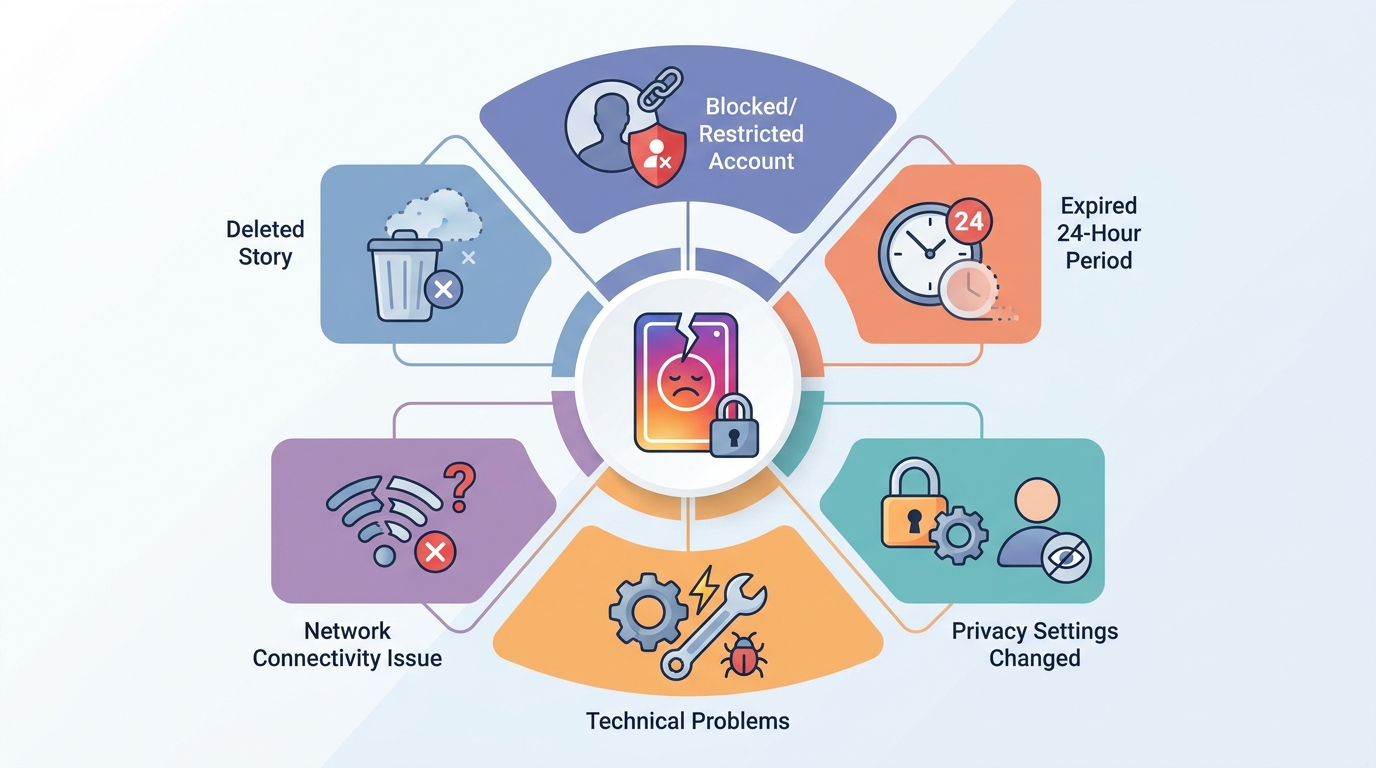
TL;DR: When you see « story not available on Instagram, » it typically means the story was deleted by the user, your account was blocked or restricted, the story expired after 24 hours, there’s a network connectivity issue, or Instagram is experiencing technical problems. Check your internet connection and app updates first to resolve the issue.
Frequently Asked Questions
Why does it say story not available on Instagram?
The ‘story not available’ message on Instagram appears when a user has deleted their story, blocked you, deactivated their account, or set their profile to private after you viewed it. It can also occur due to network connectivity issues, Instagram server problems, or if the 24-hour story expiration period has passed. Occasionally, app glitches or outdated versions may trigger this error message.
How do you fix the story not available error on Instagram?
To fix the story not available error, first check your internet connection and restart the Instagram app. Update Instagram to the latest version through your app store. Clear the app cache in your device settings, or try logging out and back in. If the issue persists, uninstall and reinstall the Instagram app. The error may also resolve itself if it’s due to temporary server issues.
Can you still see Instagram stories after someone deactivates their account?
No, you cannot see Instagram stories after someone deactivates their account. When users deactivate Instagram, all their content including stories, posts, and profile information becomes immediately invisible to other users. The ‘story not available’ message will appear if you try to view their content. Stories will only reappear if the user reactivates their account within the deactivation period.
What’s the difference between story not available and being blocked on Instagram?
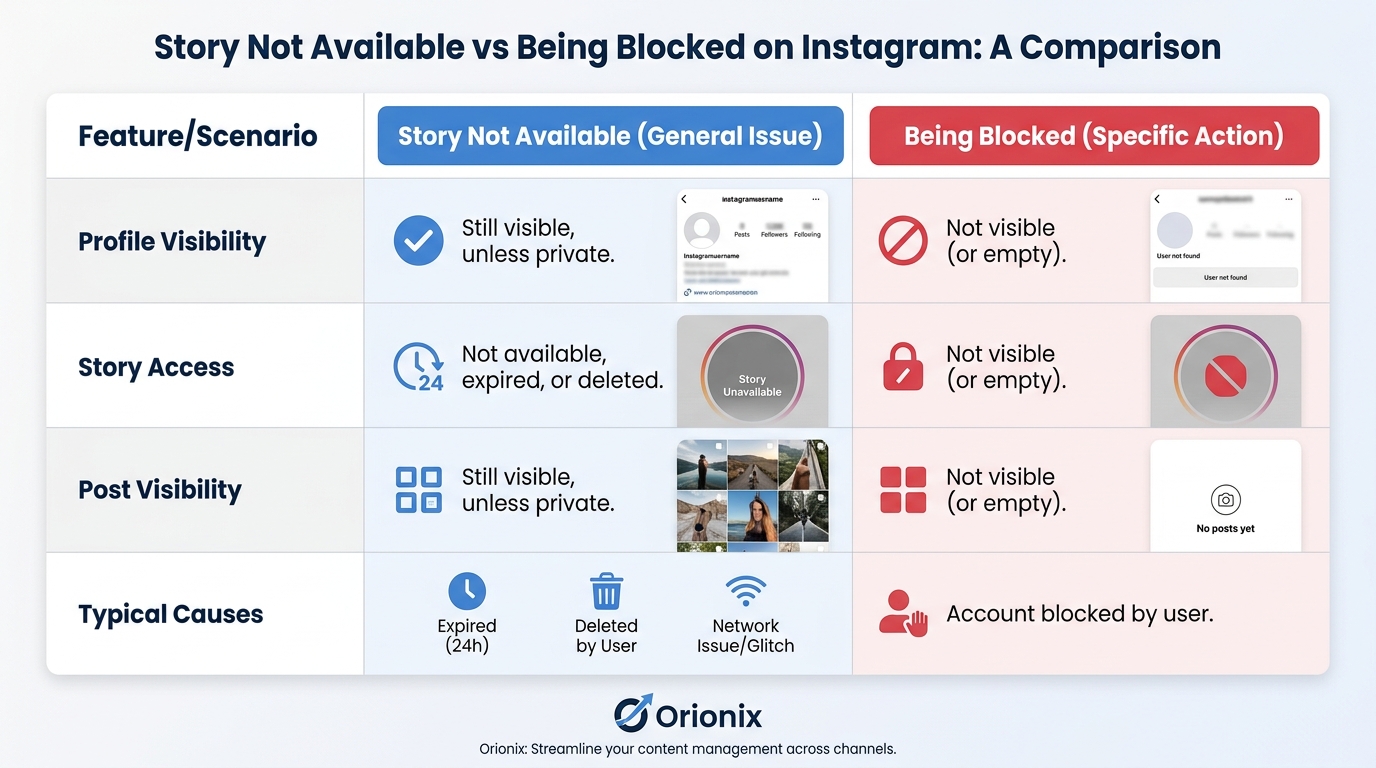
When you’re blocked on Instagram, you can’t find the user’s profile, view their stories, or see their posts. The ‘story not available’ message appears when you still have access to their profile but can’t view a specific story. Being blocked removes all visibility, while story unavailability is typically temporary and relates to individual content pieces rather than complete profile access.
How long are Instagram stories available before showing the not available message?
Instagram stories are available for exactly 24 hours from the time of posting before they automatically disappear and show the ‘not available’ message. Users can extend story visibility by adding them to Highlights, which preserves stories permanently on their profile. For social media marketing purposes, understanding this timeframe helps plan content scheduling and ensures maximum engagement during the active period.
Does story not available on Instagram mean the user deleted it?
Story not available doesn’t always mean the user deleted it. While deletion is one common reason, other causes include account deactivation, privacy setting changes, blocking, expired 24-hour duration, or technical issues. The user may have also restricted their story visibility to close friends only, excluding you from viewing. Instagram’s algorithm occasionally produces this error during server maintenance or app updates.
How can you delete an Instagram story that shows as not available?
If your own story shows as ‘not available,’ you can still delete it by going to your profile, tapping your profile picture, selecting the story, and clicking the three-dot menu to choose ‘Delete.’ For social media platforms management, tools like Orionix allow centralized content control across multiple channels. If the story already expired after 24 hours, it’s automatically removed unless saved to Highlights.
What should social media marketers do when their Instagram stories show not available?
Social media marketers should immediately check account status, verify posting permissions, and test content visibility from different accounts. Document the issue with screenshots for platform support. Use social media marketing tools to monitor story performance and schedule reposts during best times to post on Instagram. Platforms like Orionix help streamline content publishing across social media platforms, reducing errors and ensuring consistent story availability for audiences.
Understanding Why Instagram Stories Become Unavailable
Have you ever tried to view an Instagram story only to see the frustrating message « story not available on instagram »? This common issue affects millions of users daily and can happen for several legitimate reasons. Understanding why stories become unavailable helps you navigate the platform more effectively and manage your own content strategy.
Instagram Stories have become a cornerstone of social media marketing and personal communication on the platform. When these stories suddenly become inaccessible, it disrupts engagement and can leave both viewers and creators confused about what went wrong.
The unavailability of Instagram Stories isn’t always a technical glitch. Often, there are specific reasons behind this message that relate to user actions, privacy settings, or account status. Let’s explore the most common causes and what they mean for your Instagram experience.
Common Reasons Why Story Not Available on Instagram Appears
🔒 Privacy Settings and Account Restrictions
One of the most frequent causes of unavailable stories relates to privacy controls. When someone restricts their account or changes their privacy settings, their stories may no longer be visible to certain viewers.
If you’ve been restricted on Instagram, you’ll experience limited access to that person’s content. The restrict feature allows users to control who sees their stories without blocking them entirely.
- Private account changes: When a public account switches to private, previous followers who haven’t been approved will lose access
- Story hiding: Users can hide stories from specific people while keeping their account public
- Close Friends lists: Stories shared only with Close Friends won’t appear to other followers
- Blocked users: If you’ve been blocked, all content from that user becomes unavailable
⏰ Time-Related Story Expiration
Instagram Stories automatically disappear after 24 hours by design. This temporary nature is a core feature that distinguishes stories from permanent feed posts on social media platforms.
When you click on a story notification or link after the 24-hour window has passed, you’ll encounter the unavailable message. This is completely normal behavior and affects everyone equally.
| Story Type | Duration | Availability After Expiration |
|---|---|---|
| Regular Story | 24 hours | Unavailable (unless archived) |
| Highlights | Permanent | Always available until removed |
| Archived Stories | Indefinite | Visible only to account owner |
🗑️ Deleted Content and Account Removal
Users can manually delete their stories at any time before the 24-hour expiration. When someone removes a story you were viewing or planned to view, it becomes immediately unavailable.
More significantly, if someone has decided to delete their Instagram account entirely, all their content including stories becomes permanently unavailable. Understanding how do you delete an instagram account helps explain why content suddenly disappears from the platform.
Account deactivation also causes stories to become unavailable. When users learn how to deactivate instagram temporarily, their entire profile and all associated content becomes hidden until they reactivate.
Technical Issues Behind Unavailable Instagram Stories
📱 App and Connection Problems
Sometimes the « story not available » message appears due to technical difficulties rather than user actions. Poor internet connectivity, outdated app versions, or server issues can all contribute to this problem.
Your device’s connection quality directly impacts your ability to load Instagram content. Stories require stable data transmission to display properly, especially when they contain high-quality videos or multiple segments.
- Weak WiFi or cellular signal: Insufficient bandwidth prevents stories from loading
- Outdated Instagram app: Old versions may have compatibility issues
- Cache and data corruption: Accumulated app data can cause display errors
- Instagram server outages: Platform-wide issues affect all users temporarily
🔧 How to Troubleshoot Technical Story Issues
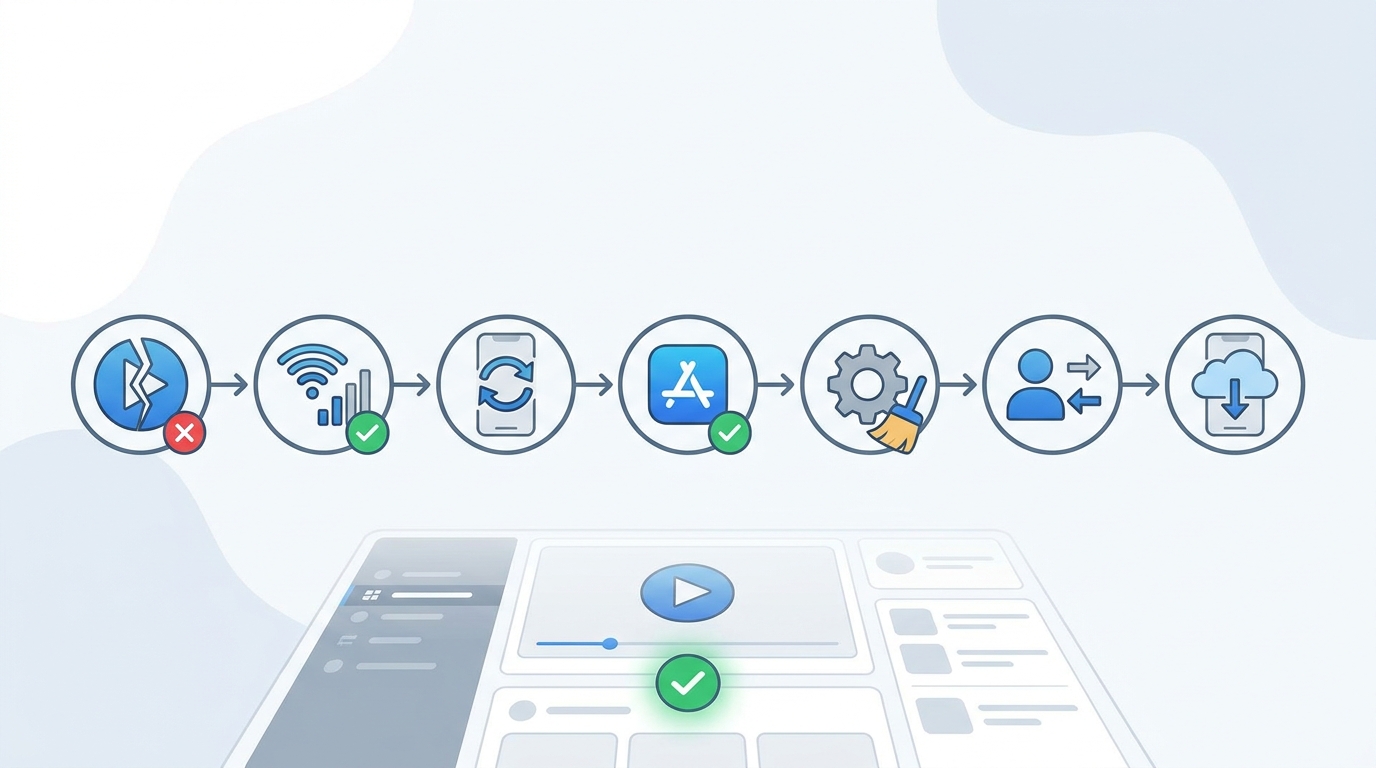
Before assuming you’ve been blocked or restricted, try these troubleshooting steps to rule out technical problems:
- Check your internet connection: Switch between WiFi and cellular data to test connectivity
- Update the Instagram app: Visit your device’s app store and install the latest version
- Clear app cache: Go to your device settings and clear Instagram’s cached data
- Restart your device: A simple reboot often resolves temporary glitches
- Reinstall Instagram: Completely remove and reinstall the app for a fresh start
Impact on Social Media Marketing and Content Strategy
📊 Why Story Availability Matters for Marketers
For businesses and content creators, understanding story availability is crucial for effective social media marketing. When your stories become unavailable to certain audience segments, it directly impacts your reach and engagement metrics.
Digital marketing professionals need to carefully manage their story settings to ensure maximum visibility while maintaining appropriate privacy controls. The balance between exclusivity and reach requires strategic planning.
Timing plays a critical role in story effectiveness. Knowing the best times to post on instagram ensures your stories reach viewers before they expire. Research shows that posting during peak engagement hours maximizes story views and interactions.
| Audience Type | Best Time to Post | Peak Engagement Window |
|---|---|---|
| General Consumers | 11 AM – 1 PM | Lunch breaks |
| Business Professionals | 7 AM – 9 AM | Morning commute |
| Young Adults | 7 PM – 9 PM | Evening leisure time |
| International Audience | Varies by timezone | Local evening hours |
🎯 Content Planning for Maximum Story Availability
Creating a robust content strategy involves planning for story longevity and accessibility. While stories are temporary by nature, strategic use of Highlights can extend their lifespan indefinitely.
If you’re managing social media marketing for restaurants or other businesses, story availability becomes even more critical. Time-sensitive promotions, daily specials, and event announcements require careful timing to reach customers before expiration.
Content creators across various industries, from music artists to small businesses, must understand how story mechanics affect their marketing digital marketing efforts. Unavailable stories represent missed opportunities for engagement and conversions.
Privacy Controls That Affect Story Visibility
👥 Managing Who Sees Your Stories
Instagram provides granular controls over story visibility, allowing users to customize their audience for each story they share. These privacy features explain many instances of unavailable stories.
When you post a story, you can choose to share it with everyone, hide it from specific users, or share it only with your Close Friends list. Each option affects who will see your content versus who will encounter the unavailable message.
- Hide story from: Selectively block specific users from viewing your stories
- Close Friends: Create an exclusive group for private story sharing
- Allow message replies: Control who can respond to your stories
- Share to other platforms: Determine cross-platform visibility
🔐 Understanding Restrict vs. Block Features
The restrict feature on Instagram creates a middle ground between full access and complete blocking. When you restrict someone, they can still see your public content, but their interaction with your stories becomes limited.
Learning about what happens when you restrict someone on Instagram helps explain why certain users might see unavailable messages while others don’t. Restricted users may see delayed story updates or miss stories entirely.
Blocking takes restriction further by completely preventing someone from viewing any of your content. Blocked users will consistently see unavailable messages when attempting to view your stories or profile.
Best Practices for Content Creators and Businesses
✅ Ensuring Story Accessibility for Your Audience
To maximize the impact of your Instagram Stories and minimize unavailability issues, follow these proven strategies used by successful content creators and businesses:
- Maintain consistent posting schedules: Regular story updates keep your audience engaged and prevent confusion about content availability
- Use Highlights strategically: Save important stories to Highlights to extend their availability beyond 24 hours
- Monitor privacy settings: Regularly review who can see your stories to ensure you’re reaching your intended audience
- Communicate deactivation plans: If you need to temporarily deactivate your account, inform your followers in advance
- Test story visibility: Use a secondary account to verify your stories appear correctly to different audience segments
📱 Leveraging Multiple Social Media Platforms
Don’t rely solely on Instagram Stories for time-sensitive content. Diversifying across social media platforms ensures your message reaches audiences even if technical issues or privacy settings cause Instagram story unavailability.
Understanding the strengths of different social media platforms for content creators allows you to create backup distribution channels. When Instagram stories become unavailable, your content remains accessible through alternative platforms.
Cross-posting strategies help mitigate the temporary nature of Instagram Stories while maintaining engagement across your entire digital presence. Consider sharing similar content to Facebook Stories, Snapchat, or other platforms simultaneously.
How to Recover from Unavailable Story Issues
🔄 Steps to Take When Your Stories Become Unavailable
If your followers report that your stories are showing as unavailable, take immediate action to diagnose and resolve the issue. Quick response prevents prolonged engagement drops and maintains audience trust.
Start by checking your account status and privacy settings. Verify that you haven’t accidentally changed settings that would limit story visibility to your target audience.
| Problem | Likely Cause | Solution |
|---|---|---|
| Some followers can’t see stories | Privacy settings or restrictions | Review « Hide story from » list and restrictions |
| Stories disappear immediately | Accidental deletion or app glitch | Check archive and reinstall app if needed |
| No one can see stories | Account issue or shadowban | Contact Instagram support and review community guidelines |
| Stories won’t upload | Technical or connection problem | Check internet, update app, clear cache |
💡 Preventing Future Unavailability Problems
Proactive measures reduce the likelihood of story unavailability issues affecting your content strategy. Regular account maintenance and awareness of platform changes keep your stories accessible to your intended audience.
Stay informed about Instagram updates and policy changes that might affect story visibility. The platform frequently adjusts algorithms and features, which can impact how and when your stories appear to followers.
- Document your privacy settings: Keep records of your story visibility preferences
- Educate your team: Ensure everyone managing your account understands story settings
- Monitor engagement metrics: Sudden drops in story views may indicate availability issues
- Maintain backup content: Save important stories externally before they expire
Advanced Story Management Techniques
📈 Optimizing Story Performance Across Social Media and Marketing
Professional social media marketing requires sophisticated story management that goes beyond basic posting. Understanding availability patterns helps you optimize timing, content, and distribution strategies.
Analytics tools provide insights into when your stories perform best and which audience segments engage most actively. Use this data to refine your posting schedule and ensure maximum visibility before stories expire.
For those working in social media marketing jobs or managing multiple accounts, developing systematic approaches to story management prevents unavailability issues and maximizes content ROI.
🎨 Creating Content That Stays Relevant
While stories are temporary, their impact doesn’t have to be. Strategic content creation ensures your messages resonate even within the 24-hour window and can be effectively repurposed.
Consider what content to post on social media that maintains value throughout its lifespan. Time-sensitive promotions should be clearly marked, while evergreen content can be saved to Highlights for extended availability.
The best time to post on instagram varies by audience, industry, and content type. Experiment with different posting times and track when unavailability issues occur least frequently due to technical problems or low engagement periods.
Understanding Account Status and Story Availability
⚠️ How Account Actions Affect Story Visibility
Your account status directly impacts whether your stories remain available to viewers. Violations of Instagram’s community guidelines can result in restricted reach or complete content removal.
When users wonder how can you delete an instagram account or how to deactivate instagram, they should understand the immediate effect on story availability. Deactivation makes all content temporarily unavailable, while deletion removes it permanently.
If you’re considering account changes, review the implications for your existing stories and Highlights. Content saved to your archive remains accessible to you even after deactivation, but viewers will see unavailable messages.
🔍 Monitoring Your Story Health
Regular monitoring helps identify availability issues before they significantly impact your reach. Track metrics like story completion rates, replies, and forward/backward navigation to gauge content health.
Sudden changes in these metrics might indicate that your stories are becoming unavailable to portions of your audience due to technical issues or changed privacy settings.
Conclusion: Mastering Instagram Story Availability
Understanding why the « story not available on instagram » message appears empowers you to manage your content more effectively and troubleshoot issues quickly. Whether caused by privacy settings, technical problems, or account status changes, most unavailability issues have straightforward solutions. 📲
For businesses and content creators, story availability directly impacts engagement and marketing effectiveness. By implementing the strategies outlined in this guide, you can minimize unavailability issues and ensure your content reaches its intended audience consistently.
Remember that Instagram Stories are just one component of a comprehensive social media marketing strategy. Diversifying your content across multiple formats and platforms protects against the temporary nature of stories and potential availability issues.
Ready to take your social media content management to the next level? Visit Orionix to discover how our centralized platform helps you plan, create, and publish content across all your social channels through a single dashboard. Streamline your workflow, reduce unavailability issues, and maximize your content’s impact with tools designed for modern digital marketing professionals. 🚀
Don’t let unavailable stories hold back your social media success. Start optimizing your content strategy today with professional tools that ensure your message reaches your audience every time. Explore more social media tips and strategies to enhance your digital presence across all platforms.
Article created using IntentRank