
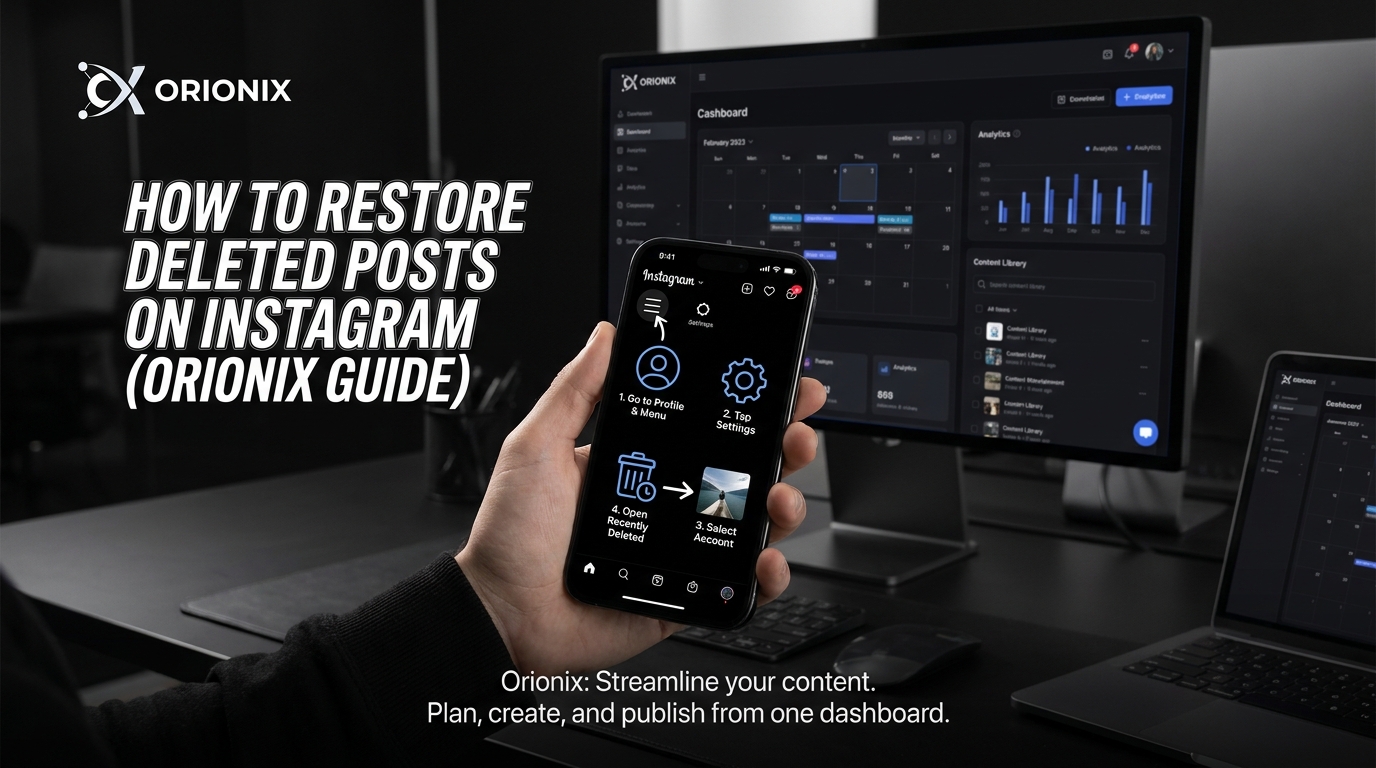
TL;DR: To restore deleted posts on Instagram, navigate to Settings, then Account, and select Recently Deleted. Here you’ll find posts removed within the last 30 days. Tap the content you want to recover and select Restore. Posts permanently deleted after 30 days cannot be retrieved through Instagram’s native features.
Frequently Asked Questions
How to restore deleted posts on Instagram?
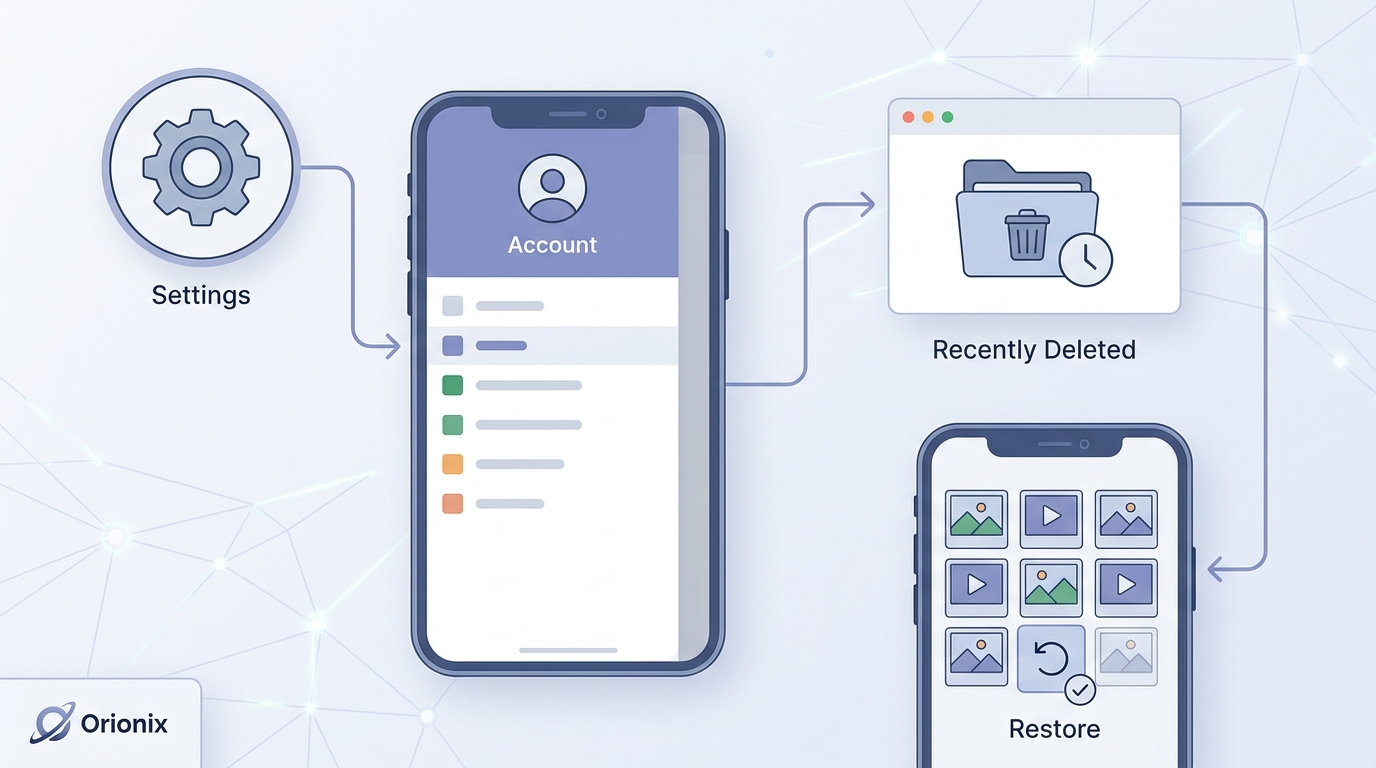
To restore deleted Instagram posts, open the Instagram app and go to Settings > Account > Recently Deleted. Here you’ll find posts deleted within the last 30 days. Select the content you want to recover and tap ‘Restore.’ The post will return to your profile with its original caption, likes, and comments intact. This feature works for photos, videos, Reels, and Stories.
Can you recover permanently deleted Instagram posts after 30 days?
No, Instagram permanently deletes posts after 30 days from the Recently Deleted folder. Once this period expires, the content cannot be recovered through Instagram’s built-in features. To prevent permanent loss, always restore important posts within the 30-day window. Consider backing up your content regularly using Instagram’s data download feature or third-party social media management platforms.
Where is the Recently Deleted folder on Instagram?
Access the Recently Deleted folder by opening Instagram, tapping your profile icon, then selecting the menu (three lines). Navigate to Settings > Account > Recently Deleted. This folder stores deleted posts, Stories, Reels, and IGTV videos for 30 days before permanent deletion. You’ll need to verify your identity before viewing or restoring content from this folder.
What happens when you delete an Instagram post?
When you delete an Instagram post, it moves to the Recently Deleted folder where it remains for 30 days. During this period, the post is hidden from your profile and followers but can be restored. After 30 days, Instagram permanently deletes the content, including all engagement metrics like likes, comments, and shares. The deletion process helps prevent accidental permanent loss.
How long do deleted Instagram posts stay in Recently Deleted?
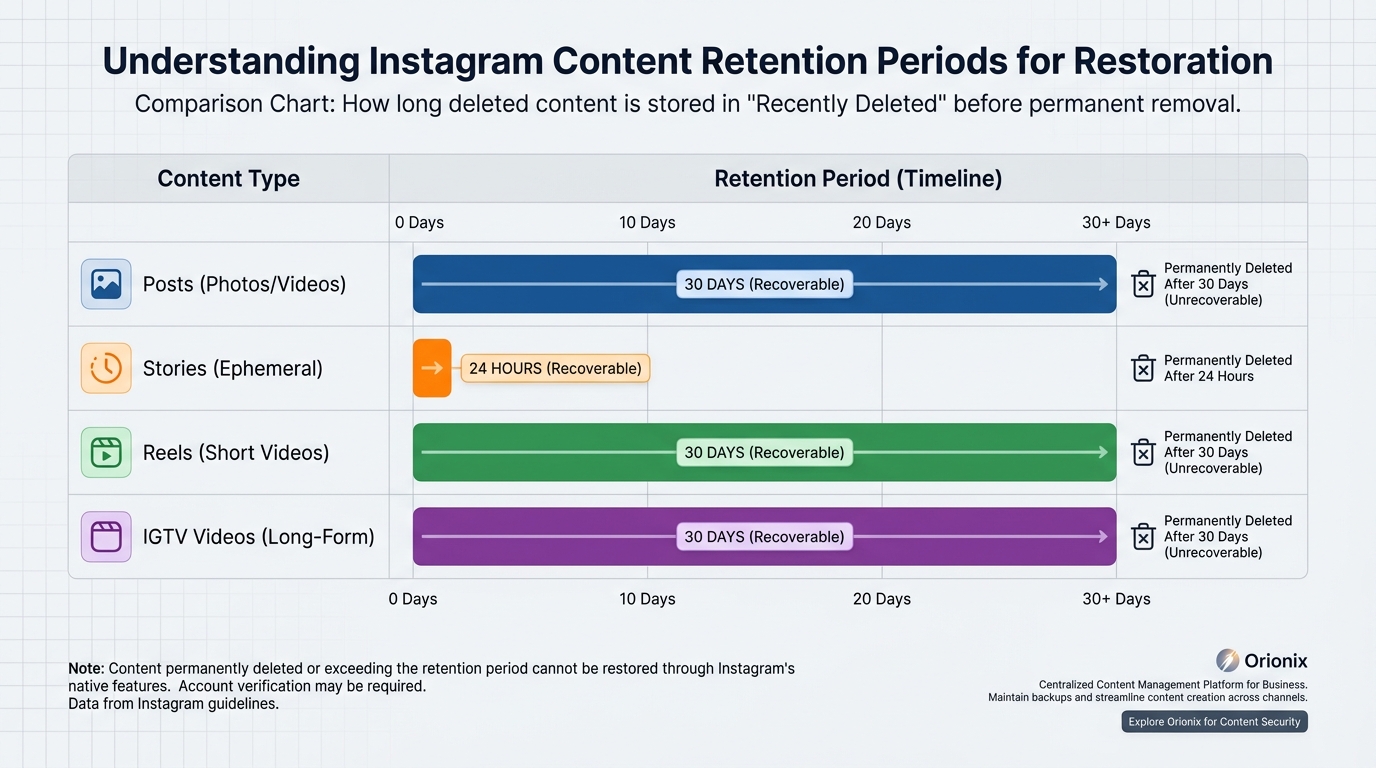
Deleted Instagram posts remain in the Recently Deleted folder for 30 days. Stories stay for 24 hours after deletion. During this retention period, you can restore or permanently delete the content. Instagram automatically purges all items after their respective timeframes expire. This temporary storage system provides a safety net for social media marketing professionals managing multiple accounts.
Can you restore Instagram posts if you deactivate your account?
Yes, deactivating your Instagram account doesn’t affect the Recently Deleted folder. When you reactivate your account, previously deleted posts within the 30-day window remain recoverable. However, if you permanently delete your Instagram account, all content including items in Recently Deleted is immediately and irreversibly removed. Deactivation is temporary, while deletion is permanent.
How do you permanently delete Instagram posts immediately?
To permanently delete posts immediately, go to Settings > Account > Recently Deleted, select the post, and tap ‘Delete Permanently.’ Alternatively, you can delete the entire Recently Deleted folder at once. This bypasses the 30-day waiting period and removes content instantly. Use this option carefully as permanently deleted posts cannot be recovered through any method.
Why can’t I see my deleted posts in Recently Deleted on Instagram?
If deleted posts aren’t appearing in Recently Deleted, they may have exceeded the 30-day retention period or were permanently deleted immediately. Account verification issues can also prevent access. Ensure you’re logged into the correct account and have verified your identity. For business accounts managing social media marketing campaigns, consider using centralized content management platforms to maintain backup copies.
Understanding Instagram Post Recovery: What You Need to Know
Accidentally deleting an Instagram post can feel like a nightmare, especially when it contained valuable memories, high-performing content, or important brand messaging. The good news is that learning how to restore deleted posts on Instagram is not only possible but relatively straightforward if you act quickly. Instagram has implemented several features that allow users to recover deleted content, making it easier than ever to undo those accidental deletions.
In today’s digital landscape, social media platforms like Instagram have become essential tools for personal branding and business growth. Whether you’re managing multiple accounts for digital marketing campaigns or simply trying to recover a cherished memory, understanding Instagram’s recovery features is crucial for anyone active on social media and content creation.
This comprehensive guide will walk you through every method available for restoring deleted Instagram posts, from using the built-in Recently Deleted folder to advanced recovery techniques. We’ll also explore best practices for preventing future losses and maintaining a strong presence across social media platforms.
The Recently Deleted Folder: Your First Line of Defense 🛡️
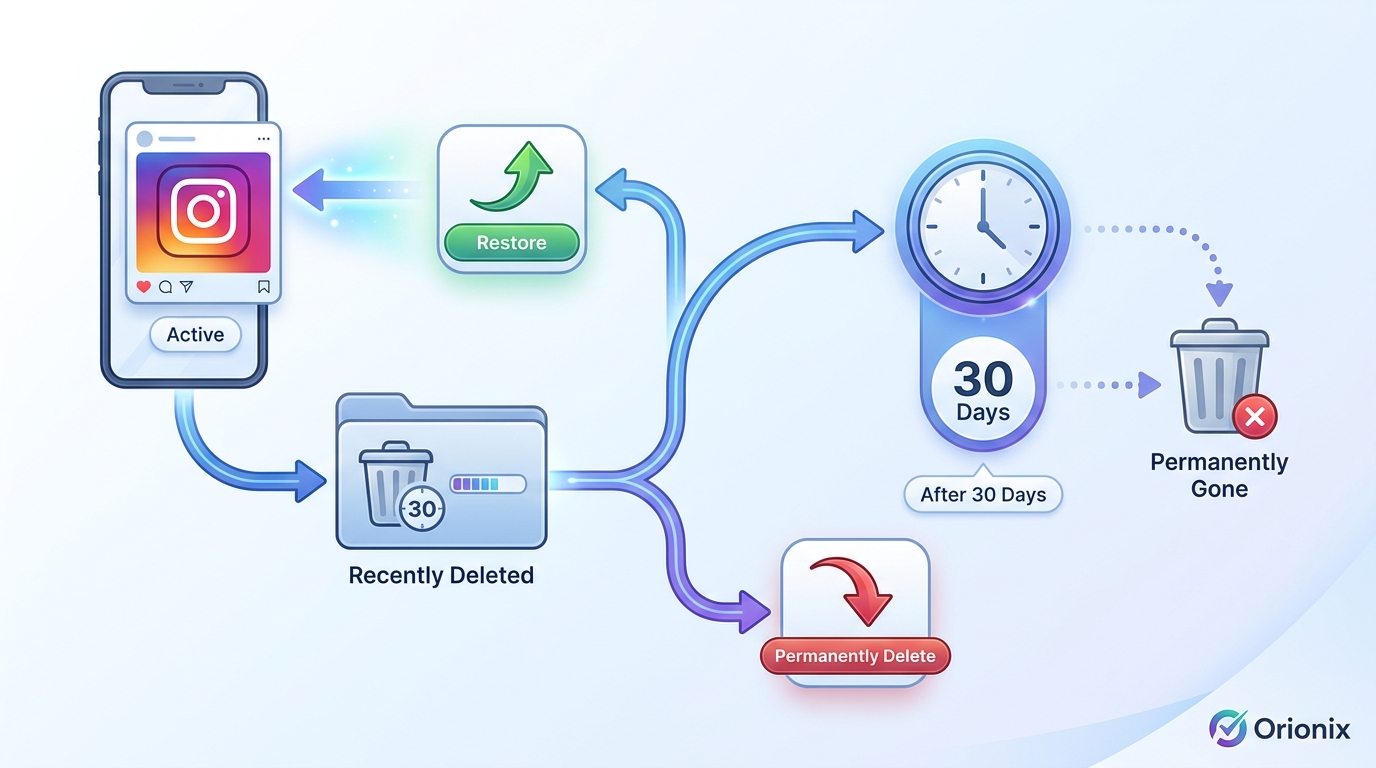
Instagram introduced the Recently Deleted folder in 2021 as a safety net for users who accidentally remove content. This feature functions similarly to a computer’s recycle bin, temporarily storing deleted posts, stories, reels, and IGTV videos before permanent removal.
How the Recently Deleted Feature Works
When you delete a post on Instagram, it doesn’t immediately vanish forever. Instead, the content moves to a Recently Deleted folder where it remains for a specific period:
- Posts, Reels, and IGTV videos: Stored for 30 days
- Stories: Stored for 24 hours
- Live videos: Not recoverable once deleted
This temporary storage system gives you ample time to reconsider your deletion decision and recover important content before it’s permanently erased from Instagram’s servers.
Step-by-Step Guide to Restore Deleted Posts
Follow these detailed instructions to recover your deleted Instagram content:
- Open Instagram app: Launch the Instagram application on your mobile device (iOS or Android)
- Navigate to your profile: Tap your profile picture in the bottom right corner
- Access settings: Tap the three horizontal lines (menu icon) in the top right corner
- Select « Your Activity »: Scroll down and tap on « Your Activity » option
- Find Recently Deleted: Look for and tap on « Recently Deleted » in the menu
- Authenticate your identity: Instagram will require you to verify your identity through password or biometric authentication
- Select the content: Browse through your deleted posts and tap on the one you want to restore
- Restore the post: Tap the three dots in the top right corner and select « Restore »
- Confirm restoration: The post will immediately return to your profile grid
This process works seamlessly for recovering posts that were deleted within the retention period. The authentication step ensures that only you can access and restore your deleted content, providing an additional layer of security.
Alternative Methods for Instagram Post Recovery
If your deleted post has exceeded the Recently Deleted retention period, or if you’re dealing with older content, several alternative recovery methods might help you retrieve your lost Instagram posts.
Archive Feature: Preventive Recovery Solution
Instagram’s Archive feature serves as a proactive alternative to deletion. Instead of removing posts permanently, you can archive them to hide content from your profile without losing it entirely.
| Feature | Archive | Delete |
|---|---|---|
| Visibility | Hidden from profile, visible only to you | Removed from profile |
| Recovery Time | Instant restoration anytime | 30 days maximum |
| Engagement Data | Preserved completely | Preserved during retention period |
| Best For | Seasonal content, temporary removal | Unwanted or outdated content |
To archive a post instead of deleting it, tap the three dots on any post and select « Archive. » This approach is particularly valuable for social media marketing professionals who want to maintain clean profiles while preserving content for future campaigns.
Third-Party Data Recovery Tools
Several third-party applications claim to recover permanently deleted Instagram posts. However, exercise extreme caution when considering these options:
- ⚠️ Security risks: Many apps require Instagram login credentials, potentially compromising your account
- ⚠️ Effectiveness concerns: Most cannot access Instagram’s servers directly, limiting recovery capabilities
- ⚠️ Privacy violations: Some apps may collect and misuse your personal data
- ⚠️ Terms of service: Using unauthorized tools may violate Instagram’s terms and risk account suspension
If you’re considering third-party recovery tools, thoroughly research the application’s reputation and read user reviews before proceeding.
Downloading Your Instagram Data
Instagram allows users to download a complete copy of their data, which may include deleted posts if the download was requested before deletion occurred. This method won’t recover recently deleted content, but it’s valuable for maintaining backups.
To request your Instagram data:
- Go to Settings and Privacy
- Select « Your Activity »
- Tap « Download Your Information »
- Choose the data you want to include
- Select format (HTML or JSON)
- Submit the request
Instagram typically processes these requests within 48 hours and sends a download link to your registered email address. This proactive approach helps you maintain records of your content for both personal archives and social media content planning.
Why Instagram Posts Get Deleted: Common Scenarios 🔍
Understanding why posts disappear helps prevent future losses and informs your content strategy across social media platforms. Several scenarios can lead to post deletion:
Accidental User Deletion
The most common cause of deleted posts is simple human error. Users accidentally tap delete while trying to edit, share, or archive content. This is particularly common when managing multiple accounts for digital marketing purposes or when navigating the app quickly.
Instagram Community Guidelines Violations
Instagram automatically removes content that violates its community guidelines. Common violations include:
- Copyrighted material without permission
- Inappropriate or explicit content
- Hate speech or harassment
- Spam or misleading information
- Violence or dangerous organizations
When Instagram removes content for policy violations, you’ll typically receive a notification explaining the reason. These posts may not be recoverable through the Recently Deleted folder.
Account Security Issues
Compromised accounts often experience unauthorized deletions. If someone gains access to your account, they may delete posts, change settings, or even attempt to delete your Instagram account entirely.
Signs of account compromise include:
- Unexpected post deletions
- Changed profile information
- Unfamiliar login locations
- New followers or following activity you didn’t initiate
- Messages sent from your account that you didn’t write
If you suspect unauthorized access, immediately change your password, enable two-factor authentication, and review your account activity.
Best Practices for Protecting Your Instagram Content 💡
Prevention is always better than recovery. Implementing these best practices helps safeguard your valuable social media content and reduces the risk of permanent loss.
Regular Content Backups
Creating systematic backups of your Instagram content ensures you always have copies available, regardless of what happens on the platform. Consider these backup strategies:
| Method | Frequency | Best For |
|---|---|---|
| Instagram Data Download | Monthly | Complete account archives |
| Cloud Storage (Google Drive, Dropbox) | Weekly | High-value content and campaigns |
| External Hard Drive | Quarterly | Long-term preservation |
| Content Management Platform | Real-time | Professional marketing digital marketing teams |
For businesses and content creators managing multiple social media platforms, using a centralized content management system streamlines the backup process and ensures consistency across channels.
Strategic Use of Archive vs. Delete
Before permanently deleting any post, consider whether archiving would better serve your long-term goals. Archive posts when:
- Content is seasonal or time-sensitive
- You’re testing different profile aesthetics
- Posts contain valuable engagement data for future analysis
- Content may be repurposed for future campaigns
- You’re unsure about permanent removal
Only delete posts when you’re certain they no longer serve any purpose and you’ve backed up any important elements.
Optimize Posting Strategy
Understanding the best times to post on Instagram and planning your content calendar reduces rushed posting decisions that might lead to regrettable deletions later. Research shows that engagement rates vary significantly based on posting time, with the best time to post on Instagram typically falling during morning commutes (7-9 AM) and evening leisure hours (7-9 PM) in your target audience’s timezone.
Strategic planning through content creator platforms helps you maintain consistent posting schedules while giving you time to review and refine content before publication.
Managing Instagram Accounts: Deactivation vs. Deletion
Understanding the difference between deactivating and deleting your Instagram account is crucial for protecting your content long-term. Many users confuse these two options, leading to unintended consequences.
How to Deactivate Instagram Temporarily
If you need a break from social media and want to preserve your content, deactivation is the appropriate choice. When you deactivate Instagram, your profile, posts, comments, and likes are hidden but not deleted.
To how to deactivate Instagram:
- Log into Instagram via web browser (deactivation isn’t available in the app)
- Navigate to your profile and click « Edit Profile »
- Scroll down and select « Temporarily disable my account »
- Choose a reason from the dropdown menu
- Re-enter your password
- Click « Temporarily Disable Account »
Deactivation is reversible—simply log back in to reactivate your account with all content intact. This option is ideal for users taking social media breaks without losing their established presence.
Understanding Permanent Account Deletion
Permanent deletion is irreversible and removes all your content, followers, and account data. If you’re considering this option, review our detailed guide on how do you delete an Instagram account to understand the full implications.
Before permanently deleting your account:
- Download your Instagram data for personal records
- Save important photos and videos externally
- Export valuable engagement metrics for future reference
- Notify followers through other channels if maintaining those connections matters
- Consider deactivation as an alternative if you might return
Remember that Instagram provides a 30-day grace period after deletion requests, during which you can cancel the deletion by logging back in. After 30 days, the deletion becomes permanent and irreversible.
Advanced Instagram Management for Businesses and Creators
For professionals using Instagram for social media marketing, managing content across multiple accounts and social media platforms requires sophisticated tools and strategies beyond basic post recovery.
Content Management Systems for Instagram
Professional content management platforms offer comprehensive solutions for planning, publishing, and protecting your Instagram content. These systems provide:
- 📊 Centralized dashboards: Manage multiple accounts from one interface
- 🗓️ Content calendars: Plan and schedule posts in advance
- 💾 Automatic backups: Store copies of all published content
- 📈 Analytics integration: Track performance across campaigns
- 👥 Team collaboration: Multiple users with different permission levels
- 🔄 Cross-platform publishing: Coordinate content across all social channels
These features are particularly valuable for social media marketing teams managing campaigns for multiple clients or brands.
Instagram Engagement and Privacy Features
Understanding Instagram’s privacy and engagement features helps you make informed decisions about content management. For instance, knowing what happens when you restrict someone on Instagram helps you manage interactions without completely blocking users.
Similarly, learning how to unfollow on Instagram efficiently helps maintain a curated feed that inspires your own content creation. These seemingly small features contribute to a more strategic approach to social media management.
Content Strategy Optimization
Successful Instagram management extends beyond post recovery to comprehensive content strategy. Key considerations include:
| Strategy Element | Impact on Content Preservation | Implementation Tip |
|---|---|---|
| Content Audits | Identifies valuable posts worth preserving | Review quarterly, archive top performers |
| Hashtag Strategy | Increases discoverability, reducing deletion temptation | Follow relevant hashtags for inspiration |
| Engagement Tracking | Informs which content to keep vs. remove | Monitor liked posts for patterns |
| Profile Management | Reduces impulsive deletion decisions | Use archive for temporary changes |
For businesses exploring marketing digital marketing strategies, Instagram offers unique opportunities for visual storytelling and audience engagement. Whether you’re running restaurant social media campaigns or promoting music artists, protecting your content investment is essential for long-term success.
Troubleshooting Common Instagram Recovery Issues
Even when following proper recovery procedures, you may encounter obstacles. Here are solutions to common problems users face when trying to restore deleted Instagram posts.
Recently Deleted Folder Not Appearing
If you can’t find the Recently Deleted folder in your Instagram settings:
- Update your Instagram app to the latest version (the feature requires recent updates)
- Log out and log back into your account
- Clear the app cache and restart your device
- Check if you’re using a business or creator account (feature availability may vary)
- Ensure you deleted the content after Instagram introduced this feature (February 2021)
Authentication Failures During Recovery
Instagram requires identity verification before accessing Recently Deleted content. If authentication fails:
- Verify you’re entering the correct password
- If using biometric authentication, ensure your device settings are properly configured
- Reset your password through the « Forgot Password » option
- Check for any security alerts on your account
- Contact Instagram support if you’ve been locked out
Content Exceeding Retention Period
Posts that have been in Recently Deleted for more than 30 days (or 24 hours for stories) are permanently removed. In these cases:
- Check your previously downloaded Instagram data archives
- Search your device’s photo gallery for original images or videos
- Review cloud storage backups (Google Photos, iCloud, etc.)
- Check if you shared the content to other platforms like Facebook or Twitter
- Look for screenshots or reposts by other users (though quality may be reduced)
Dealing with Permanently Deleted Content
When content is permanently deleted and no backups exist, your options are limited. However, you can:
- Recreate the content using original source materials if available
- Reach out to collaborators who may have copies
- Check if any followers or fans saved or screenshot the content
- Review engagement data to understand what made the post successful for future recreation
- Learn from the experience and implement better backup systems going forward
Instagram Privacy and Content Control Features
Beyond post recovery, Instagram offers various privacy and content control features that help you manage your digital presence effectively. Understanding these tools prevents situations where you might need to delete or recover content.
Understanding Instagram’s Visibility Settings
Instagram provides granular control over who sees your content. Before deleting posts due to privacy concerns, explore these alternatives:
- Private account: Requires approval for new followers
- Close Friends lists: Share stories with select audiences
- Hidden posts: Remove from profile grid without deletion
- Comment controls: Filter or disable comments on specific posts
- Restrict function: Limit interactions without blocking users
These features provide flexibility for managing your content visibility without resorting to deletion, which should always be a last resort for valuable posts.
Monitoring Account Activity
Regular account monitoring helps you catch unauthorized changes early. Instagram’s « Your Activity » section provides insights into:
| Activity Type | What It Shows | Why It Matters |
|---|---|---|
| Login Activity | Locations and devices accessing your account | Detects unauthorized access |
| Content Interactions | Posts, comments, and likes | Tracks engagement patterns |
| Account Changes | Profile edits, settings modifications | Identifies suspicious activity |
| Recently Deleted | Removed content within retention period | Enables content recovery |
Checking these metrics weekly helps you stay informed about your account status and quickly address any concerns.
The Future of Instagram Content Management
As social media platforms evolve, content management and recovery features continue to improve. Understanding upcoming trends helps you prepare for future changes in how we manage digital content.
Emerging Instagram Features
Instagram regularly introduces new features that affect content management:
- 🤖 AI-powered content suggestions: Automated recommendations for archiving vs. deleting
- ☁️ Extended cloud storage: Longer retention periods for deleted content
- 🔐 Enhanced security measures: Better protection against unauthorized deletions
- 📊 Advanced analytics: Deeper insights into content performance before deletion decisions
- 🔄 Cross-platform integration: Seamless content management across Meta’s ecosystem
Staying informed about these developments ensures you leverage new tools as they become available.
Best Practices for Modern Content Creators
Professional content creators and businesses should adopt forward-thinking approaches to content management:
- Implement comprehensive backup systems that automatically save content across multiple locations
- Use professional content management tools that provide centralized control over all social media platforms
- Develop clear content policies that outline when to archive, delete, or preserve posts
- Train team members on proper content handling procedures to prevent accidental deletions
- Regular audits of archived and active content to maintain organized digital assets
These practices are especially important for those pursuing careers in social media marketing, where content management skills are increasingly valuable.
Streamline Your Instagram Management with Professional Tools 🚀
Managing Instagram content effectively requires more than just knowing how to restore deleted posts. It demands a comprehensive approach to content planning, publishing, and preservation across all your social media platforms.
Professional content management solutions eliminate the stress of potential content loss by providing automated backups, scheduled publishing, and centralized control over your entire social media presence. Instead of worrying about recovering deleted posts, you can focus on creating engaging content that drives results.
Why Centralized Content Management Matters
A unified platform for managing your Instagram presence alongside other social channels offers significant advantages:
- ✅ Automatic content backups: Never lose another post to accidental deletion
- ✅ Team collaboration tools: Multiple users can manage content without security risks
- ✅ Cross-platform scheduling: Coordinate posts across Instagram, Facebook, Twitter, and more
- ✅ Performance analytics: Make data-driven decisions about which content to keep or archive
- ✅ Content libraries: Organize and repurpose your best-performing posts
- ✅ Approval workflows: Prevent premature publishing or deletion
These features transform content management from a reactive process (recovering deleted posts) into a proactive strategy that protects your digital assets while maximizing their value.
Whether you’re a solo content creator, a small business owner, or part of a larger marketing team, having the right tools makes all the difference. Professional platforms designed for social media management provide the infrastructure you need to maintain consistent, high-quality content across all channels without the constant worry of losing valuable posts.
Ready to take control of your Instagram content strategy and eliminate the stress of deleted posts? Visit our website to discover how Orionix’s centralized content management platform can streamline your workflow, protect your digital assets, and help you build a stronger social media presence across all your channels. Start your free trial today and experience the peace of mind that comes with professional-grade content management tools! 💪
Article created using IntentRank