
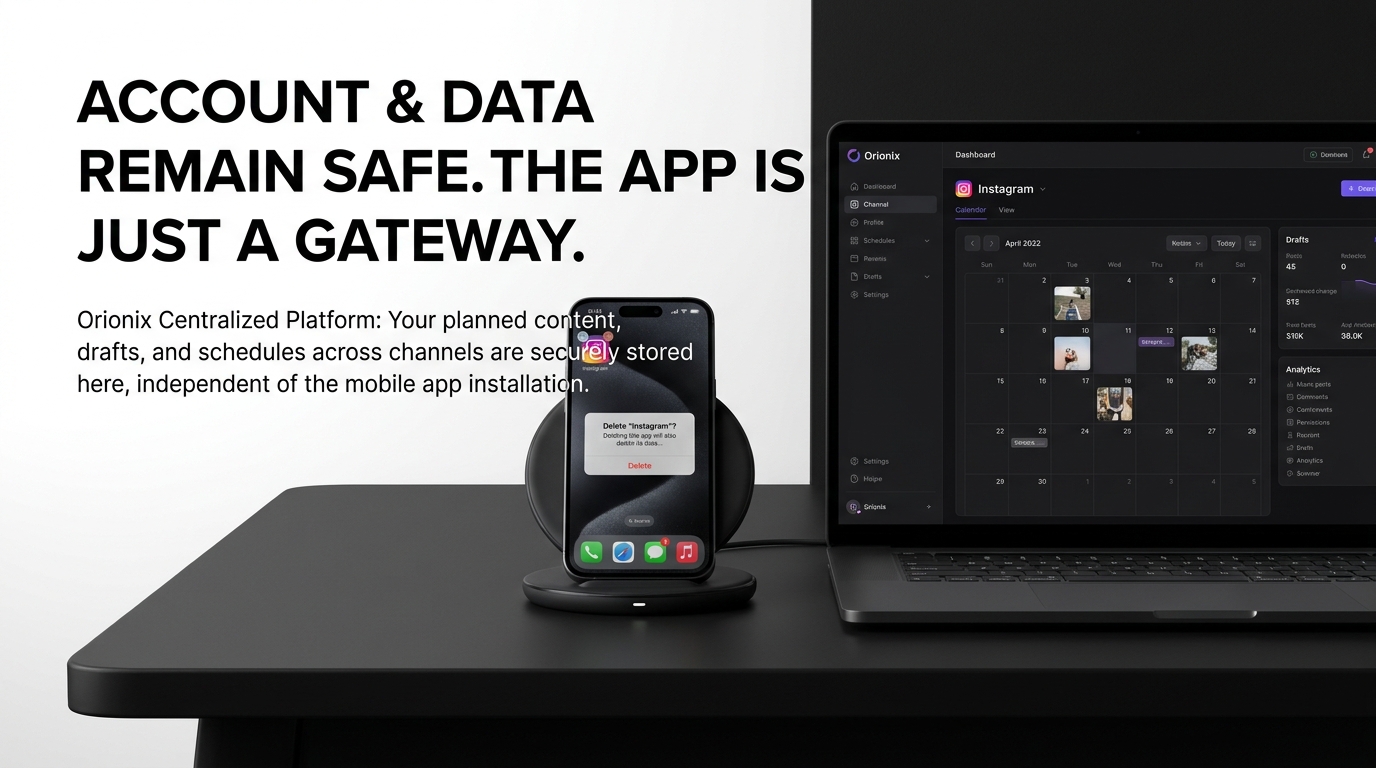
TL;DR: If you delete Instagram app from your phone, your account remains active and intact. You simply remove the app interface while your profile, photos, messages, and followers stay saved on Instagram’s servers. You can reinstall the app anytime to access everything again. Deleting the app differs from deactivating or deleting your account permanently.
Frequently Asked Questions
What happens if you delete the Instagram app from your phone?
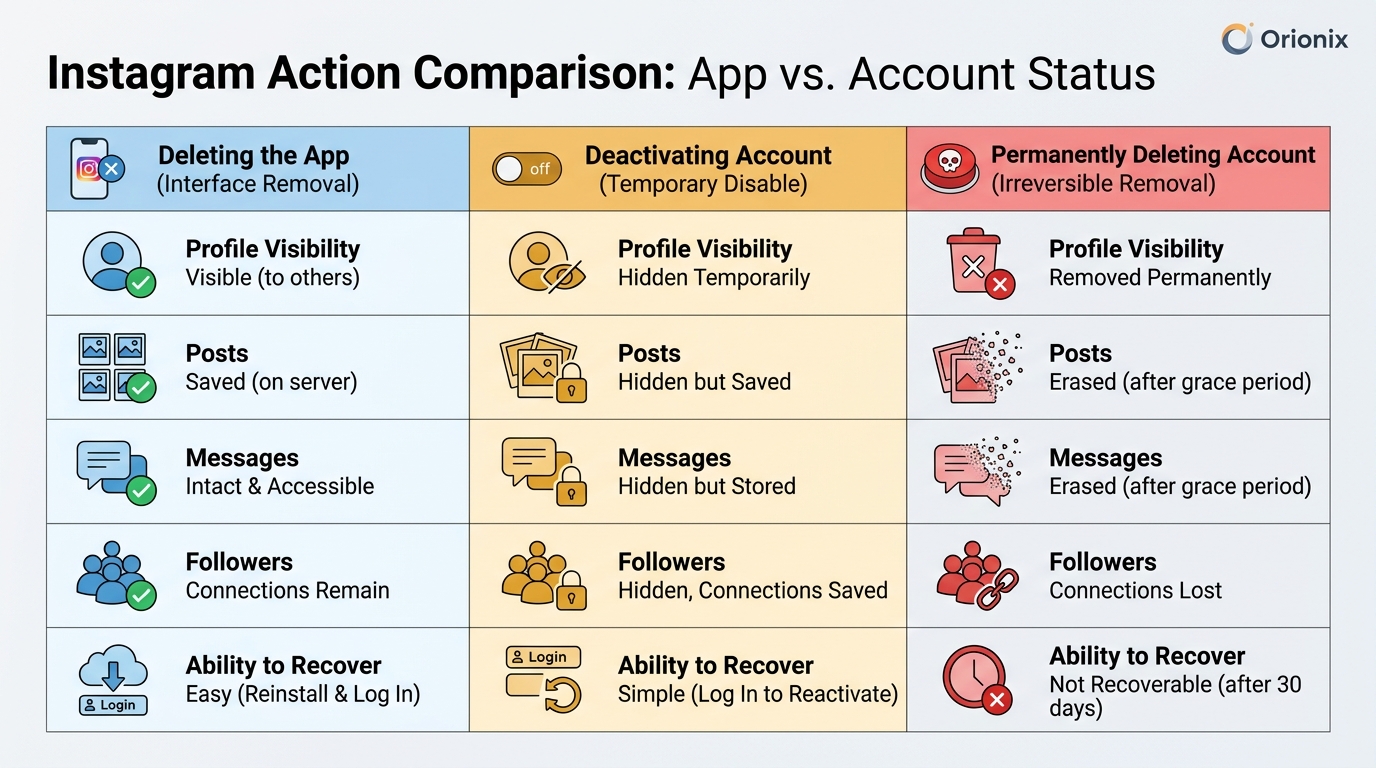
Deleting the Instagram app only removes it from your device—your account, photos, followers, and data remain intact on Instagram’s servers. You can reinstall the app anytime and log back in to access everything. This is different from deactivating or permanently deleting your account. Your profile stays active and visible to other users on social media platforms.
Will deleting Instagram app delete your messages and posts?
No, deleting the Instagram app does not delete your messages, posts, or any content. All your photos, videos, Stories, direct messages, and followers remain saved on Instagram’s servers. You’re simply removing the app from your device. To permanently remove content, you need to manually delete posts or deactivate your Instagram account through the settings.
Can people still see your Instagram profile if you delete the app?
Yes, your Instagram profile remains fully visible and active when you delete the app. Other users can still view your posts, send you messages, tag you, and interact with your content. Deleting the app only affects your device access—it doesn’t change your account status on social media platforms or hide your presence from followers.
How is deleting Instagram app different from deactivating Instagram account?
Deleting the app removes Instagram from your phone but keeps your account active and visible. Deactivating your Instagram account temporarily hides your profile, posts, and comments from others until you reactivate it by logging back in. To deactivate Instagram, you must use a web browser or the app settings before deletion, as it’s an account-level action.
Do you lose your followers if you delete Instagram app?
No, you keep all your followers when you delete the Instagram app. Your follower count, following list, and all connections remain unchanged because your account stays active on Instagram’s servers. Followers can still interact with your existing content. Only permanently deleting your Instagram account through official settings would result in losing followers and all data.
What happens to scheduled Instagram posts when you delete the app?
Scheduled posts created through third-party social media marketing tools like Orionix will still publish as planned when you delete the Instagram app. These posts are managed through Instagram’s API and don’t require the app on your device. However, posts scheduled directly within Instagram’s native app may not publish, so using a centralized content management platform ensures continuity.
Can you still access Instagram after deleting the app?
Yes, you can access Instagram through a web browser at instagram.com after deleting the app. Simply log in with your credentials to view your feed, post content, respond to messages, and manage your account. You can also reinstall the Instagram app anytime from your device’s app store and log back in to restore full mobile functionality.
How do you permanently delete an Instagram account versus just removing the app?
To permanently delete an Instagram account, you must visit Instagram’s account deletion page through a web browser, select a reason, and confirm deletion. This removes all your data, posts, and followers permanently. Simply deleting the app doesn’t affect your account. For temporary breaks, you can deactivate Instagram instead, which hides your profile until you’re ready to return.
Understanding What Happens If You Delete Instagram App 📱
If you’re wondering if you delete instagram app what happens to your account, photos, and data, you’re not alone. Many users across social media platforms face confusion about the difference between deleting the app from their device and permanently removing their Instagram account. This comprehensive guide will clarify exactly what occurs when you remove the Instagram application from your phone.
The Instagram app deletion process is surprisingly simple, but understanding its implications is crucial for anyone managing their digital marketing presence or personal social media strategy. Whether you’re a social media manager taking a break or simply decluttering your device, knowing the consequences helps you make informed decisions.
Let’s explore the complete picture of what happens when you delete the Instagram app, how it differs from account deactivation, and what steps you can take to manage your social media presence effectively.
The Core Difference: Deleting the App vs. Deleting Your Account 🔍
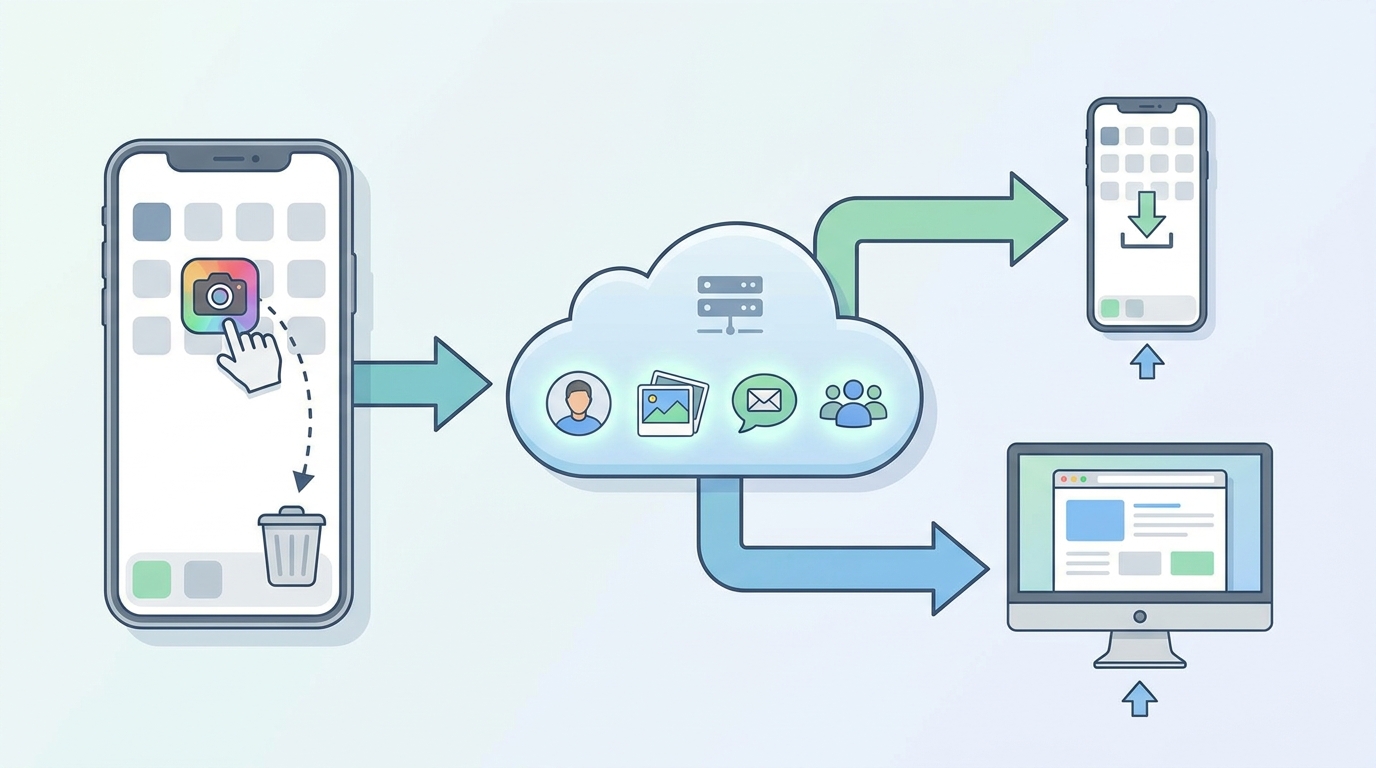
The most critical distinction to understand is that deleting the Instagram app does not delete your account. Your Instagram profile, photos, videos, followers, and all associated data remain completely intact on Instagram’s servers.
When you remove the Instagram application from your smartphone or tablet, you’re simply removing the software interface that allows you to access your account. Think of it like removing a key from your pocket—the door still exists, you just don’t have immediate access to it.
What Remains Active After App Deletion
- Your profile: Your username, bio, profile picture, and all account settings stay exactly as they were
- Your content: All posts, Stories, Reels, IGTV videos, and highlights remain visible to your audience
- Your connections: Followers, following lists, and direct messages are preserved
- Your engagement: Likes, comments, and saved posts continue to exist
- Your activity: Your account remains searchable and accessible to others
How Social Media Platforms Handle App vs. Account Data
Understanding how social media platforms separate app access from account data is essential for digital marketing professionals and content marketers. Instagram, like other social media platforms, maintains your account information independently from the application you use to access it.
This architecture allows you to access your Instagram account through multiple channels—the mobile app, web browser, or third-party social media management platforms—without affecting your underlying data.
Step-by-Step: What Actually Happens When You Delete the Instagram App 📲
When you tap that delete button on your phone, here’s the precise sequence of events that occurs:
| Time | What Happens | Impact on Your Account |
|---|---|---|
| Immediately | App is removed from your device | No impact—account remains fully active |
| Within minutes | Local cached data is cleared | No impact—server data is unchanged |
| Ongoing | You lose device access to your account | Account continues receiving engagement |
| Indefinitely | App stays deleted until reinstalled | Profile remains searchable and active |
Your Device-Level Changes
Deleting the Instagram app only affects your local device. The application files, cached images, and temporary data stored on your phone are removed, freeing up storage space. This can be particularly beneficial if you’re running low on device memory.
However, your login credentials may still be saved in your device’s password manager, making it easy to reinstall and log back in whenever you choose.
What Others See During Your App-Free Period 👥
From your followers’ perspective, absolutely nothing changes. Your profile appears normal, your posts remain visible, and if someone tags you or sends you a direct message, those actions still go through. The only difference is that you won’t be notified or able to respond until you reinstall the app or access Instagram through another method.
This is particularly important for social media marketing professionals who need to maintain consistent brand presence even during personal breaks from the platform.
How to Deactivate Instagram: A True Temporary Break 🚫
If your goal is to take a genuine break from Instagram where your profile becomes temporarily invisible, you need to learn how to deactivate instagram rather than just deleting the app. Deactivation is Instagram’s built-in feature for temporary account suspension.
The Deactivation Process
- Log into Instagram through a web browser (deactivation isn’t available in the mobile app)
- Navigate to your profile and click « Edit Profile »
- Scroll to the bottom and select « Temporarily disable my account »
- Choose a reason for deactivation from the dropdown menu
- Re-enter your password to confirm
- Click « Temporarily Disable Account »
When you deactivate your account, your profile, photos, comments, and likes are hidden until you reactivate by logging back in. This is fundamentally different from simply deleting the Instagram app, where everything remains publicly visible.
Deactivation vs. App Deletion: Key Differences
| Feature | Deleting App | Deactivating Account |
|---|---|---|
| Profile Visibility | Remains visible to everyone | Hidden from all users |
| Content Accessibility | All posts remain public | All content temporarily hidden |
| Searchability | Profile appears in searches | Profile cannot be found |
| Direct Messages | Others can still send DMs | Conversations are hidden |
| Reactivation | Reinstall app and log in | Simply log back in |
For content marketers managing multiple accounts, understanding these distinctions is crucial for maintaining your social media marketing strategy while taking necessary breaks from active engagement.
How Do You Delete an Instagram Account Permanently? ⚠️
If you’re looking for information on how do you delete an instagram account permanently, that’s an entirely different process from deleting the app. Permanent deletion is irreversible and removes all your data from Instagram’s servers.
Many users search for how can you delete an instagram account when they actually just want to remove the app or take a temporary break. Before proceeding with permanent deletion, ensure this is truly what you want—there’s no going back.
Permanent Account Deletion Process
For those certain about permanently removing their Instagram presence, we have a comprehensive guide on how do you delete an Instagram account permanently in 2026 that walks through every step of the process.
The permanent deletion process requires:
- Accessing Instagram through a web browser (not the mobile app)
- Navigating to the dedicated account deletion page
- Selecting a reason for deletion
- Confirming your password
- Understanding the 30-day grace period before final deletion
The 30-Day Grace Period 📅
Instagram provides a 30-day window after you initiate permanent deletion. During this period, your account is deactivated but not yet deleted. If you log in during these 30 days, your deletion request is cancelled and your account is restored.
This safety mechanism protects users from impulsive decisions and hacking attempts where malicious actors try to delete your account without permission.
Impact on Your Social Media Marketing Strategy 📊
For digital marketing professionals and social media managers, understanding the implications of app deletion versus account management is essential for maintaining consistent marketing digital marketing efforts across platforms.
Managing Multiple Accounts Without the App
Many social media marketing professionals manage multiple Instagram accounts for different clients or brands. Deleting the app from your personal device doesn’t prevent you from managing these accounts through desktop browsers or dedicated management tools.
Platforms like Hootsuite for social media management allow you to schedule posts, respond to comments, and monitor engagement without needing the Instagram app installed on your device.
Maintaining Optimal Posting Schedules 🕐
Understanding the best times to post on instagram remains crucial even if you’ve deleted the app from your device. Your content strategy shouldn’t suffer because you’re taking a personal break from scrolling.
The best time to post on instagram typically falls during high-engagement windows—generally weekdays between 10 AM and 3 PM, with peak engagement on Wednesdays around 11 AM. However, these times vary by industry and audience demographics.
Using scheduling tools through social media management platforms allows you to maintain consistent posting schedules even without the app on your phone.
Content Strategy Continuity
Deleting the Instagram app doesn’t mean abandoning your content calendar. Smart social media managers use this approach to separate personal consumption from professional responsibilities:
- Schedule posts in advance using desktop tools or management platforms
- Set specific times for checking analytics and engagement via web browser
- Delegate monitoring tasks to team members
- Use automation tools for routine interactions
- Maintain content quality without constant app access
This separation can actually improve your social media marketing effectiveness by reducing distractions and allowing more focused strategy development.
Alternative Ways to Access Instagram Without the App 💻
Deleting the Instagram app doesn’t mean losing access to your account entirely. Several alternative methods allow you to maintain your presence across social media platforms without the mobile application.
Web Browser Access
Instagram’s web interface at instagram.com provides most core functionality available in the app. You can:
- View and post to your feed
- Access direct messages
- Browse and comment on other posts
- Edit your profile information
- View Stories (with some limitations)
- Access Instagram Reels
While the mobile web experience isn’t as polished as the app, it provides sufficient functionality for maintaining your account and staying connected with your audience.
Third-Party Management Tools
Professional social media managers often prefer third-party tools that aggregate multiple social media platforms into a single dashboard. These platforms offer advantages over the native app:
| Benefit | Description | Best For |
|---|---|---|
| Multi-platform management | Manage Instagram alongside Facebook, Twitter, LinkedIn | Agencies and multi-brand managers |
| Advanced scheduling | Plan content weeks or months in advance | Content strategists |
| Team collaboration | Multiple users with different permission levels | Marketing teams |
| Analytics integration | Comprehensive reporting across platforms | Data-driven marketers |
| Content libraries | Organized asset management | Brand consistency |
These tools allow you to maintain professional digital marketing standards while keeping the Instagram app off your personal device.
Common Scenarios: Why People Delete the Instagram App 🤔
Understanding common motivations for app deletion helps contextualize the decision and its implications for different user types.
Digital Wellbeing and Mental Health
Many users delete Instagram to reduce screen time and improve mental health. The constant stream of curated content can create comparison anxiety and reduce productivity. Removing the app while keeping the account allows for:
- Reduced impulsive checking behavior
- More intentional social media use through web access
- Better focus on offline activities
- Maintained connections without constant engagement pressure
Professional Boundary Setting
Social media professionals often delete the app from personal devices to establish work-life boundaries. This approach allows them to:
- Access Instagram during work hours on desktop
- Avoid after-hours work creep
- Separate personal scrolling from professional monitoring
- Maintain client accounts without personal distraction
For insights on managing professional social media responsibilities, explore our guide on social media marketing positions and required skills.
Device Storage Management
Instagram apps can consume significant storage space through cached images and videos. Users with limited device storage may delete the app temporarily while traveling or when storage is needed for other applications.
Privacy and Security Concerns
Some users delete the app during sensitive periods or when concerned about data collection. While this doesn’t prevent Instagram from collecting data when you access via browser, it does limit background app activity and location tracking.
What Happens to Your Data When You Delete the App? 🔒
Data privacy is a major concern for users across all social media platforms. When you delete the Instagram app, here’s what happens to different types of data:
Local Device Data
All data stored locally on your device is removed:
- Cached images and videos
- Temporary files
- App preferences and settings
- Downloaded content
- Login session data (unless saved in device password manager)
Server-Side Data
Everything stored on Instagram’s servers remains completely intact:
- Your entire post history
- All photos and videos you’ve uploaded
- Comments, likes, and engagement history
- Direct message conversations
- Follower and following lists
- Search history and preferences
- Account settings and privacy preferences
Tracking and Analytics
Instagram continues to track interactions with your content even when you don’t have the app installed. If someone views your profile, likes your post, or shares your content, those analytics are recorded. This is particularly relevant for businesses tracking their social media marketing performance.
Reinstalling Instagram: Getting Back Your Access 🔄
One of the biggest advantages of simply deleting the app versus deactivating or deleting your account is the ease of returning. Reinstalling Instagram is straightforward and restores full access immediately.
The Reinstallation Process
- Open your device’s app store (Apple App Store or Google Play Store)
- Search for « Instagram »
- Tap « Install » or « Get » to download the app
- Open the app once installation completes
- Log in with your username and password
- Complete any security verification if prompted
Your account appears exactly as you left it, with all content, followers, and settings preserved. You’ll see any notifications that accumulated during your absence, and can immediately resume normal activity.
What to Expect After Reinstalling
When you return to Instagram after deleting the app, you may notice:
- A backlog of notifications if you were away for an extended period
- Changes to Instagram’s interface or features (if updates occurred)
- Accumulated direct messages requiring responses
- Algorithm adjustments to your feed based on time away
- Potential need to review updated terms of service
For businesses and content creators, checking your analytics after returning helps you understand how your content performed during your absence and whether your posting schedule maintained engagement levels.
Best Practices for Managing Your Instagram Presence 🎯
Whether you’re considering deleting the app or looking for ways to manage your social media and digital presence more effectively, these best practices help maintain balance:
For Personal Users
- Set app time limits: Use built-in screen time features before resorting to deletion
- Disable notifications: Reduce interruptions without losing access
- Schedule specific check-in times: Access Instagram intentionally rather than impulsively
- Use web access strategically: The extra friction of opening a browser can reduce mindless scrolling
- Consider temporary deactivation: If you need a complete break, deactivation is more effective than app deletion
For Social Media Professionals
Managing Instagram professionally while maintaining personal boundaries requires strategic approaches:
| Strategy | Implementation | Benefit |
|---|---|---|
| Separate devices | Use work phone for Instagram app, personal phone without | Clear work-life separation |
| Scheduled access | Delete app after work hours, reinstall next day | Enforced boundaries |
| Management platforms | Use desktop tools for all professional activity | Reduced mobile dependency |
| Team delegation | Distribute monitoring responsibilities | Prevents burnout |
For comprehensive strategies on managing social media professionally, check out our resources on social media marketing for restaurants and social media marketing for music artists.
Content Strategy Without Constant App Access
Maintaining effective content strategy doesn’t require having Instagram on your phone 24/7. Consider these approaches:
- Batch content creation during dedicated sessions
- Use scheduling tools to maintain consistent posting
- Set specific times for engagement and community management
- Monitor analytics weekly rather than daily
- Automate routine responses where appropriate
For ideas on what to share when you do access the platform, explore our guide on social media what to post: content ideas that work.
Frequently Confused Instagram Actions Clarified 🔎
Many users confuse different Instagram account actions. Let’s clarify the distinctions to help you make informed decisions:
Restricting vs. Blocking vs. Unfollowing
Managing your Instagram relationships involves different tools for different situations. If you’re wondering about managing followers, our guide on if you restrict someone on Instagram what happens in 2026 provides detailed insights.
Similarly, understanding how to unfollow on Instagram helps you curate your feed without deleting the app entirely.
Content Management Options
Before deleting your app or account, you might want to manage existing content. Instagram offers several options:
- Archive posts: Hide posts from your profile without deleting them
- Delete individual posts: Permanently remove specific content
- Hide Stories: Control Story visibility without deletion
- Restore deleted content: Learn about how to restore deleted posts on Instagram if you change your mind
Account Discovery and Search
Even without the app, you can still find and connect with people on Instagram. Our guide on how to look for someone on Instagram using 5 easy search methods works through web browsers as well as the app.
Understanding how do you follow hashtags on Instagram also helps you curate your feed for more intentional engagement when you do access the platform.
Growing Your Presence Without Constant App Access 📈
Ironically, deleting the Instagram app from your phone can sometimes improve your marketing results by forcing more strategic, intentional engagement rather than reactive scrolling.
Strategic Growth Approaches
Focus on quality over quantity with these growth strategies that don’t require constant app access:
- Create high-quality, evergreen content that continues attracting engagement
- Optimize posting times based on audience analytics
- Use hashtag strategies effectively
- Engage meaningfully during scheduled sessions
- Collaborate with other accounts strategically
For detailed tactics, explore our guides on how to gain followers on Instagram for free in 2024 and 7 proven strategies for getting more followers on Instagram.
Automation and Scheduling Tools
Modern social media management platforms enable sophisticated automation that maintains your presence without requiring the app on your device. These tools handle:
- Scheduled post publishing at optimal times
- Automated responses to common questions
- Cross-platform content distribution
- Analytics tracking and reporting
- Team collaboration and approval workflows
This approach is particularly valuable for businesses managing multiple accounts or campaigns across various social media platforms.
The Psychology of App Deletion and Social Media Breaks 🧠
Understanding the psychological aspects of app deletion helps contextualize why so many users consider this option and what alternatives might better serve their needs.
The Friction Factor
Deleting the Instagram app creates « productive friction »—a small barrier that prevents impulsive checking. Opening a web browser requires more intentional action than tapping an app icon, naturally reducing usage frequency.
This friction can help break habitual checking patterns without completely severing your connection to the platform, making it a middle-ground solution between full access and complete deactivation.
FOMO and Social Connection
Fear of missing out (FOMO) often prevents users from deactivating accounts entirely. Deleting just the app addresses this concern—you maintain your presence and connections while reducing the compulsive engagement that feeds anxiety.
For parents and families navigating these challenges, our insights on mothers’ social media usage and modern parenting provide valuable perspectives on balanced social media relationships.
Professional Obligations vs. Personal Wellbeing
Many social media professionals face the challenge of managing accounts professionally while protecting their mental health. Deleting the app from personal devices while maintaining access through work computers or dedicated devices offers a practical compromise.
This separation allows professionals to fulfill their digital marketing responsibilities without sacrificing personal boundaries or wellbeing.
Technical Considerations and Troubleshooting 🔧
Understanding the technical aspects of app deletion helps prevent unexpected issues and ensures smooth account management.
Multiple Device Considerations
If you use Instagram on multiple devices, deleting the app from one device doesn’t affect access on others. Your account remains logged in on tablets, other phones, or computers where the app or web access remains available.
Storage and Cache Management
Instagram apps can consume significant storage through cached content. Before deleting, check how much space you’ll recover:
| Device Type | Average App Size | Average Cache Size | Total Recovery |
|---|---|---|---|
| iOS (iPhone) | 200-300 MB | 500 MB – 2 GB | 700 MB – 2.3 GB |
| Android | 150-250 MB | 300 MB – 1.5 GB | 450 MB – 1.75 GB |
The cache size varies based on usage patterns—heavy users who watch many videos or view Stories frequently accumulate larger caches.
Login and Security After Reinstallation
When reinstalling Instagram after deletion, you may encounter additional security verifications, especially if you:
- Deleted and reinstalled multiple times in a short period
- Changed devices or IP addresses
- Have two-factor authentication enabled
- Haven’t logged in for an extended period
These security measures protect your account but may require access to your email or phone number for verification codes.
Regional and Demographic Considerations 🌍
App deletion patterns and motivations vary across different user demographics and geographic regions, reflecting diverse relationships with social media platforms.
Professional vs. Personal Use Patterns
Different user types approach Instagram deletion differently:
- Content creators: Rarely delete the app due to income dependency, but may use scheduling tools to reduce active time
- Casual users: More likely to delete and reinstall based on personal preference
- Business owners: Often maintain app access but delegate management to team members
- Marketing professionals: Use desktop tools and separate devices to manage professional accounts
For location-specific strategies, our guide on Miami social media marketing demonstrates how regional approaches differ in social media management.
Age and Generation Factors
Younger users often maintain multiple social media apps and are less likely to delete Instagram entirely. Older demographics may delete apps more readily as part of digital minimalism trends or due to storage constraints on older devices.
Future-Proofing Your Instagram Strategy 🚀
As social media platforms evolve, understanding how to maintain flexibility in your approach ensures long-term success regardless of whether you keep the app installed.
Platform Independence
Building your presence across multiple channels reduces dependency on any single platform. This approach protects your digital marketing investment if you need to step back from Instagram temporarily or permanently.
Content Ownership and Backup
Before making any changes to your Instagram access or account status, ensure you have backups of important content. Instagram allows you to download your data, including:
- All photos and videos you’ve posted
- Your Stories archive
- Profile information and settings
- Comments you’ve made
- Direct message history
This backup provides security whether you’re deleting the app temporarily or considering more permanent account changes.
Evolving Best Practices
Social media best practices continually evolve. Staying informed about platform changes, algorithm updates, and new features ensures your strategy remains effective even with limited app access.
Tools and platforms that aggregate insights across social media platforms help you stay current without constant hands-on engagement with every platform.
Making the Right Choice for Your Situation ✅
Deciding whether to delete the Instagram app, deactivate your account, or maintain full access depends on your specific goals and circumstances.
Decision Framework
Use this framework to determine the best approach:
| Your Goal | Best Solution | Why This Works |
|---|---|---|
| Reduce screen time | Delete the app, use web access | Creates friction without losing access |
| Complete social media break | Deactivate account temporarily | Hides profile and content from others |
| Free up device storage | Delete app, reinstall when needed | Recovers space without data loss |
| Improve mental health | Deactivate or delete app with web limits | Reduces comparison and FOMO triggers |
| Establish work boundaries | Delete from personal device only | Separates professional from personal |
| Leave Instagram permanently | Delete account after 30-day consideration | Complete removal with grace period |
Testing Different Approaches
You don’t need to commit permanently to any single approach. Try different methods to discover what works best for your lifestyle and goals:
- Start with app deletion for one week and monitor how you feel
- If you need more separation, try temporary deactivation
- Use web access strategically to maintain important connections
- Evaluate your productivity, mental health, and connection quality
- Adjust your approach based on results
The flexibility of simply deleting the app versus more permanent changes allows you to experiment without major consequences.
Conclusion: Understanding Your Options Empowers Better Decisions 💡
If you delete Instagram app what happens is fundamentally different from deactivating or permanently deleting your account. The app deletion removes only your device-level access while preserving your entire account, content, and connections on Instagram’s servers.
This distinction is crucial for anyone managing their digital presence, whether you’re a casual user seeking better life balance or a social media marketing professional establishing boundaries between work and personal life.
Key takeaways include:
- Deleting the app doesn’t affect your account—everything remains active and visible
- You can still access Instagram through web browsers or management platforms
- Deactivation provides a true temporary break with hidden profile and content
- Permanent deletion requires a separate process with a 30-day grace period
- Professional social media management is possible without the app on personal devices
- Strategic use of scheduling and automation tools maintains presence without constant access
Whether you’re exploring how to deactivate instagram temporarily or simply want to reduce app dependency while maintaining your social media and digital marketing presence, understanding these options helps you make informed decisions aligned with your goals.
Ready to streamline your social media management without the overwhelm of constant app access? Visit Orionix to discover how our centralized platform helps you plan, create, and publish content across all your channels through a single dashboard—giving you the control and flexibility you need to maintain your presence without sacrificing your wellbeing or productivity. Take charge of your social media strategy today! 🎯
Article created using IntentRank