
TL;DR: Instagram allows you to see who views your Instagram Stories for 48 hours after posting, displaying a list of usernames at the bottom of each Story. However, Instagram does not reveal who views your regular posts, Reels, or profile. Only Stories provide viewer information, while other content shows engagement metrics like likes and comments instead.
Frequently Asked Questions
Can you see who views your Instagram profile?
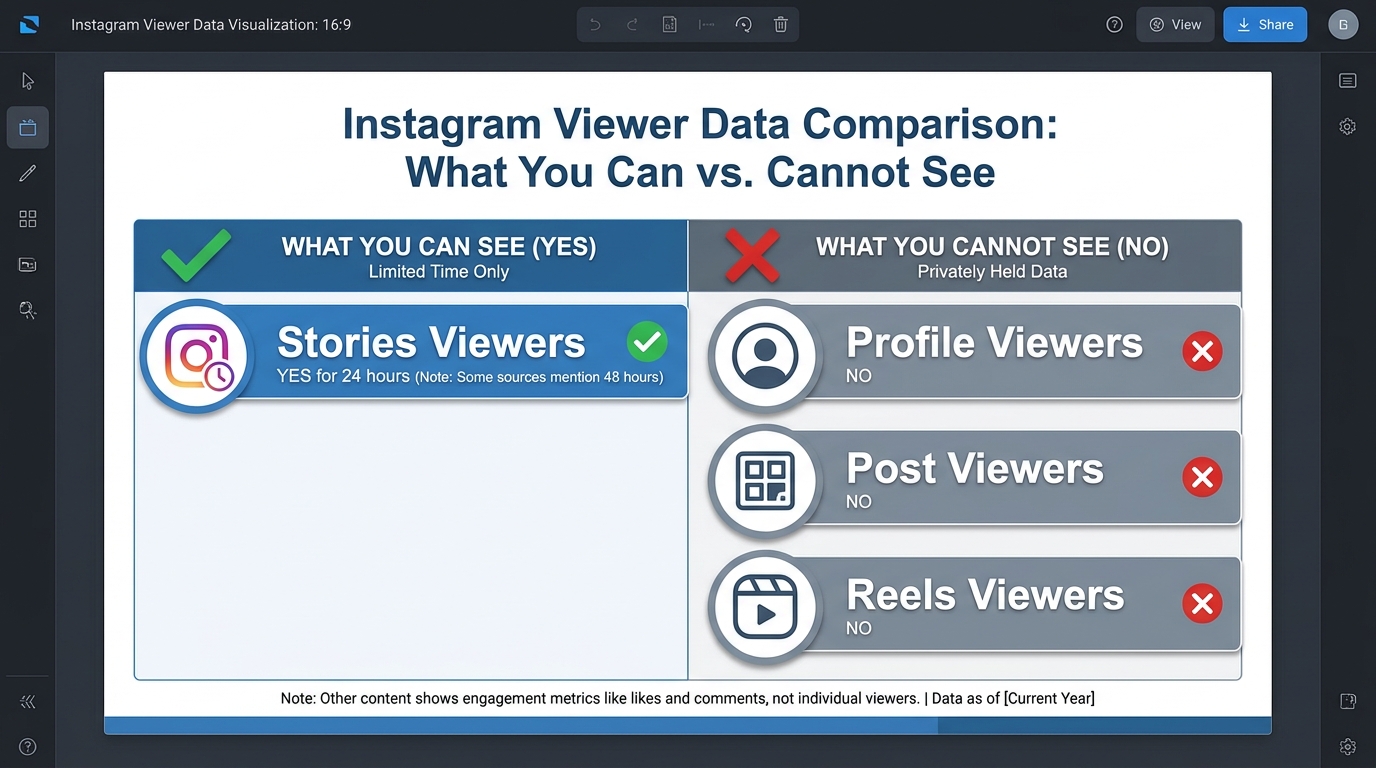
No, Instagram does not allow users to see who views their profile. This feature is not available for personal or business accounts. While you can see who views your Instagram Stories for 24 hours, profile visits remain private. Third-party apps claiming to show profile viewers violate Instagram’s terms of service and may compromise your account security.
Who can see when you view their Instagram Story?
Anyone who posts an Instagram Story can see a list of viewers who watched it within the 24-hour period. The viewer list shows usernames in chronological order or by engagement. However, if you view a Story in airplane mode or through certain methods, your view may not be recorded. Business accounts can access more detailed Story analytics through Instagram Insights.
How do you delete an Instagram account permanently?
To permanently delete your Instagram account, visit instagram.com/accounts/remove/request/permanent from a web browser (not the app). Log in, select a reason for deletion, re-enter your password, and click ‘Delete Account.’ The deletion is permanent after 30 days. During this grace period, you can cancel by logging back in. All content, followers, and data will be permanently removed.
What’s the difference between deactivating and deleting Instagram?
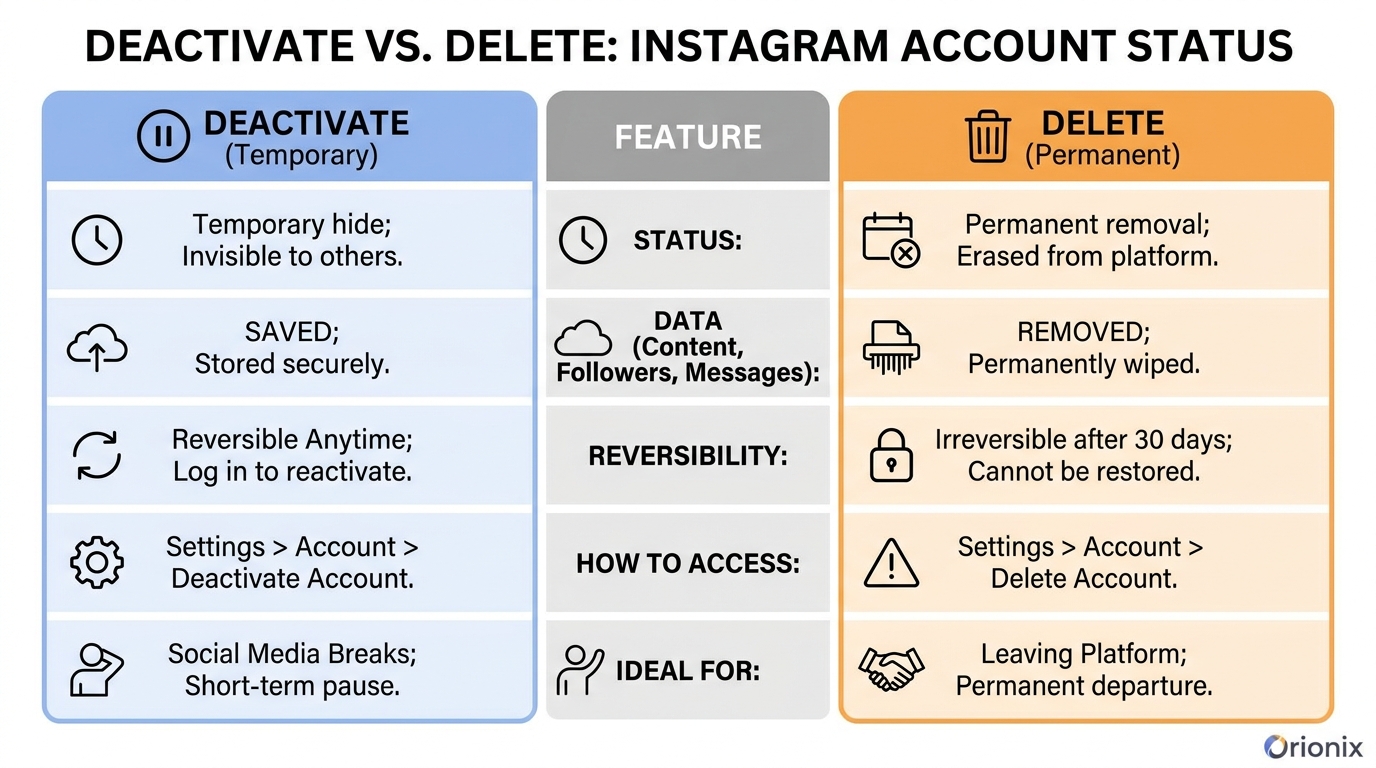
Deactivating Instagram temporarily hides your profile, photos, and comments until you reactivate by logging back in. Your data remains saved. Deleting permanently removes your account and all content after 30 days with no recovery option. To deactivate, go to Settings > Account > Deactivate Account. Deletion must be done through a web browser at instagram.com/accounts/remove/request/permanent.
What are the best times to post on Instagram for maximum engagement?
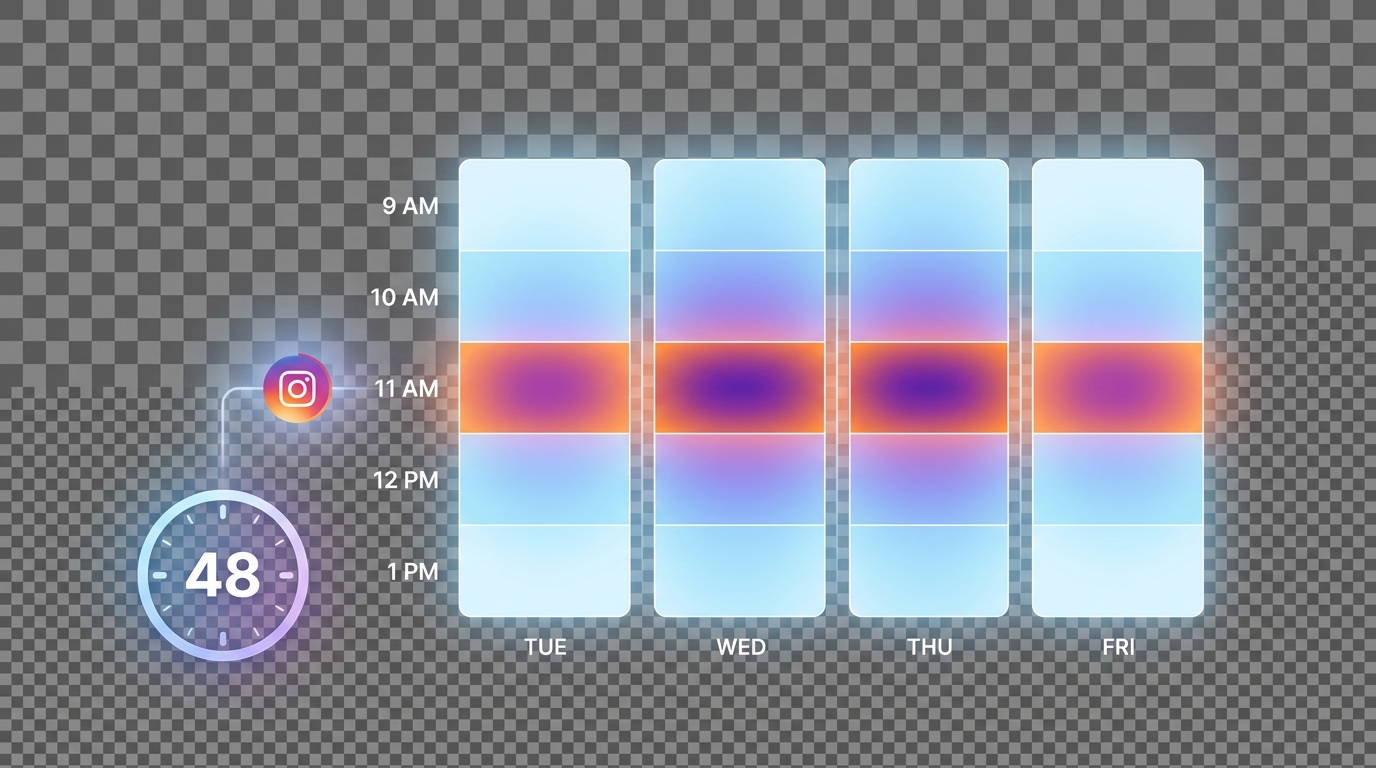
The best times to post on Instagram are typically Tuesday through Friday between 9 AM and 1 PM, with peak engagement around 11 AM. However, optimal timing varies by industry and audience location. Use Instagram Insights to analyze when your specific followers are most active. Consistent posting schedules and content quality matter more than perfect timing for long-term social media marketing success.
How can social media platforms help with digital marketing?
Social media platforms like Instagram enable businesses to reach targeted audiences, build brand awareness, and drive engagement through organic and paid content. They offer analytics tools to track performance, facilitate direct customer communication, and support various content formats including posts, Stories, and Reels. Effective social media marketing requires consistent posting, audience engagement, and strategic content planning across multiple platforms.
Can you track Instagram profile views for business accounts?
Instagram business accounts can access limited analytics through Instagram Insights, showing profile visits over specific time periods (7 or 30 days) but not individual viewer identities. You’ll see metrics like reach, impressions, and website clicks. This data helps measure social media marketing effectiveness. For comprehensive content management across social media platforms, tools like Orionix provide centralized dashboards to track performance and plan content strategically.
How do you deactivate Instagram temporarily without deleting it?
To temporarily deactivate Instagram, log in through a web browser or app, go to your profile, select Settings > Account > Deactivate Account. Choose a reason from the dropdown menu, enter your password, and confirm. Your profile becomes invisible until you log back in to reactivate. Unlike deletion, deactivation preserves all your content, followers, and data, making it ideal for social media breaks.
Understanding Who Views Your Instagram: The Complete Guide
If you’ve ever wondered who views your Instagram profile, posts, or stories, you’re not alone. This question ranks among the most common inquiries from users across all social media platforms. Understanding your audience and tracking engagement metrics has become essential for anyone serious about social media marketing and building a meaningful online presence.
Instagram provides various built-in analytics tools that reveal viewer information, but the extent of what you can see depends on your account type and the specific content format. Whether you’re a content creator, business owner, or casual user, knowing who’s engaging with your content can transform your digital marketing strategy and help you connect more effectively with your audience.
This comprehensive guide will walk you through everything you need to know about Instagram viewership, from understanding story views to leveraging Instagram Insights for better social media management. 📊
Can You Really See Who Views Your Instagram Profile?
Let’s address the elephant in the room: Instagram does not allow users to see who views their profile. Despite countless third-party apps claiming to offer this feature, Instagram’s official stance is clear—profile view tracking is not available to regular users.
This limitation exists for privacy reasons and applies to all account types, including personal, creator, and business accounts. Any app or service promising to reveal your profile visitors is either misleading or potentially compromising your account security.
What Instagram Does Let You Track
While profile views remain hidden, Instagram provides several legitimate ways to understand your audience engagement:
- Story Views: See exactly who watched your Instagram Stories within 24 hours
- Post Insights: Access detailed metrics about reach, impressions, and engagement on business accounts
- Live Video Viewers: View real-time lists of who’s watching your live broadcasts
- Reel Analytics: Track plays, likes, comments, and shares on your Reels content
- IGTV Metrics: Monitor views and engagement on longer-form video content
How to Check Who Views Your Instagram Stories
Instagram Stories offer the most transparent viewer tracking available on the platform. This feature has become invaluable for social media marketing professionals who need to understand audience engagement patterns and optimize their content strategy. 👀
Step-by-Step Process for Viewing Story Viewers
- Open Instagram and navigate to your profile
- Tap your profile picture or the « Your Story » icon at the top left
- Swipe up on the active story to reveal the viewer list
- View the complete list of accounts that watched your story
- Tap individual names to visit their profiles
The viewer list appears in chronological order initially, showing the most recent viewers first. However, Instagram’s algorithm may reorganize this list based on your interaction patterns with different accounts.
Understanding Story View Metrics
| Metric | What It Shows | Why It Matters |
|---|---|---|
| Total Views | Number of times your story was viewed | Measures overall reach and content performance |
| Unique Viewers | Individual accounts that viewed your story | Indicates actual audience size |
| Exits | Users who left before finishing your story | Helps identify content that loses engagement |
| Replies | Direct messages sent in response to your story | Shows active engagement and conversation starters |
For those managing multiple accounts or looking to streamline their content strategy, consider exploring social media management platforms that consolidate these analytics across different channels.
Instagram Insights: Unlocking Deeper Viewer Analytics
Business and Creator accounts gain access to Instagram Insights, a powerful analytics tool that provides comprehensive data about your audience and content performance. This feature transforms how you approach digital marketing on the platform. 📈
Accessing Instagram Insights
To view Instagram Insights, you need either a Business or Creator account. If you’re still using a personal account, switching takes just a few minutes and unlocks valuable analytics capabilities essential for effective social media marketing.
Navigate to your profile, tap the menu icon, and select « Insights » to access your analytics dashboard. Here you’ll find three main categories: Content, Activity, and Audience.
Key Metrics Available Through Instagram Insights
- Reach: The number of unique accounts that saw your content
- Impressions: Total number of times your content was displayed
- Engagement Rate: Percentage of viewers who interacted with your content
- Profile Visits: How many times users visited your profile (though not who visited)
- Website Clicks: Number of users who clicked your profile link
- Follower Demographics: Age ranges, gender distribution, and geographic locations
- Active Times: When your followers are most active on Instagram
Using Insights to Determine the Best Times to Post on Instagram
One of the most valuable features of Instagram Insights is discovering the best times to post on Instagram for your specific audience. The Activity section shows when your followers are most active, broken down by days and hours.
This data-driven approach to scheduling content significantly improves visibility and engagement rates. Rather than guessing when to publish, you can align your posting schedule with your audience’s online habits.
Understanding the best time to post on Instagram varies by industry, audience demographics, and geographic location. Regularly reviewing your Insights helps you adapt to changing patterns and optimize your content calendar accordingly.
Third-Party Analytics Tools for Instagram
While Instagram’s native analytics provide substantial data, many social media marketing professionals supplement these insights with third-party tools that offer deeper analysis and cross-platform management capabilities.
Popular Instagram Analytics Platforms
| Feature | Instagram Insights | Third-Party Tools |
|---|---|---|
| Story Viewer Lists | ✅ Complete lists | ❌ Not available |
| Profile Visitors | ❌ Count only | ❌ Not possible |
| Competitor Analysis | ❌ Not available | ✅ Comprehensive |
| Historical Data | ⚠️ Limited timeframe | ✅ Extended history |
| Custom Reports | ❌ Basic only | ✅ Fully customizable |
For comprehensive social media management, platforms like Hootsuite offer centralized dashboards that consolidate analytics from multiple social media platforms. This approach is particularly valuable for businesses managing content across Instagram, Facebook, Twitter, and LinkedIn simultaneously.
If you’re specifically focused on growing your presence, check out strategies for gaining followers on Instagram for free to complement your analytics efforts.
Privacy Considerations When Viewing Instagram Content
Understanding who can see your viewing activity is crucial for maintaining privacy on social media platforms. Instagram’s visibility settings affect both what you can see and what others can see about your activity. 🔒
What Others Can See About Your Instagram Activity
When you view someone’s content on Instagram, your visibility depends on the content type:
- Stories: Your username appears in their viewer list if you watch their story
- Posts: No notification or record of viewing (unless you like, comment, or share)
- Live Videos: Your username appears in the live viewer list
- Reels: No viewing notification (only engagement metrics are tracked)
- Profile Visits: Completely anonymous—they cannot see you visited
Managing Your Instagram Viewing Privacy
If you want to view content more privately, consider these approaches:
- View stories from a private or secondary account
- Use airplane mode to view stories (though this prevents proper loading)
- Understand that likes and comments always reveal your identity
- Remember that screenshots may trigger notifications in direct messages
For those concerned about privacy, understanding what happens when you restrict someone on Instagram can help you manage unwanted interactions while maintaining your presence on the platform.
Leveraging Viewer Data for Social Media Marketing Success
Knowing who views your Instagram content is only valuable if you use that information strategically. Successful digital marketing requires transforming raw viewer data into actionable insights that drive engagement and growth. 🚀
Strategies for Using Viewer Analytics
Identify Your Most Engaged Followers: Pay attention to accounts that consistently view your stories and engage with your posts. These are your brand advocates who deserve special attention and engagement.
Analyze Content Performance Patterns: Track which types of content attract the most views and engagement. Use this data to refine your content strategy and produce more of what resonates with your audience.
Optimize Posting Schedule: Use the activity data from Instagram Insights to determine the best times to post on Instagram for maximum visibility. This simple adjustment can dramatically improve your content’s reach.
Content Strategy Based on Viewer Insights
| Viewer Behavior | Content Strategy | Expected Outcome |
|---|---|---|
| High story completion rate | Create more multi-slide story sequences | Increased engagement and time spent |
| Low post reach | Adjust posting times and hashtag strategy | Improved visibility and discovery |
| Consistent viewer group | Create exclusive content for loyal followers | Stronger community connection |
| High profile visits, low follows | Optimize bio and highlight covers | Better conversion to followers |
For artists and creators, specialized strategies outlined in our guide on social media for artists can help you leverage viewer data to build a more engaged community around your work.
Common Myths About Instagram Viewership
Misinformation about Instagram’s viewing features spreads rapidly across social media platforms. Let’s debunk the most common myths and clarify what’s actually possible. ❌
Myth #1: Third-Party Apps Can Show Profile Visitors
Despite numerous apps claiming to reveal who viewed your profile, this feature doesn’t exist. Instagram’s API doesn’t provide this data to third parties, and any app making this claim is either scamming users or compromising account security.
Myth #2: The Story Viewer Order Is Random
While Instagram hasn’t officially confirmed the algorithm, the story viewer list isn’t completely random. It appears to prioritize accounts you interact with frequently, creating a personalized order based on your engagement patterns.
Myth #3: You Can View Stories Anonymously
Unless you’re viewing from a different account, Instagram always logs your story views. Airplane mode tricks and third-party viewers often fail or violate Instagram’s terms of service, potentially risking your account.
Myth #4: Switching to Business Account Reduces Reach
This persistent myth has no basis in reality. Business accounts don’t experience reduced organic reach compared to personal accounts. In fact, the analytics and advertising capabilities often lead to improved performance when used strategically.
Understanding these myths helps you focus on legitimate strategies rather than wasting time on ineffective tactics. For more insights on managing your Instagram presence effectively, explore our guide on proven strategies to get more followers.
Instagram Account Management and Viewer Privacy
Managing your Instagram presence involves understanding how account settings affect both your ability to see viewer data and others’ ability to see your activity. These decisions impact your overall social media marketing effectiveness.
Account Type Considerations
Your account type significantly affects what viewer data you can access:
- Personal Accounts: Limited to story viewer lists and basic engagement metrics
- Creator Accounts: Access to Instagram Insights with audience demographics and content performance
- Business Accounts: Full analytics suite plus advertising capabilities and contact options
How to Deactivate Instagram Temporarily
If you need a break from the platform while preserving your viewer data and content, understanding how to deactivate Instagram is essential. Deactivation temporarily hides your profile, posts, and comments without permanently deleting your account.
To deactivate your account:
- Log into Instagram from a web browser (you cannot deactivate from the mobile app)
- Navigate to your profile and click « Edit Profile »
- Scroll down and select « Temporarily disable my account »
- Choose a reason from the dropdown menu
- Re-enter your password and confirm deactivation
This differs from understanding how can you delete an Instagram account permanently, which removes all your data irreversibly. For detailed information about permanent deletion, including what happens to your viewer data and content, research how do you delete an Instagram account through Instagram’s official help center.
If you’re considering account changes, you might also want to understand what happens if you delete the Instagram app versus deactivating or deleting your account entirely.
Advanced Viewer Analytics for Social Media Marketing Professionals
Professional social media marketing requires sophisticated approaches to viewer analytics that go beyond basic metrics. These advanced strategies help businesses maximize their return on investment across social media platforms. 💼
Segmenting Your Audience Based on Viewer Behavior
Effective digital marketing involves dividing your audience into segments based on their engagement patterns. This allows for targeted content strategies that resonate with specific groups:
- Core Audience: Consistently views stories and engages with posts—prioritize their interests
- Passive Viewers: Views content but rarely engages—create compelling calls-to-action
- New Followers: Recently joined your audience—provide introductory content
- Inactive Followers: Haven’t engaged recently—re-engagement campaigns needed
Integrating Instagram Analytics with Broader Marketing Strategies
Instagram viewer data becomes most powerful when integrated with your overall marketing digital marketing ecosystem. Cross-reference Instagram metrics with website analytics, email marketing performance, and sales data to understand the complete customer journey.
For restaurants and hospitality businesses, specialized approaches outlined in our social media marketing for restaurants guide demonstrate how viewer analytics translate into foot traffic and reservations.
Competitive Analysis Through Viewer Insights
While you can’t see who views your competitors’ profiles, you can analyze their public content performance to benchmark your own results. Monitor their posting frequency, engagement rates, and content types to identify opportunities in your niche.
This competitive intelligence helps you understand industry standards and identify gaps in your own strategy. For comprehensive competitor analysis, consider tools that track performance across multiple social media platforms simultaneously.
Industry-Specific Applications of Instagram Viewer Data
Different industries leverage Instagram viewer analytics in unique ways. Understanding these specialized applications helps you tailor your approach to your specific market and audience needs.
Music Artists and Entertainment
Musicians use viewer data to gauge fan engagement and plan tour locations. Story views often correlate with geographic markets showing strong support, informing concert scheduling decisions.
For detailed strategies specific to the music industry, explore our comprehensive guide on social media marketing for music artists, which covers how to transform viewer metrics into streaming numbers and ticket sales.
E-commerce and Retail Brands
Retail businesses analyze viewer patterns to optimize product launches and promotional campaigns. Understanding when your audience is most active helps time flash sales and limited-edition releases for maximum impact.
Content Creators and Influencers
Professional content creators rely heavily on viewer analytics to demonstrate value to brand partners. Detailed engagement metrics, audience demographics, and viewer retention rates become part of media kits and sponsorship proposals.
| Industry | Key Viewer Metric | Primary Use Case |
|---|---|---|
| E-commerce | Story completion rate | Product showcase effectiveness |
| Music/Entertainment | Geographic viewer distribution | Tour planning and promotion |
| Food & Beverage | Peak viewing times | Menu promotion timing |
| Fashion/Beauty | Engagement rate by content type | Content strategy optimization |
| B2B Services | Profile visit conversion | Lead generation effectiveness |
Tools and Resources for Managing Instagram Viewer Data
Efficiently managing and analyzing Instagram viewer data requires the right tools and systems. Whether you’re a solo entrepreneur or managing multiple client accounts, the right social media marketing infrastructure makes all the difference. 🛠️
Social Media Management Platforms
Centralized platforms streamline the process of monitoring viewer data across multiple accounts and social media platforms. These tools aggregate analytics, schedule content based on optimal posting times, and generate comprehensive reports.
A robust social media marketing assistant can help automate routine tasks while you focus on strategy and creative content development. This approach is particularly valuable for small businesses and entrepreneurs managing their own social media presence.
Analytics and Reporting Tools
Beyond Instagram’s native Insights, specialized analytics tools provide deeper analysis and historical data tracking. These platforms help identify long-term trends that inform strategic decisions and content planning.
For businesses operating in specific markets, location-based strategies like those covered in our Miami social media marketing guide demonstrate how to leverage viewer demographics for localized campaigns.
Content Planning and Scheduling
Knowing the best time to post on Instagram is only valuable if you have systems to consistently publish at those optimal times. Scheduling tools allow you to batch-create content and automatically post when your audience is most active.
This systematic approach ensures consistent presence on the platform without requiring constant manual attention, freeing up time for engagement and community building.
Future Trends in Instagram Viewer Analytics
Instagram continuously evolves its analytics capabilities, and staying ahead of these changes positions you for continued success on the platform. Understanding emerging trends helps you prepare for future opportunities. 🔮
Predicted Analytics Enhancements
Industry experts anticipate several potential improvements to Instagram’s viewer analytics:
- Enhanced Story Analytics: More detailed breakdown of viewer behavior within individual story frames
- Predictive Insights: AI-powered recommendations for optimal posting times and content types
- Cross-Platform Attribution: Better tracking of user journeys across Instagram, Facebook, and other Meta properties
- Improved Audience Segmentation: More sophisticated tools for identifying and targeting specific audience segments
- Real-Time Analytics: Live performance tracking during active campaigns
Preparing for Privacy Changes
As privacy regulations evolve globally, Instagram may implement additional restrictions on viewer data access. Successful social media marketing strategies will need to balance analytics capabilities with user privacy expectations.
Building first-party data relationships through email lists, website traffic, and direct customer relationships becomes increasingly important as third-party tracking capabilities diminish across all social media platforms.
The Rise of AI-Powered Analytics
Artificial intelligence is transforming how we interpret viewer data. Rather than manually analyzing metrics, AI tools can identify patterns, predict trends, and recommend actions based on your specific goals and audience behavior.
These technologies make sophisticated analytics accessible to businesses of all sizes, democratizing capabilities that previously required dedicated data science teams.
Troubleshooting Common Instagram Viewer Issues
Even experienced users encounter problems with Instagram’s viewer features. Understanding common issues and their solutions helps you maintain consistent access to your analytics data. 🔧
Story Viewer List Not Showing
If you can’t see who viewed your story, try these solutions:
- Ensure your story is still active (within 24 hours of posting)
- Check your internet connection—poor connectivity prevents list loading
- Update your Instagram app to the latest version
- Log out and back into your account
- Clear your app cache and restart your device
Instagram Insights Not Available
If you can’t access Instagram Insights, verify that:
- Your account is set to Business or Creator mode (not personal)
- Your account is not newly converted (wait 24-48 hours after switching)
- You have sufficient content history (at least a few posts)
- Your app is updated to the latest version
For additional troubleshooting help, including issues with stories not being available, Instagram’s help center provides comprehensive support resources.
Inaccurate Viewer Counts
Occasionally, viewer counts may appear inflated or deflated due to:
- Instagram’s processing delays (metrics update periodically, not instantly)
- Users viewing content multiple times (counted as separate views)
- Bot accounts or fake followers (consider periodic follower audits)
- Technical glitches during high-traffic periods
Building a Comprehensive Instagram Analytics Strategy
Transforming viewer data into business results requires a structured approach to analytics. This strategic framework helps you move from raw numbers to actionable insights that drive growth. 📊
Establishing Baseline Metrics
Before optimizing your Instagram presence, document your current performance across key metrics:
- Average story views per post
- Story completion rate
- Post reach and impressions
- Engagement rate (likes, comments, shares)
- Profile visit to follower conversion rate
- Follower growth rate
These baseline measurements provide context for evaluating future improvements and identifying what’s working in your strategy.
Setting Meaningful Goals
Effective digital marketing requires specific, measurable objectives tied to business outcomes. Rather than vanity metrics like follower count, focus on goals that impact your bottom line:
| Business Objective | Instagram Metric | Target |
|---|---|---|
| Brand Awareness | Reach and impressions | 20% increase quarterly |
| Community Engagement | Comments and DM responses | 50+ quality interactions weekly |
| Website Traffic | Link clicks and swipe-ups | 500+ clicks monthly |
| Lead Generation | Profile visits and contact actions | 100+ qualified leads monthly |
| Sales Conversion | Shopping tag clicks | 5% conversion rate |
Regular Reporting and Analysis
Establish a consistent schedule for reviewing your Instagram analytics. Weekly quick checks identify immediate issues, while monthly deep dives reveal longer-term trends and inform strategic adjustments.
Document your findings and decisions to build institutional knowledge about what works for your specific audience. This historical perspective becomes invaluable when training new team members or explaining strategy to stakeholders.
For those in social media marketing positions, developing expertise in analytics interpretation is crucial for career advancement. Our guide on social media marketing positions outlines the skills and knowledge areas that employers value most.
Maximizing Your Instagram Presence with Viewer Insights
The ultimate goal of tracking who views your Instagram content is to build a more engaged, loyal audience that supports your business objectives. These final strategies help you translate analytics into meaningful growth. 🌟
Engaging with Your Most Active Viewers
Your consistent story viewers and post engagers represent your core community. Prioritize building relationships with these accounts through:
- Responding promptly to their comments and DMs
- Viewing and engaging with their content
- Featuring user-generated content in your stories
- Creating exclusive content or offers for loyal followers
- Acknowledging their support publicly when appropriate
Content Optimization Based on Viewer Behavior
Use viewer data to continuously refine your content strategy. If certain content types consistently attract more views and engagement, produce more of that content. Conversely, phase out formats that underperform despite multiple attempts.
This data-driven approach to content creation ensures you’re investing time and resources in activities that deliver measurable results rather than following generic best practices that may not apply to your specific audience.
Converting Viewers into Customers
The path from viewer to customer requires strategic nurturing. Use your understanding of viewer behavior to create content that guides prospects through your sales funnel:
- Awareness Stage: Educational and entertaining content that attracts new viewers
- Consideration Stage: Product showcases, testimonials, and behind-the-scenes content
- Decision Stage: Special offers, limited-time promotions, and clear calls-to-action
- Retention Stage: Customer success stories and exclusive content for existing customers
Track how viewers progress through these stages using Instagram Insights combined with website analytics and sales data. This holistic view reveals which content types most effectively move prospects toward conversion.
Take Control of Your Instagram Analytics Today
Understanding who views your Instagram content empowers you to make informed decisions about your social media strategy. While Instagram doesn’t reveal profile visitors, the platform provides robust analytics for stories, posts, and overall account performance that can transform your digital marketing effectiveness.
The key to success lies in consistently monitoring your viewer data, identifying patterns and opportunities, and adjusting your strategy based on what the metrics reveal about your audience’s preferences and behaviors.
Whether you’re a solo entrepreneur, content creator, or managing social media for a business, leveraging Instagram’s viewer analytics capabilities positions you for sustainable growth on the platform. The insights you gain inform not just your Instagram strategy, but your broader approach to social media marketing across all platforms.
Ready to streamline your content management and analytics tracking across multiple social media platforms? Visit Orionix to discover how our centralized platform helps you plan, create, and publish content more efficiently while maintaining comprehensive oversight of your viewer analytics and engagement metrics. Transform your social media workflow and focus more time on creating compelling content that resonates with your audience. 🚀
Article created using IntentRank