
TL;DR: To hide Instagram followers, go to your profile settings, select Privacy, then toggle on « Private Account » to restrict who sees your follower list. Alternatively, you cannot selectively hide followers on public accounts, but you can remove specific followers by going to your followers list and selecting « Remove. » Understanding how do you hide Instagram followers helps maintain your privacy preferences effectively.
Frequently Asked Questions
How do you hide Instagram followers from public view?
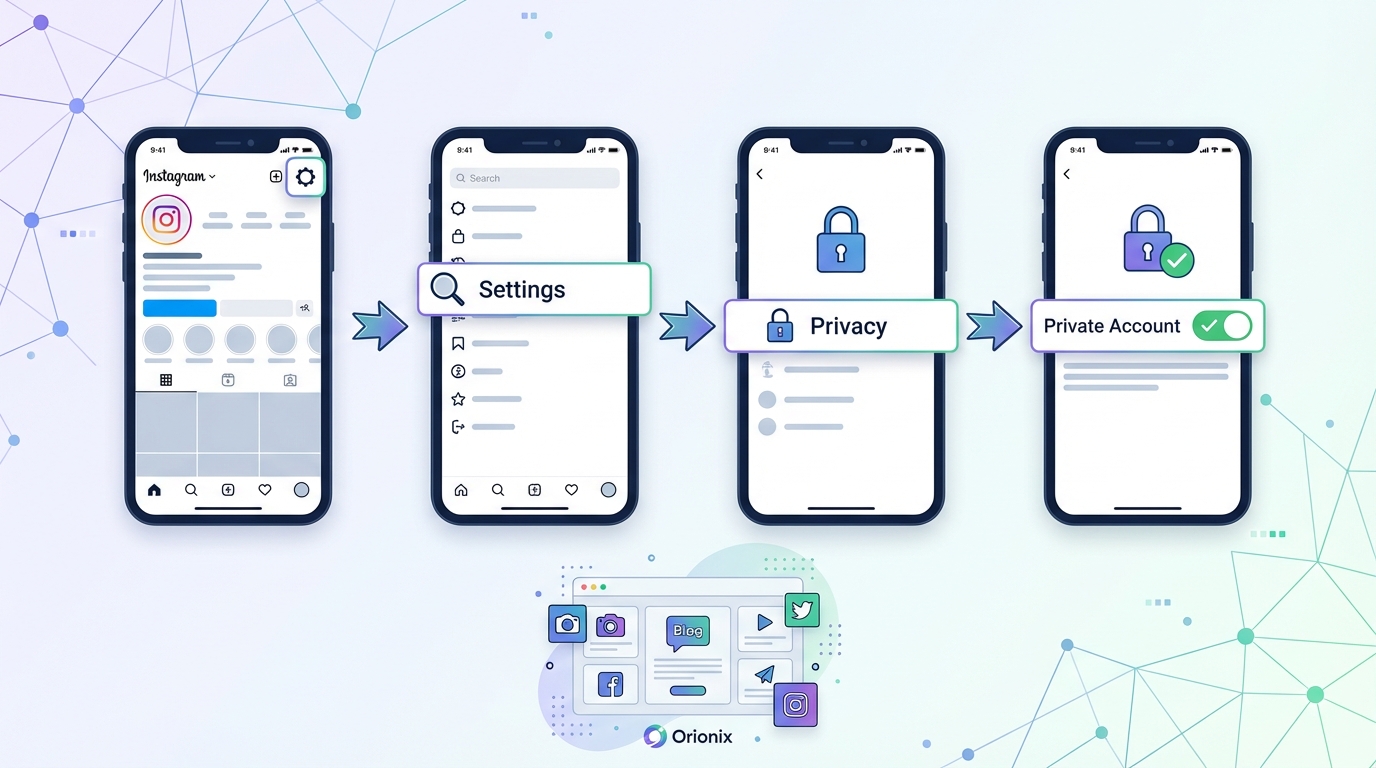
To hide Instagram followers, go to Settings > Privacy > Connections, then toggle off ‘Show Activity Status.’ However, Instagram doesn’t allow completely hiding your follower count or list on public accounts. The only way to fully hide followers is by switching to a private account in Settings > Privacy > Account Privacy, which requires approval for new followers and restricts who can view your follower list.
Can you hide your follower count on Instagram without going private?
No, Instagram doesn’t currently offer a feature to hide your follower count on public accounts. The follower number remains visible on your profile. Your only option is switching to a private account, which limits visibility to approved followers only. Third-party apps claiming to hide follower counts violate Instagram’s terms of service and may compromise your account security.
What happens when you switch to a private Instagram account?
When you switch to a private Instagram account, your posts, followers, and following lists become visible only to approved followers. New users must send follow requests that you can accept or decline. Your content won’t appear in Explore, hashtag searches, or location tags for non-followers. Existing followers remain unless you manually remove them from your follower list.
How can you delete an Instagram account if you want complete privacy?
To permanently delete your Instagram account, visit instagram.com/accounts/remove/request from a browser, log in, select a reason for deletion, re-enter your password, and click ‘Delete Account.’ This action is permanent after 30 days. Alternatively, you can temporarily deactivate your account through Settings > Account > Deactivate Account, which hides your profile until you log back in.
Does hiding Instagram followers affect your social media marketing strategy?
Yes, hiding followers by going private significantly impacts social media marketing. Private accounts limit discoverability, preventing potential customers from finding your content through hashtags or Explore. Follower counts serve as social proof that builds credibility. For businesses and influencers, maintaining a public profile while using content management platforms like Orionix to optimize posting times and engagement typically yields better marketing results.
Can you remove specific followers on Instagram without blocking them?
Yes, you can remove followers without blocking them on Instagram. Go to your profile, tap ‘Followers,’ find the user, tap the three dots next to their name, and select ‘Remove.’ They won’t be notified and can follow you again unless you have a private account. This feature helps manage your follower list while maintaining privacy without the permanence of blocking.
What are the best times to post on Instagram for maximum follower engagement?
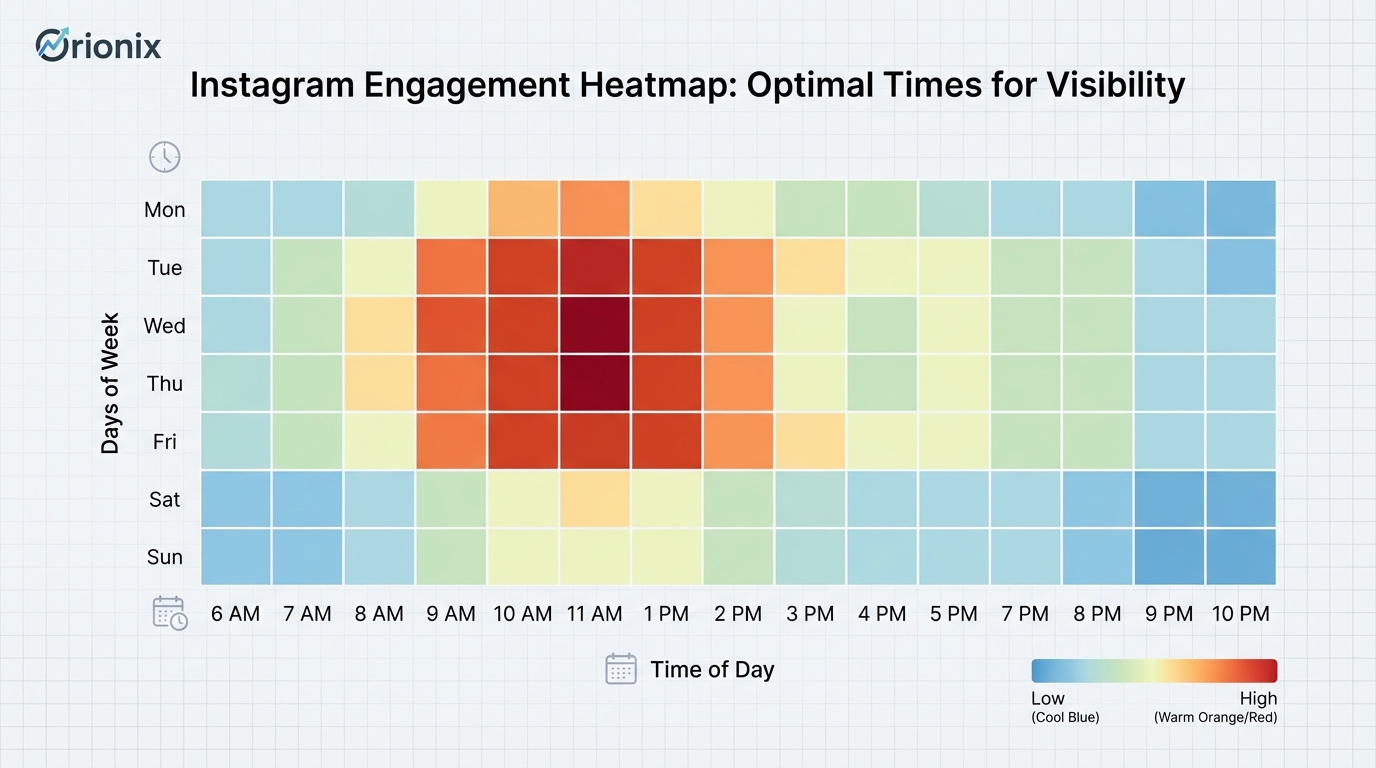
The best times to post on Instagram are typically Tuesday through Friday between 9 AM-1 PM, with peak engagement around 11 AM. However, optimal posting times vary by audience demographics and time zones. Using social media management platforms like Orionix helps analyze your specific audience’s activity patterns and schedule content when your followers are most active, maximizing visibility and engagement across multiple social media platforms.
How does Instagram privacy settings affect gaining followers organically?
Instagram privacy settings directly impact follower growth. Public accounts gain followers more easily through hashtags, Explore page, and shares. Private accounts require manual approval for each follower, significantly slowing growth. To gain followers on Instagram for free while maintaining some privacy, keep your account public, use relevant hashtags, post consistently at optimal times, and engage authentically with your target audience rather than relying on questionable free follower websites.
Understanding Instagram Privacy: How Do You Hide Instagram Followers?
Privacy concerns on social media platforms have become increasingly important, and many users wonder how do you hide Instagram followers to maintain better control over their online presence. Whether you’re managing a personal brand, working in digital marketing, or simply want more privacy, understanding Instagram’s follower visibility settings is essential for protecting your digital footprint.
Instagram’s privacy features have evolved significantly over the years, offering users various options to control who sees their content and follower lists. This comprehensive guide will walk you through everything you need to know about hiding your followers, managing your privacy settings, and optimizing your Instagram presence for both personal and professional purposes.
In today’s competitive landscape of social media marketing, understanding these privacy features isn’t just about protection—it’s about strategic control of your digital presence across social media platforms. Let’s explore the various methods and considerations for managing your follower visibility.
Why Hide Your Instagram Followers? 🔒
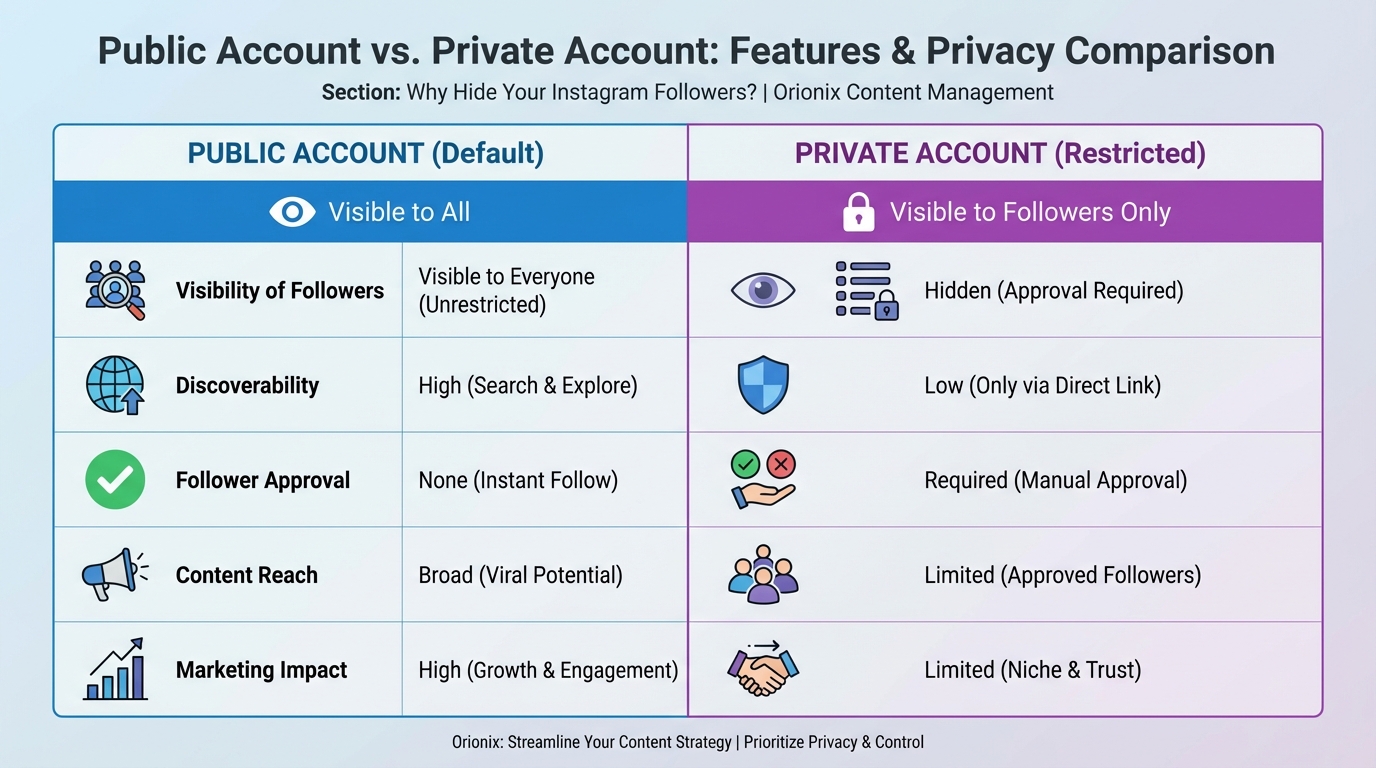
Before diving into the technical steps, it’s important to understand why you might want to hide your Instagram followers. The reasons vary widely depending on your personal or professional circumstances.
Privacy and Security Concerns
Many users prioritize privacy for personal safety reasons. When your follower list is public, anyone can see who follows you and potentially contact those people. This can lead to unwanted attention or even security risks.
- Protecting personal relationships from public scrutiny
- Preventing competitors from accessing your network in digital marketing contexts
- Reducing spam and unwanted contact attempts
- Maintaining professional boundaries between personal and business connections
Professional and Business Considerations
For those involved in social media marketing or running business accounts, hiding followers can serve strategic purposes. It prevents competitors from analyzing your audience and reaching out to your followers directly.
Business owners and influencers often want to protect their hard-earned audience from being poached by competitors. This is particularly relevant when you’re working to gain followers on Instagram for free through organic strategies.
The Primary Method: Switching to a Private Account
The most effective way to hide your Instagram followers is by converting your account to private. This fundamental change affects how your entire profile appears to others on the platform.
How to Make Your Instagram Account Private
Converting to a private account is straightforward and takes just a few minutes. Here’s the step-by-step process:
- Open the Instagram app and tap your profile icon in the bottom right corner
- Tap the three horizontal lines (menu) in the top right corner
- Select « Settings » from the menu options
- Navigate to « Privacy » settings
- Toggle on « Private Account » at the top of the privacy menu
Once enabled, only approved followers can see your posts, stories, and follower/following lists. This is the most comprehensive privacy solution Instagram offers.
What Changes When You Go Private?
Understanding the implications of a private account helps you make an informed decision about your social media and privacy strategy.
| Feature | Public Account | Private Account |
|---|---|---|
| Follower List Visibility | Visible to everyone | Visible only to approved followers |
| Post Visibility | Anyone can see | Only approved followers |
| Story Visibility | Public (unless restricted) | Only approved followers |
| Follow Requests | Automatic | Requires approval |
| Discoverability | High | Limited |
For businesses and influencers focused on growth, going private might seem counterintuitive. However, it can create exclusivity and increase engagement among your existing audience, which is valuable when considering the best times to post on Instagram for maximum impact.
Alternative Privacy Options Without Going Fully Private 🛡️
If making your entire account private doesn’t align with your social media marketing goals, Instagram offers several alternative privacy controls that provide partial protection.
Using the Restrict Feature
The restrict feature allows you to limit someone’s interaction with your account without blocking them completely. When you restrict someone on Instagram, they can’t see when you’re online or if you’ve read their messages.
Restricted accounts also can’t see who follows you or who you follow, making this a selective way to hide your follower list from specific individuals while keeping your account public.
Blocking Specific Users
For more severe cases, you might need to know how to block someone on Instagram. Blocked users cannot see your profile, posts, or follower list at all.
- Complete invisibility to blocked users
- Prevents them from searching for your account
- Removes them from your follower list automatically
- Can be reversed at any time
Close Friends List for Stories
While this doesn’t hide your followers, the Close Friends feature allows you to share content with a select group. This creates a tiered privacy approach for your content strategy.
Managing Your Instagram Presence Strategically 📊
Privacy settings should align with your overall digital marketing strategy. Whether you’re building a personal brand or managing business accounts, strategic privacy management is crucial.
Balancing Privacy and Growth
One of the biggest challenges is maintaining privacy while still growing your audience. Many users want to protect their existing followers while continuing to attract new ones.
Consider these strategies for balanced growth:
- Use a public account but regularly audit your followers
- Create separate personal and business accounts with different privacy levels
- Leverage Instagram’s various privacy tools selectively
- Focus on quality engagement rather than vanity metrics
Timing Your Posts for Maximum Engagement
Understanding the best time to post on Instagram becomes even more critical when you have a private account, as your reach is limited to your approved followers. Research shows that engagement rates vary significantly based on posting times.
The best times to post on Instagram typically fall during lunch hours (11 AM – 1 PM) and evenings (7 PM – 9 PM) in your audience’s timezone. However, these patterns can vary based on your specific audience demographics and behavior.
Content Strategy for Private Accounts
When your account is private, your content strategy must focus on retention and engagement rather than viral reach. This means creating highly valuable content that keeps your approved followers engaged and encourages them to share your profile with others.
Consider incorporating diverse content types, such as learning how to add your own audio to Instagram Reels to create unique, engaging content that resonates with your audience.
Common Misconceptions About Hiding Instagram Followers ❌
There are several myths and misunderstandings about Instagram privacy that can lead to confusion. Let’s clarify the most common misconceptions.
Myth 1: Third-Party Apps Can Hide Your Followers
Many apps and websites claim they can hide your followers without making your account private. This is false and potentially dangerous. These apps often violate Instagram’s terms of service and can compromise your account security.
While some services offer free Instagram views or claim to provide privacy features, Instagram’s native privacy settings are the only legitimate way to control follower visibility.
Myth 2: You Can Hide Followers Selectively
Currently, Instagram doesn’t offer a feature to hide your follower list from some users while showing it to others (except through the private account setting, which affects everyone uniformly).
Myth 3: Private Accounts Don’t Grow
While growth may be slower with a private account, it’s not impossible. Many successful accounts maintain privacy while building engaged communities through word-of-mouth and strategic content sharing.
| Myth | Reality | Impact |
|---|---|---|
| Apps can hide followers | Only native settings work | Security risk with third-party apps |
| Selective follower hiding | Not currently possible | All-or-nothing approach required |
| Private = no growth | Growth still possible | Requires different strategy |
| Followers can’t screenshot | Screenshots always possible | Content can still be shared |
The Connection Between Privacy and Account Management 🔄
Understanding privacy settings is closely related to overall account management. Sometimes, users consider more drastic measures when dealing with privacy concerns.
When to Consider Account Deactivation
If privacy concerns become overwhelming, you might wonder about how to deactivate Instagram temporarily. Deactivation hides your entire profile, posts, and followers until you reactivate.
For a temporary break while maintaining privacy, closing your Instagram account temporarily is an option. This differs from permanent deletion and allows you to return whenever you’re ready.
Permanent Account Deletion
In extreme cases, users might need to know how can you delete an Instagram account permanently. This is the most drastic privacy measure, as it removes all your content, followers, and data permanently.
Before taking this step, consider:
- Downloading your data for backup purposes
- Informing important contacts of alternative ways to reach you
- Understanding that deletion is permanent and irreversible after 30 days
- Exploring whether temporary deactivation might serve your needs better
Starting Fresh with Better Privacy
Some users choose to delete their old account and start fresh with proper privacy settings from the beginning. This approach allows you to build an audience intentionally while maintaining the privacy controls you want.
Tools and Platforms for Enhanced Social Media Management 🛠️
Managing privacy across multiple social media platforms can be challenging. Professional tools can help streamline this process while maintaining security.
Centralized Management Solutions
For those managing multiple accounts or working in social media marketing, using a centralized platform can simplify privacy management. Understanding social media and content management tools helps you maintain consistent privacy standards across all platforms.
Professional solutions like those offered through social media management platforms allow you to monitor and control multiple accounts from a single dashboard, making it easier to maintain privacy protocols.
Benefits of Professional Management Tools
When you’re serious about social media marketing, professional tools offer several advantages:
- Unified privacy controls across multiple platforms
- Better monitoring of follower activity and engagement
- Scheduled posting that respects optimal timing
- Analytics that help you understand your audience without compromising privacy
Advanced Privacy Strategies for Businesses and Influencers 💼
Professional accounts require more sophisticated approaches to privacy management. Here’s how businesses and influencers can protect their follower lists while maintaining growth.
Creating Multiple Account Tiers
Many successful brands maintain separate accounts for different purposes:
- Public brand account – For marketing and customer engagement
- Private community account – For VIP customers or loyal followers
- Personal account – For the business owner’s private use
This tiered approach allows you to maintain public visibility for marketing while keeping certain connections private. It’s particularly effective for those learning to gain followers on Instagram for free through organic methods.
Vetting Follower Requests
When operating a private account, develop a systematic approach to approving follower requests:
- Check if the account has a profile picture and bio
- Review their existing posts and engagement patterns
- Look for mutual connections or relevant interests
- Be wary of newly created accounts with no content
Monitoring and Auditing Your Followers
Regular follower audits help maintain account health and security. While you can’t see who views your Instagram profile specifically, you can monitor follower behavior and engagement patterns.
Many users wonder can you see if someone views your Instagram profile, but Instagram doesn’t provide this feature. However, you can track engagement metrics to understand which followers are actively interacting with your content.
The Impact of Privacy Settings on Growth and Engagement 📈
Understanding how privacy settings affect your account’s performance is crucial for making informed decisions about follower visibility.
Growth Metrics for Private vs. Public Accounts
Research shows that private accounts typically experience:
| Metric | Public Account | Private Account |
|---|---|---|
| Follower Growth Rate | Higher (3-5% monthly) | Lower (1-2% monthly) |
| Engagement Rate | Moderate (2-4%) | Higher (5-8%) |
| Content Reach | Broader (includes non-followers) | Limited (followers only) |
| Quality of Followers | Variable | Generally higher |
Optimizing Engagement with Privacy Settings
Private accounts often see higher engagement rates because followers are more invested in the content. This creates opportunities for deeper connections and more meaningful interactions.
Focus on these engagement strategies when operating a private account:
- Create exclusive content that rewards followers for their commitment
- Use Instagram Stories to maintain daily presence
- Respond promptly to comments and direct messages
- Host private Q&A sessions or live streams for followers only
Leveraging Privacy for Marketing Advantage
Counterintuitively, privacy can be a marketing tool. The exclusivity of a private account can make your content more desirable, creating a « VIP club » mentality among followers.
This strategy works particularly well when combined with other social media marketing techniques and proper timing. Understanding when to share content is crucial, which is why knowing the best times to post on Instagram remains important even for private accounts.
Legal and Ethical Considerations ⚖️
Privacy on social media isn’t just about settings—it also involves understanding your rights and responsibilities as a user.
Instagram’s Terms of Service
Instagram’s terms explicitly state how follower information can be used and shared. Understanding these terms helps you make informed decisions about privacy settings.
Key points include:
- Instagram owns the platform but you own your content
- Follower lists are considered part of your profile data
- Third-party apps that scrape follower data violate terms of service
- You have the right to download your data at any time
GDPR and Privacy Regulations
For users in certain regions, additional privacy protections apply. The GDPR and similar regulations give users enhanced control over their personal data, including follower information.
Ethical Considerations for Businesses
Businesses using Instagram for digital marketing must balance privacy with transparency. Hiding follower lists might be seen as lacking transparency, while public lists expose your audience to competitors.
Consider these ethical guidelines:
- Be transparent about why you’ve chosen your privacy settings
- Respect the privacy of your followers in your content
- Don’t use follower data for purposes beyond Instagram marketing
- Obtain proper consent before featuring followers in content
Practical Tips for Managing Follower Visibility 💡
Beyond the basic privacy settings, here are practical tips for managing who can see your followers effectively.
Regular Privacy Audits
Schedule monthly privacy audits to review:
- Your current privacy settings and whether they still serve your needs
- Recent follower requests and whether to approve them
- Existing followers who may no longer be relevant
- Any suspicious activity or accounts
Managing Follower Quality
Quality matters more than quantity. If you’re concerned about who sees your followers, focus on building a high-quality audience rather than chasing numbers.
Many users look for shortcuts through free Instagram followers websites, but these often result in low-quality followers that don’t engage with your content. Organic growth strategies yield better results for long-term success.
Using Instagram’s Close Friends Feature Strategically
While Close Friends doesn’t hide your follower list, it creates a tiered content strategy that can reduce the need for extreme privacy measures. Share sensitive or exclusive content with Close Friends while keeping your main account more open.
Communication with Your Audience
If you’re switching from public to private, communicate this change to your audience. Explain your reasons and assure followers that the change won’t affect the quality of your content.
The Future of Instagram Privacy Features 🔮
Instagram continues to evolve its privacy features in response to user demands and regulatory requirements. Understanding upcoming trends helps you prepare for future changes.
Emerging Privacy Trends
Several trends are shaping the future of social media platforms and privacy:
- Increased granular control over who sees specific types of content
- Enhanced transparency about how follower data is used
- Better tools for managing follower requests and audience segmentation
- Integration of privacy features across Meta’s family of apps
Preparing for Privacy Changes
Stay informed about Instagram’s policy updates and new features. Follow official Instagram announcements and adjust your strategy accordingly.
For professionals managing multiple accounts or working in social media marketing, staying updated on platform changes is essential. Consider following industry resources and joining professional communities to stay informed.
Integrating Privacy into Your Overall Social Media Strategy 🎯
Privacy settings shouldn’t exist in isolation—they should be part of your comprehensive social media and content strategy.
Aligning Privacy with Business Goals
Your privacy settings should support your overall business objectives. For example:
- Brand awareness campaigns – Typically require public accounts for maximum reach
- Community building – May benefit from private accounts to create exclusivity
- Customer service – Usually needs public visibility for accessibility
- Personal branding – Can use either approach depending on your goals
Cross-Platform Privacy Consistency
Maintain consistent privacy standards across all your social media platforms. This creates a coherent brand image and reduces confusion among your audience.
Understanding social media and content management across platforms helps you maintain this consistency while adapting to each platform’s unique features.
Training and Education
If you’re managing accounts for a business, ensure your team understands privacy protocols. This might include pursuing certifications like the Hootsuite Social Marketing Certification to build professional expertise.
Troubleshooting Common Privacy Issues 🔧
Even with proper settings, users sometimes encounter privacy-related challenges. Here’s how to address common issues.
Followers Still Visible After Going Private
If your followers remain visible after switching to private, try these solutions:
- Log out completely and log back in to refresh settings
- Clear your app cache and restart the application
- Check that the privacy toggle is actually enabled in settings
- Wait 24 hours for changes to fully propagate across Instagram’s servers
Managing Unwanted Follow Requests
Private accounts receive follow requests that you must approve. To manage these efficiently:
- Review requests regularly to prevent backlog
- Decline suspicious accounts immediately
- Block accounts that repeatedly request to follow after being declined
- Consider temporarily making your account unsearchable if receiving excessive requests
Dealing with Screenshots and Content Sharing
Remember that privacy settings don’t prevent screenshots. Approved followers can still capture and share your content outside Instagram. To minimize this risk:
- Only approve followers you trust
- Avoid sharing highly sensitive information even on private accounts
- Use disappearing messages for truly confidential communications
- Regularly audit your follower list and remove suspicious accounts
Building a Privacy-Conscious Instagram Presence 🌟
Creating a successful Instagram presence while maintaining privacy requires thoughtful planning and consistent execution.
Starting with Privacy in Mind
If you’re creating a new account, build privacy into your foundation from day one:
- Decide on your privacy level before posting any content
- Create clear guidelines for what you will and won’t share
- Establish criteria for approving follower requests
- Set up all privacy features before inviting followers
Maintaining Privacy During Growth
As your account grows, maintaining privacy becomes more challenging but remains important. Implement systems to manage growth while protecting your follower list.
For those focused on organic growth strategies, learning how to gain followers on Instagram for free through quality content and engagement is more sustainable than compromising privacy for quick gains.
Balancing Authenticity and Privacy
Authenticity drives engagement on social media platforms, but it doesn’t require sacrificing privacy. You can be genuine and relatable while maintaining appropriate boundaries.
Share stories and experiences that resonate with your audience without revealing sensitive personal information or exposing your entire social network.
Conclusion: Taking Control of Your Instagram Privacy
Understanding how do you hide Instagram followers is essential for anyone serious about maintaining privacy on social media. Whether you choose to make your account fully private, use selective blocking and restricting, or implement a tiered account strategy, the key is making informed decisions that align with your goals.
Privacy on Instagram isn’t one-size-fits-all. Your approach should reflect your personal or professional objectives, risk tolerance, and audience expectations. Remember that privacy settings can be adjusted as your needs evolve, so don’t be afraid to experiment with different configurations.
For businesses and professionals managing multiple accounts across various social media platforms, the complexity of privacy management increases significantly. This is where professional tools and centralized management become invaluable.
Ready to take your social media management to the next level while maintaining robust privacy controls? Visit UseOrionix to discover how our centralized platform helps you plan, create, and publish content across all your channels while maintaining the privacy standards your audience expects. Streamline your social media marketing efforts with tools designed for modern privacy-conscious users. Start your free trial today and experience the difference that professional-grade social media management makes! 🚀
Article created using IntentRank