
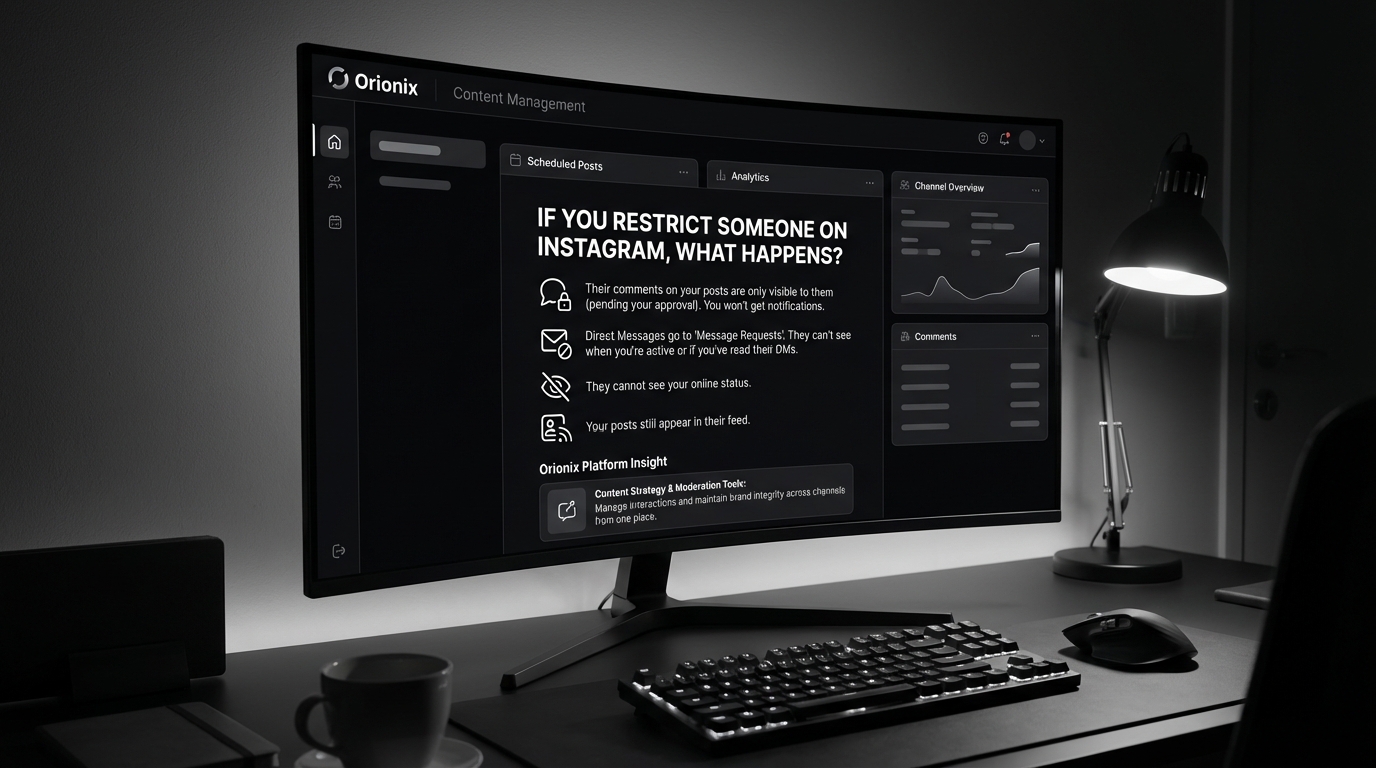
TL;DR: When you restrict someone on Instagram, they can still see your posts and comment, but their comments are only visible to them unless you approve them. They won’t see when you’re active or if you’ve read their direct messages. The restricted person won’t receive any notification that you’ve restricted them, making it a discreet moderation tool.
Frequently Asked Questions
If you restrict someone on Instagram what happens to their messages?
When you restrict someone on Instagram, their messages move to your Message Requests folder instead of your main inbox. You can read their messages without them knowing, and they won’t see when you’re online or if you’ve read their messages. This feature helps manage unwanted interactions while maintaining privacy across social media platforms.
Can a restricted person see your Instagram stories and posts?
Yes, restricted users can still see your public posts and stories on Instagram. However, they won’t see when you’re active or online. If you want to hide content completely, you’ll need to block them or adjust your privacy settings. Restricting is a softer approach to managing social media interactions without fully blocking someone.
What happens when you restrict someone on Instagram versus blocking them?
Restricting someone on Instagram keeps interactions hidden without their knowledge—messages go to requests, and they can’t see your activity status. Blocking completely prevents them from finding your profile, viewing content, or messaging you. Restricting is ideal for subtle control over social media platforms, while blocking offers complete separation.
Will someone know if you restrict them on Instagram?
No, Instagram doesn’t notify users when they’ve been restricted. They can still comment on your posts, but only they can see their comments unless you approve them. This makes restricting a discreet way to manage unwanted attention on social media platforms without causing direct confrontation or alerting the person.
If you restrict someone on Instagram what happens to their comments?
When you restrict someone on Instagram, their comments on your posts become visible only to them unless you manually approve them. This allows you to control what others see without the restricted person knowing. It’s an effective social media marketing strategy for managing your brand’s reputation and community interactions professionally.
Can you unrestrict someone on Instagram after restricting them?
Yes, you can easily unrestrict someone on Instagram at any time. Go to Settings, select Privacy, then Restricted Accounts, and remove them from the list. Once unrestricted, they’ll regain normal interaction abilities. This flexibility makes Instagram’s restrict feature useful for temporary social media management situations across various platforms.
How does restricting someone on Instagram affect your digital marketing strategy?
Restricting users on Instagram helps maintain a positive brand image for digital marketing efforts by filtering negative comments and unwanted interactions. It allows businesses to control their social media presence without losing potential audience members. This feature is essential for social media marketing professionals managing multiple accounts through centralized platforms like Orionix.
What’s the difference between restricting, deactivating, and deleting your Instagram account?
Restricting affects individual users’ interactions with you, while deactivating temporarily hides your entire Instagram account (reversible). Deleting permanently removes your account and all data. For social media marketing professionals, restricting offers granular control, while deactivating provides breaks, and deletion is final—each serves different social media platform management needs.
Understanding Instagram’s Restrict Feature: What Really Happens
If you’re wondering if you restrict someone on Instagram what happens, you’re not alone. Instagram’s restrict feature has become one of the platform’s most valuable tools for managing unwanted interactions without the drama of blocking or unfollowing. This privacy feature allows you to control your Instagram experience while maintaining a professional presence on one of the most important social media platforms for business and personal branding.
The restrict feature works differently from blocking or muting, offering a subtle way to limit someone’s access to your content and interactions. Understanding this tool is essential for anyone involved in social media marketing or managing their digital marketing presence effectively.
In this comprehensive guide, we’ll explore exactly what happens when you restrict someone, how it affects both parties, and when you should use this feature instead of other options like blocking or deactivating your account.
What Happens When You Restrict Someone on Instagram 🔒
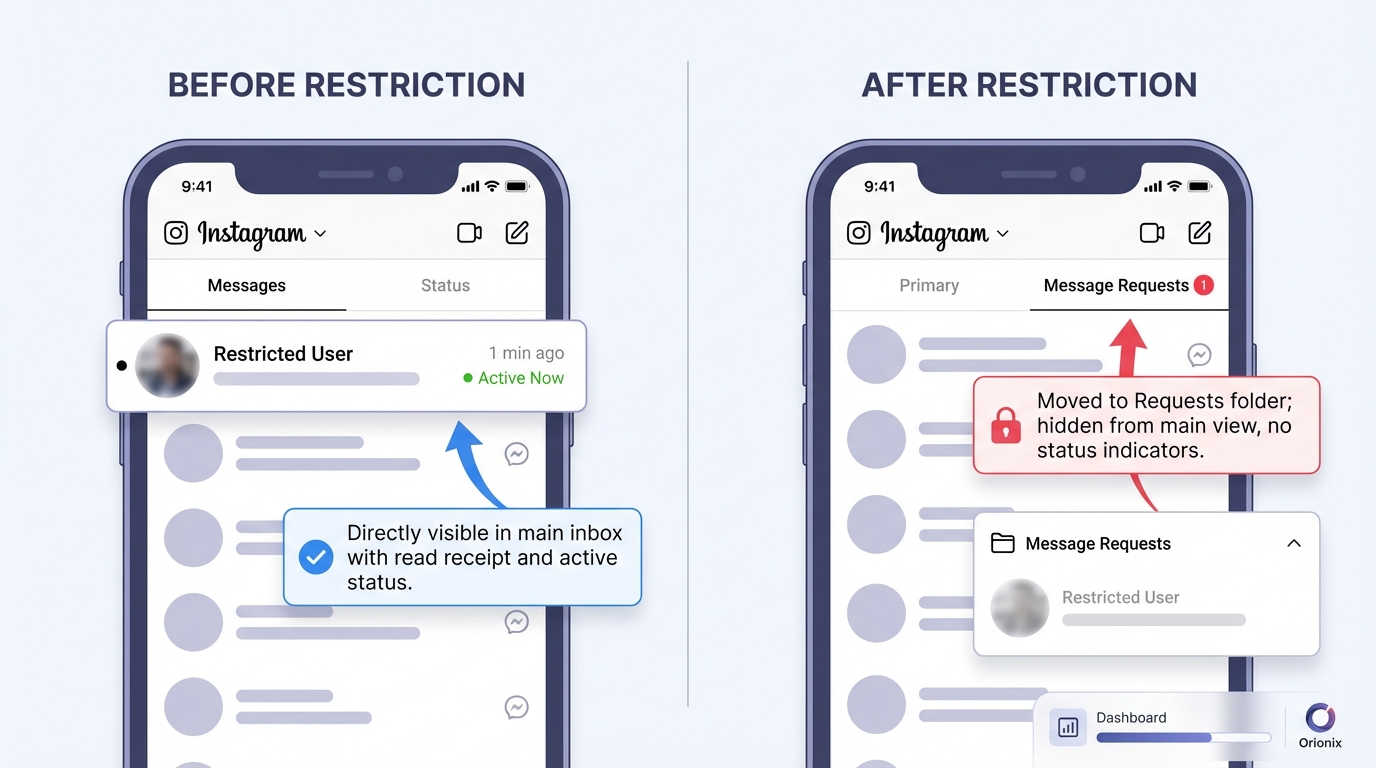
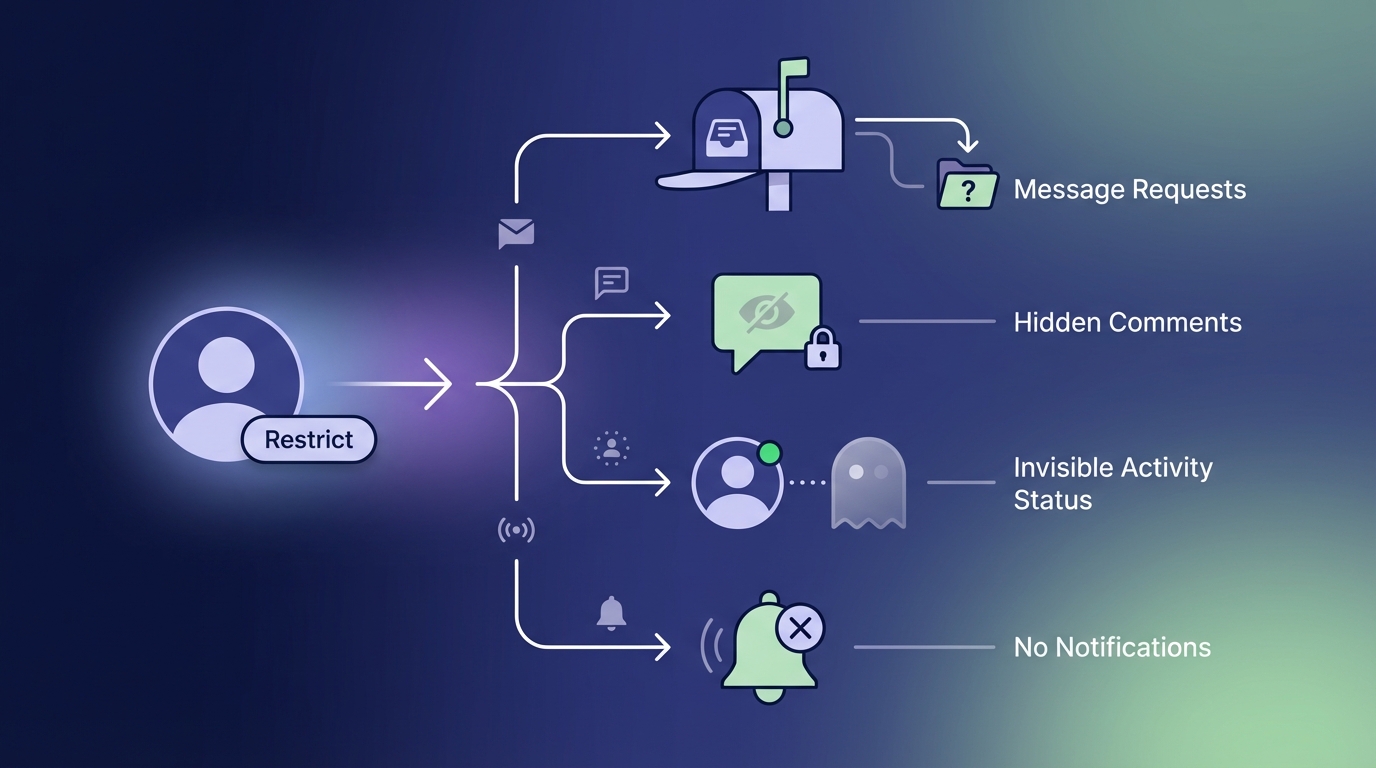
When you restrict someone on Instagram, several specific changes occur in how that person can interact with your account. The beauty of this feature is that it’s completely invisible to the restricted person—they won’t receive any notification or obvious sign that they’ve been restricted.
Comments Become Hidden
The most significant change involves comments. When a restricted account comments on your posts, their comments are only visible to them. You’ll receive a notification and can choose to approve the comment (making it visible to everyone), delete it, or leave it hidden.
This creates a powerful moderation tool for content marketers and social media managers who need to maintain professional brand images while dealing with difficult followers.
Direct Message Limitations
Messages from restricted accounts move to your Message Requests folder rather than your main inbox. You won’t receive notifications when they message you, and they won’t see when you’ve read their messages or when you’re active on Instagram.
- Messages appear in the Message Requests folder
- No read receipts are shown to the restricted person
- Your active status remains hidden from them
- They can’t see when you’re online or recently active
Story and Post Visibility
Restricted users can still see your posts and stories if your account is public. However, they won’t see when you’re active or online, which provides an additional layer of privacy without completely cutting off access to your content.
This is particularly useful for social media marketing professionals who need to maintain public visibility while managing problematic followers.
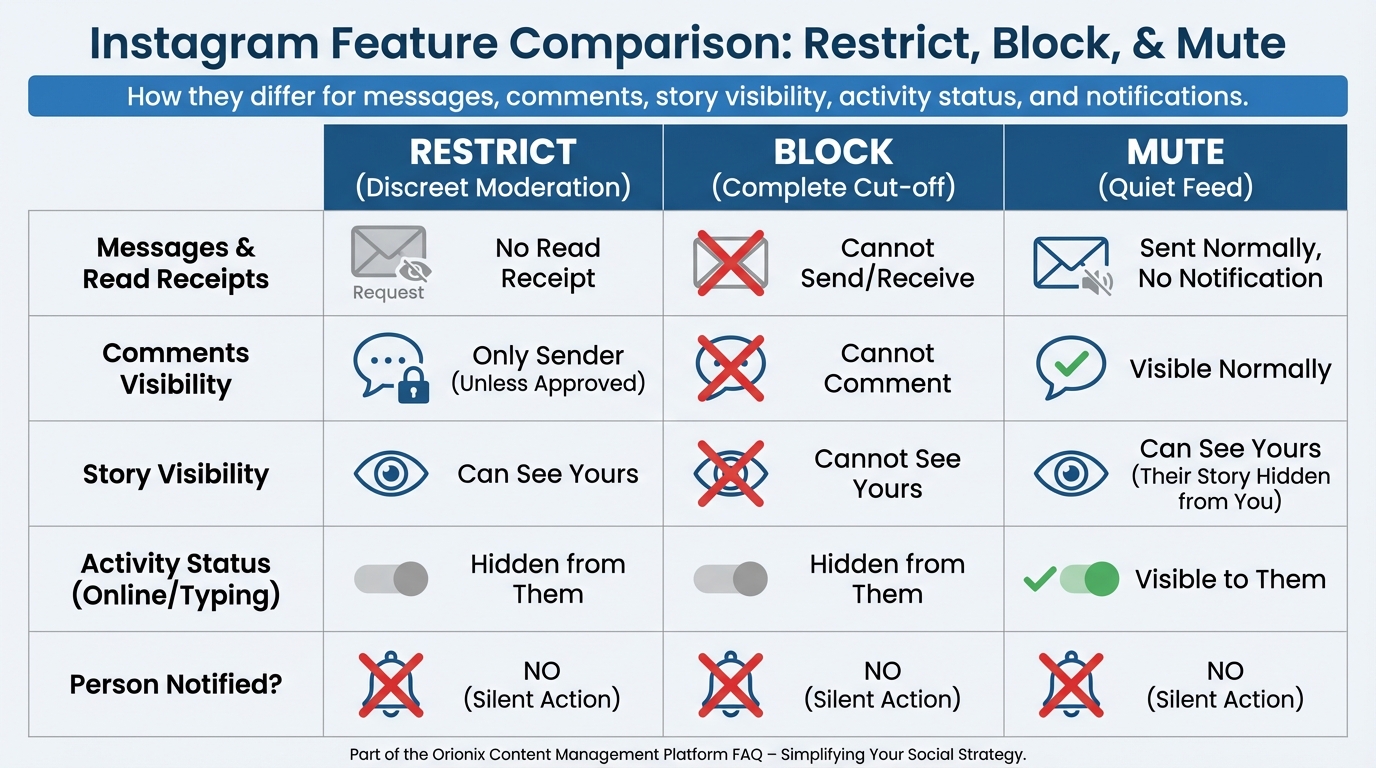
How Restricting Differs from Blocking and Muting
Understanding the differences between Instagram’s privacy features helps you choose the right tool for each situation. Each option serves different purposes in managing your social media platforms presence.
| Feature | Restrict | Block | Mute |
|---|---|---|---|
| Comments Visibility | Hidden by default (you can approve) | Cannot comment | Comments visible to everyone |
| Direct Messages | Moved to requests, no notifications | Cannot send messages | Receive messages normally |
| Profile Access | Can view profile and posts | Cannot view profile | Can view everything |
| They Know? | No notification | May realize they’re blocked | No notification |
| Active Status | Hidden from them | N/A (no access) | Visible if enabled |
When to Use Restrict Instead of Block
Restricting is ideal when you want to maintain appearances while limiting interaction. This is especially valuable for digital marketing professionals who need to manage client relationships or business contacts delicately.
Consider restricting when dealing with:
- Difficult clients or customers who need gentle management
- Ex-partners or former friends where blocking seems too aggressive
- Trolls or negative commenters on business accounts
- Family members whose interactions you want to limit without causing drama
If you’re dealing with harassment or safety concerns, blocking remains the better option. For guidance on complete account management, check out this guide on how do you delete an Instagram account if you need more drastic measures.
Step-by-Step: How to Restrict Someone on Instagram 📱
Restricting someone on Instagram takes just a few seconds. The process is straightforward and can be done through multiple methods depending on where you encounter the account.
Method 1: Restrict from Profile
- Navigate to the profile of the person you want to restrict
- Tap the three dots (•••) in the top right corner
- Select « Restrict » from the menu options
- Confirm your choice in the pop-up dialog
Method 2: Restrict from Comments
- Find a comment from the person you want to restrict
- Swipe left on the comment (iOS) or tap and hold (Android)
- Select the « Restrict » option
- Confirm the restriction
Method 3: Restrict from Direct Messages
- Open the conversation with the person
- Tap the information icon (i) at the top
- Select « Restrict » from the options
- Confirm your decision
Managing your Instagram presence effectively is crucial for social media marketing success. For more Instagram management tips, explore our guide on how do you unfollow on Instagram to keep your following list organized.
What the Restricted Person Experiences 👤
Understanding the restricted user’s perspective helps you anticipate potential questions or concerns. The feature is designed to be subtle, but observant users might notice some changes over time.
Visible Changes They’ll Notice
From the restricted person’s viewpoint, Instagram functions almost normally with a few exceptions:
- Their comments appear to post successfully (but only they can see them)
- Messages send normally, but they never get read receipts
- Your active status never shows up for them
- They can’t see when you’re online or recently active
What Remains Normal
To maintain the subtle nature of the restriction, several features continue working normally:
- They can still follow you (if they already do)
- Your posts appear in their feed
- They can view your stories if your account is public
- They can like your posts and stories
- They can tag you in posts (though you control visibility)
This balanced approach makes restriction perfect for social media managers who need to maintain professional relationships while limiting negative interactions.
Managing Restricted Accounts: Best Practices 💡
Successfully managing restricted accounts requires understanding how to work with Instagram’s features strategically. This is especially important for professionals handling social media marketing campaigns across multiple social media platforms.
Reviewing Restricted Comments
Instagram notifies you when restricted accounts comment on your posts. You have three options:
| Action | Result | Best Used For |
|---|---|---|
| Approve | Comment becomes visible to everyone | Constructive or neutral comments |
| Delete | Comment removed permanently | Inappropriate or spam comments |
| Ignore | Comment stays hidden | Comments you want to monitor |
Monitoring Restricted Accounts
Instagram provides a dedicated section to view all your restricted accounts. Access it through:
- Settings → Privacy → Restricted accounts
- Review the list of currently restricted users
- Unrestrict accounts as needed by tapping « Unrestrict »
Regular audits of your restricted list help maintain healthy account management practices, especially important when optimizing your posting strategy during the best times to post on Instagram.
Strategic Uses for Business and Marketing Accounts 📊
For businesses and digital marketing professionals, the restrict feature offers powerful moderation capabilities without damaging customer relationships or brand reputation.
Customer Service Applications
Restricting can help manage difficult customer interactions while maintaining a professional appearance. Instead of blocking dissatisfied customers (which could escalate situations), restriction allows you to:
- Control negative comment visibility on public posts
- Respond to complaints privately without public drama
- Maintain access to customer accounts for service purposes
- Prevent spam or repeated negative comments from affecting engagement
Competitor and Industry Monitoring
Sometimes you need to monitor competitor accounts or industry contacts without encouraging direct interaction. Restriction allows this strategic distance while keeping channels technically open.
This approach supports comprehensive social media marketing strategies across multiple social media platforms. Learn more about effective platform management in our guide to best social media platforms for content creators.
Brand Protection Strategies
Protecting your brand reputation requires proactive comment moderation. The restrict feature helps by:
- Filtering potentially harmful comments before they go public
- Reducing the visibility of trolls without creating confrontation
- Maintaining professional appearances during crisis management
- Preserving positive comment sections that drive engagement
Common Questions About Instagram Restrictions ❓
Can They Tell They’ve Been Restricted?
Instagram designed the restrict feature to be undetectable. However, tech-savvy users might notice clues over time, such as never receiving read receipts or seeing your active status. The key indicator is when their comments consistently don’t receive responses or engagement from others.
Does Restricting Affect Your Algorithm Performance?
Restricting accounts doesn’t negatively impact your Instagram algorithm performance. In fact, by filtering out negative or spam comments, you may improve engagement quality, which the algorithm favors. This is particularly relevant when posting during the best time to post on Instagram for maximum reach.
Can You Restrict Someone Who Doesn’t Follow You?
Yes, you can restrict any account regardless of whether they follow you. This is useful for managing interactions from public viewers or accounts that engage with your content without following.
What Happens to Existing Comments?
When you restrict someone, their previous comments remain visible. Only new comments made after the restriction are hidden by default. You can manually delete old comments if needed.
Is Restriction Permanent?
No, you can unrestrict accounts anytime through your privacy settings. The restriction remains in place until you manually remove it—there’s no automatic expiration.
For more Instagram account management strategies, check out our comprehensive guide on how to block someone on Instagram for situations requiring stronger action.
Alternatives to Restricting: Other Instagram Privacy Tools 🛡️
While restriction is powerful, Instagram offers several other privacy tools that might better suit specific situations. Understanding all your options helps you make informed decisions about account management.
Muting Accounts
Muting hides someone’s posts and stories from your feed without unfollowing them. Unlike restriction, muting only affects what you see—it doesn’t limit their ability to interact with you.
Use muting when:
- You want to declutter your feed without offending someone
- You need a temporary break from someone’s content
- You’re managing information overload across social media platforms
Close Friends Lists
Close Friends lists let you share stories with select people. While not a restriction tool, it helps control content visibility proactively rather than reactively.
Comment Controls
Instagram’s comment controls allow you to:
- Filter comments containing specific words or phrases
- Block comments from specific accounts
- Limit who can comment on your posts
- Turn off comments entirely on individual posts
Account Deactivation or Deletion
For more serious situations requiring complete breaks from the platform, you might consider temporary deactivation or permanent deletion. Learn the differences in our guides on how to deactivate Instagram and how can you delete an Instagram account.
Impact on Your Social Media Marketing Strategy 📈
Understanding restriction’s role in your broader social media marketing strategy helps maintain healthy community engagement while protecting your brand. This tool integrates with other platform features to create comprehensive audience management.
Maintaining Engagement Quality
High-quality engagement drives Instagram’s algorithm more than raw numbers. By restricting accounts that generate negative or spam interactions, you improve your overall engagement quality metrics.
This directly impacts:
- How widely Instagram distributes your content
- Your reach during optimal posting times (the best times to post on Instagram)
- Your account’s perceived authority and trustworthiness
- Conversion rates from social traffic
Building Positive Community Spaces
Successful digital marketing requires cultivating positive community spaces where genuine followers feel comfortable engaging. Restriction helps by:
- Reducing visible negativity that might discourage other commenters
- Creating safer spaces for authentic conversation
- Protecting vulnerable community members from trolls
- Maintaining professional standards in business contexts
Integrating with Content Strategy
Your restriction strategy should align with your overall content approach. When planning what to post, consider how restriction helps maintain the environment you’re creating. Explore more content planning ideas in our guide on social media what to post.
Advanced Tips for Power Users and Social Media Managers 🚀
Professional social media managers and digital marketing specialists can leverage restriction as part of sophisticated account management strategies.
Documenting Restriction Decisions
For business accounts, maintain records of restriction decisions including:
| Information to Track | Purpose |
|---|---|
| Date of restriction | Timeline documentation |
| Reason for restriction | Policy consistency |
| Account username | Reference and auditing |
| Specific incidents | Legal protection if needed |
| Review dates | Periodic reassessment |
Training Team Members
If multiple people manage your Instagram account, ensure everyone understands:
- When to use restriction versus other tools
- Your brand’s community guidelines and enforcement standards
- How to review and respond to restricted account comments
- Documentation requirements for restriction decisions
Combining with Other Platform Tools
Restriction works best when integrated with Instagram’s full suite of moderation tools. Develop a tiered response system:
- First offense: Warning or comment deletion
- Repeated issues: Restriction
- Serious violations: Blocking and reporting
- Ongoing harassment: Platform reporting and potential legal action
Managing these strategies across multiple platforms requires robust tools. For comprehensive social media marketing management, consider centralized solutions that streamline your workflow.
Privacy Considerations and Ethics 🔐
While restriction is a legitimate privacy tool, using it responsibly requires understanding both the ethical implications and Instagram’s terms of service.
Appropriate Use Cases
Restriction is appropriate for:
- Managing harassment or bullying
- Controlling spam and bot accounts
- Limiting interactions with problematic individuals
- Protecting mental health and wellbeing
- Maintaining professional boundaries
Potential Misuse to Avoid
Avoid using restriction to:
- Silence legitimate criticism or feedback
- Hide negative reviews without addressing issues
- Manipulate engagement metrics dishonestly
- Discriminate against specific groups
Transparency in Business Contexts
For business accounts, consider developing and publishing community guidelines that explain your moderation policies. This transparency helps set expectations and demonstrates fair enforcement.
Ethical social media management extends beyond Instagram. Learn more about professional standards in our guide to entry level social media marketing.
Troubleshooting Common Restriction Issues 🔧
Restriction Not Working
If restriction doesn’t seem to be working properly:
- Ensure your Instagram app is updated to the latest version
- Try logging out and back in to refresh your account settings
- Clear your app cache and data
- Verify the restriction through Settings → Privacy → Restricted accounts
Accidentally Restricted Someone
If you restricted someone by mistake:
- Go to Settings → Privacy → Restricted accounts
- Find the account in your restricted list
- Tap « Unrestrict » to restore normal interactions
- Consider sending a message explaining if appropriate
Managing Multiple Restricted Accounts
For accounts with many restrictions, periodic reviews help maintain an accurate list. Schedule quarterly audits to:
- Remove restrictions that are no longer necessary
- Verify all current restrictions remain appropriate
- Update documentation and records
- Assess whether your restriction strategy is working
Future of Instagram Privacy Features 🔮
Instagram continuously evolves its privacy and safety features. Understanding current trends helps you anticipate future changes to your social media marketing strategies across social media platforms.
Emerging Privacy Trends
Recent Instagram updates suggest the platform is moving toward:
- More granular control over who can interact with your content
- Enhanced AI-powered comment filtering and moderation
- Improved tools for managing harassment and bullying
- Greater transparency in how privacy features work
Preparing for Changes
Stay ahead of platform changes by:
- Following Instagram’s official announcements and blog
- Testing new features as they roll out
- Adapting your strategies to leverage new tools
- Maintaining flexible policies that can evolve with the platform
Keeping up with platform changes across multiple channels requires dedication. Explore more about managing your presence effectively in our guide to social media marketing jobs and required skills.
Conclusion: Mastering Instagram Restrictions for Better Account Management ✨
Understanding if you restrict someone on Instagram what happens empowers you to take control of your social media experience without burning bridges or creating unnecessary conflict. This subtle yet powerful tool offers the perfect middle ground between full blocking and simply tolerating problematic interactions.
For individuals, restriction provides peace of mind and protection from harassment while maintaining social connections. For businesses and social media managers, it offers sophisticated moderation capabilities that protect brand reputation while preserving customer relationships.
Key takeaways include:
- Restriction hides comments and moves messages to requests without notifying the restricted person
- It’s ideal for managing difficult relationships professionally and discreetly
- The feature integrates with broader social media marketing strategies to maintain engagement quality
- Regular audits and clear policies ensure ethical and effective use
- Combining restriction with other Instagram privacy tools creates comprehensive account protection
Whether you’re managing personal boundaries or protecting a business brand across social media platforms, mastering Instagram’s restriction feature is essential for modern social media success. The ability to control interactions while maintaining appearances has never been more important in our connected digital world.
Ready to take your social media management to the next level? Visit Orionix to discover how our centralized platform helps you plan, create, and publish content across all your channels from a single dashboard. Streamline your workflow, maintain consistent engagement, and protect your brand reputation with powerful tools designed for modern digital marketing professionals. Start optimizing your social media strategy today! 🚀
Article created using IntentRank