
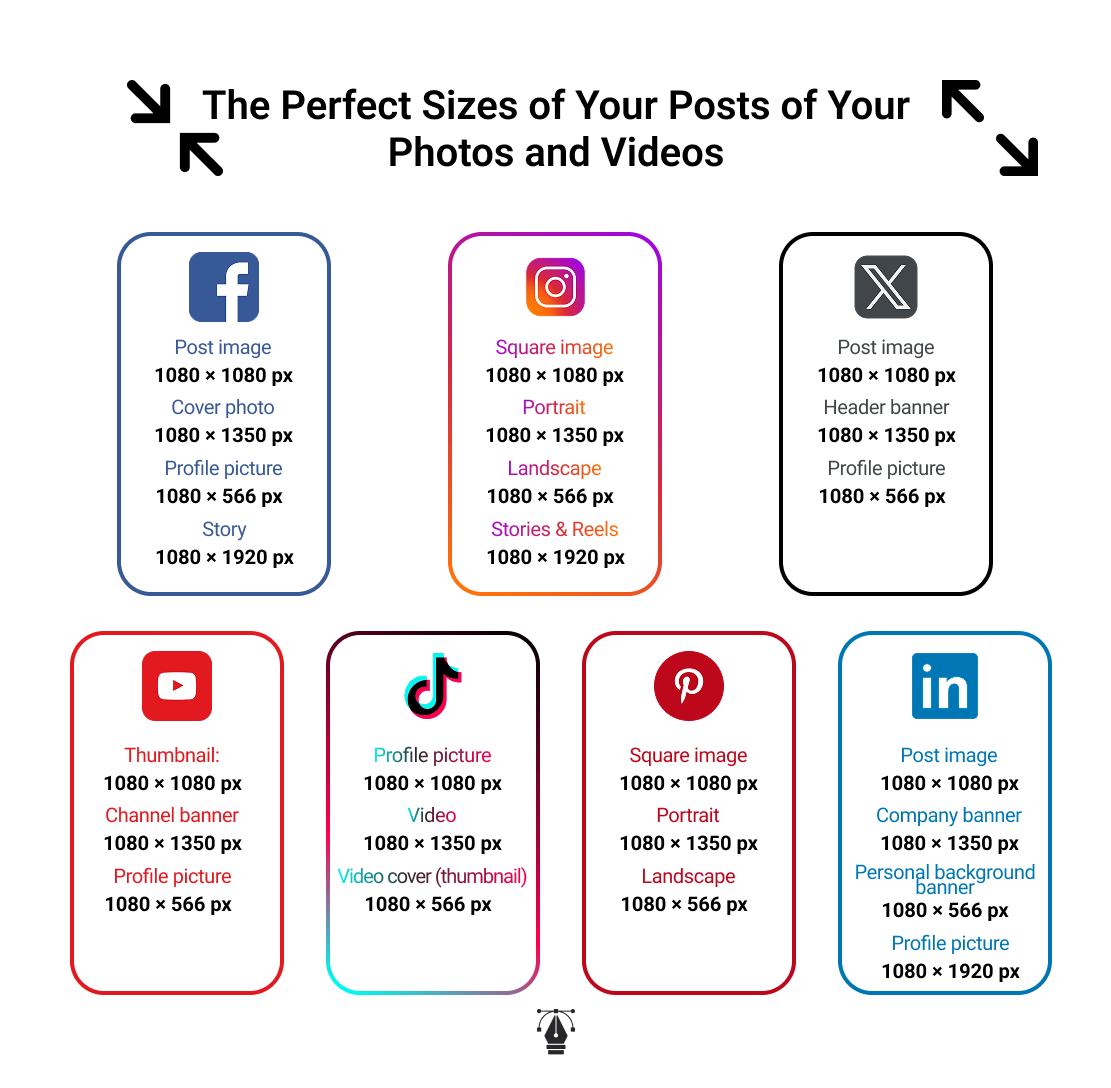
Image sizes on social media change constantly, and keeping up with them is essential for maintaining a clean, professional, and high-quality visual presence. Whether you’re a content creator, community manager, or business owner, using the correct image dimensions helps your posts stay sharp, properly displayed, and more engaging. In this article, we cover the recommended image sizes for Instagram, Facebook, LinkedIn, TikTok, YouTube, X (Twitter), Pinterest, and more — so your visuals always look perfect.
Why Image Size Is Critically Important on Social Media
Using the correct image size on social media is not just a design preference — it directly affects your visibility, your engagement, your brand identity, and even the algorithm’s behavior. Here are the key reasons why image dimensions matter:
1. Prevents Blurry, Pixelated, or Stretched Images
Each social media platform compresses images differently.
If your visual is too small, too large, or the wrong ratio:
- It becomes blurry
- It gets pixelated
- It appears stretched or zoomed in
- Important elements get cut off
A correctly sized image ensures clarity and sharpness, keeping your content looking polished.
2. Ensures Proper Cropping and Composition
Platforms use different aspect ratios.
Example:
- Instagram feed prefers 1:1 or 4:5
- Facebook uses 1.91:1
- TikTok uses 9:16 vertical
If you upload an image that doesn’t match the platform’s aspect ratio, automatic cropping may remove:
- Your text
- Important faces
- Product details
- Your logo
Correct sizing maintains the intended composition.
3. Improves Professionalism and Brand Credibility
People judge brands based on design quality.
Images that are well-sized and clean give the impression of:
- Professionalism
- Attention to detail
- Seriousness
- Creativity
Badly sized images can make even good content look amateur.
4. Increases Engagement (Likes, Shares, Comments)
Studies show that high-quality, correctly sized visuals have a higher chance of engagement.
Why? Because:
- They capture attention immediately
- They look better on mobile (where 80%+ users are)
- They take more space on the screen
- Algorithms tend to prefer content users engage with longer
Sharp visuals = higher retention = better engagement = better reach.
5. Boosts Algorithm Performance
Platforms like Instagram, Facebook, and TikTok reward posts that:
- Are visually appealing
- Retain viewers longer
- Trigger more interaction
Poorly sized visuals reduce user interest, leading to:
- Lower reach
- Lower ranking in the feed
- Fewer impressions
Correct size = better performance in the algorithm.
6. Protects Your Branding Elements
Your logo, color palette, and typography must appear clearly.
Incorrect dimensions can cause:
- Logos being cut
- Text becoming unreadable
- Colors looking distorted
- Layouts losing balance
Correct image size ensures your brand appears consistent on every platform.
7. Optimizes for Mobile (the most important platform)
Most users browse via mobile devices.
If your image is not optimized for mobile display:
- It may appear too small
- Text may be too tiny
- Cropping may hide essential content
- It won’t fill the screen properly (especially vertical formats)
Correct sizing guarantees a better mobile-friendly experience.
8. Saves Time in Your Content Creation Workflow
When you already know the correct sizes:
- You design faster
- You avoid redoing designs
- You keep templates ready for each platform
This is essential for:
- Content creators
- Social media managers
- Brands
- Agencies
Correct sizing = more productivity and fewer mistakes.
9. Increases Ad Performance
If you run ads on Facebook, Instagram, TikTok, or YouTube, image size affects:
- Approval rate
- Cost per click
- Visual clarity
- Conversion rate
10. Enhances User Experience
At the end of the day, great content should be:
- Easy to see
- Easy to read
- Beautiful
- Clear
- Consistent
Good image sizing ensures that your audience enjoys the experience and interacts more with your content.
The Ideal Image Sizes for Every Social Media Platform
Social media platforms automatically compress and crop images. If you don’t use the correct dimensions, your visuals may look pixelated, blurry, stretched, or poorly cropped.
Square image: 1080 × 1080 px
Portrait: 1080 × 1350 px
Landscape: 1080 × 566 px
Stories & Reels: 1080 × 1920 px
Profile picture: 320 × 320 px
Post image: 1200 × 630 px
Cover photo: 820 × 312 px
Profile picture: 170 × 170 px
Story: 1080 × 1920 px
Post image: 1200 × 1200 px
Company banner: 1128 × 191 px
Personal background banner: 1584 × 396 px
Profile picture: 400 × 400 px
X (Twitter)
Post image: 1600 × 900 px
Header banner: 1500 × 500 px
Profile picture: 400 × 400 px
TikTok
Profile picture: 200 × 200 px
Video: 1080 × 1920 px
Video cover (thumbnail): 1080 × 1920 px
YouTube
Thumbnail: 1280 × 720 px
Channel banner: 2560 × 1440 px
Profile picture: 800 × 800 pxVideo resolution: 1920 × 1080 px (Full HD)
Standard pin: 1000 × 1500 px
Square pin: 1000 × 1000 px
Profile picture: 165 × 165 px
Cover image: 800 × 450 p
Using the correct image sizes is key to maintaining a professional online presence and ensuring that your content looks sharp across all platforms. With this guide, you’ll never have to worry about blurry or poorly cropped visuals again. Keep it bookmarked and use it for all your future designs and social media posts
To automate Publication on your socials media accounts use: https://useorionix.com
For more info check : https://sproutsocial.com/fr/landscape/