
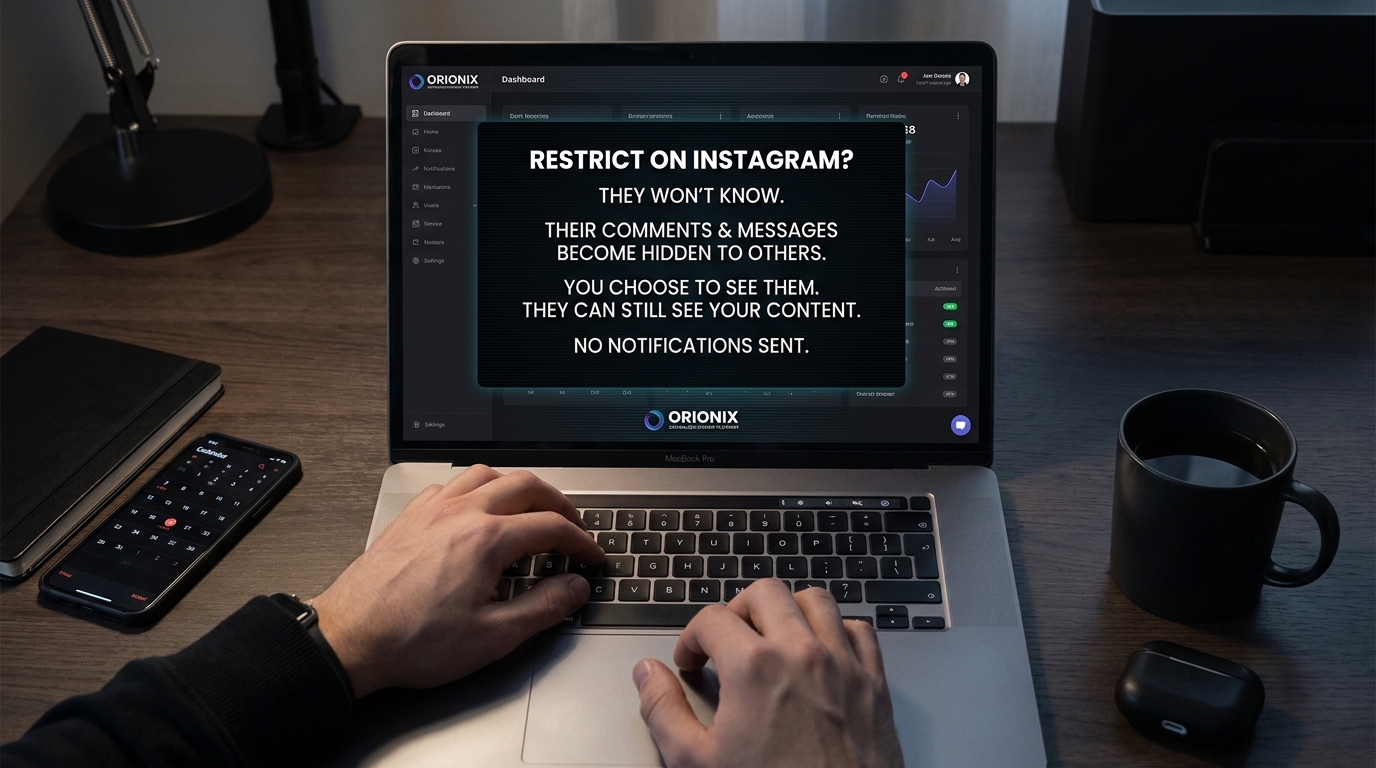
TL;DR: When you restrict someone on Instagram, they can still see your posts and comment, but their comments are only visible to them unless you approve them. They won’t see when you’re active or if you’ve read their direct messages. The restricted person isn’t notified, making it a discreet way to limit interactions without blocking.
Frequently Asked Questions
What happens when you restrict someone on Instagram?
When you restrict someone on Instagram, their comments on your posts become visible only to them unless you approve them. They won’t see when you’re active or when you’ve read their direct messages. The restricted person won’t receive any notification about being restricted, making it a discreet way to limit interactions without blocking them completely.
Can a restricted person see my Instagram stories?
Yes, a restricted person can still see your Instagram stories if your account is public or if they follow you. However, they won’t appear at the top of your story viewers list. If you want to prevent them from seeing your stories entirely, you’ll need to either block them or hide your stories from them using the story privacy settings.
How is restricting different from blocking someone on Instagram?
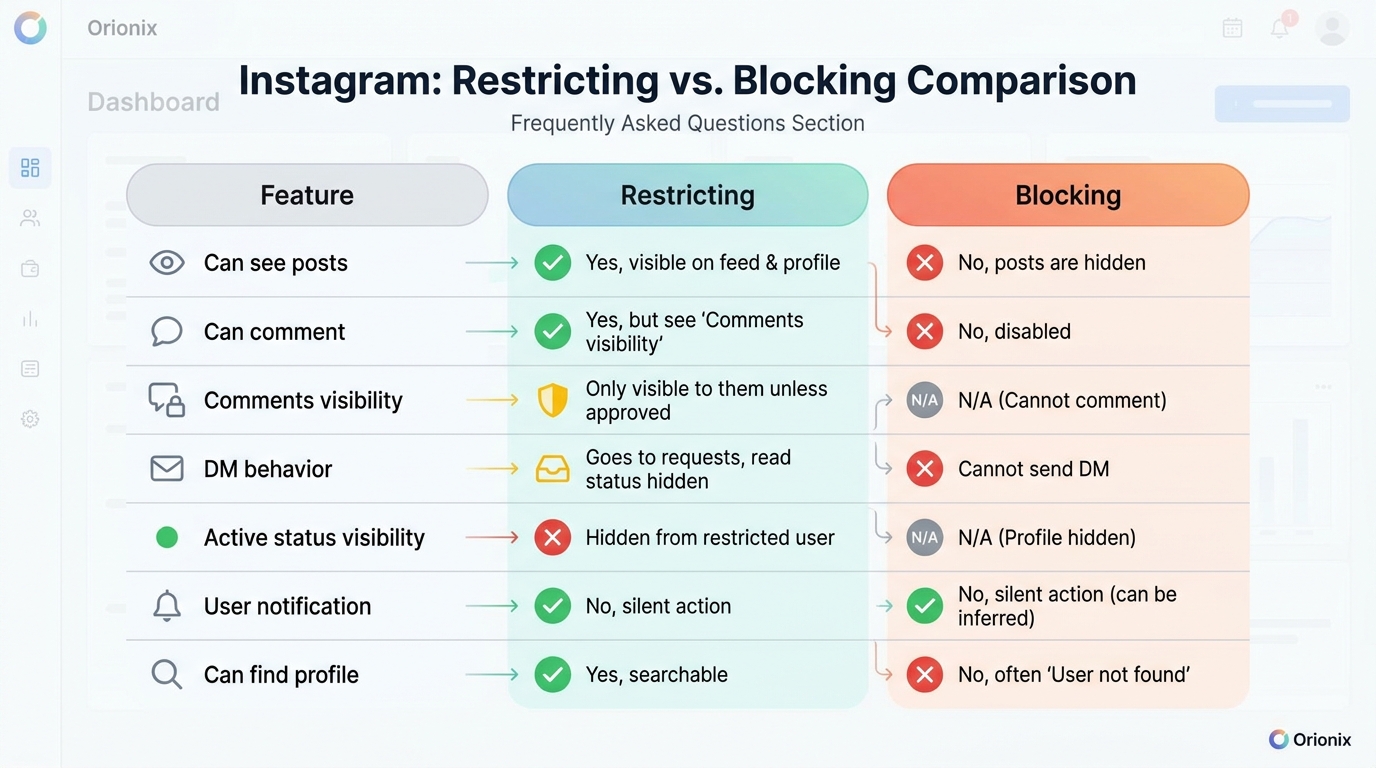
Restricting is less severe than blocking on Instagram. When you restrict someone, they can still see your posts and follow you, but their interactions are limited. Blocking completely prevents them from finding your profile, seeing your content, or messaging you. The restricted person won’t know they’re restricted, while blocked users can discover they’ve been blocked.
Will someone know if I restrict them on Instagram?
No, Instagram doesn’t notify users when they’ve been restricted. However, they might notice subtle changes like their comments not appearing publicly, you not responding to messages, or not seeing your active status. These indirect signs could make them suspect they’ve been restricted, but there’s no official notification or confirmation from Instagram.
Can restricted users still send me direct messages on Instagram?
Yes, restricted users can still send you direct messages on Instagram. However, their messages will appear in your Message Requests folder instead of your main inbox. You won’t receive notifications for their messages, and they won’t see if you’ve read them or when you’re active online, giving you complete control over engagement.
How do I restrict someone on Instagram without them knowing?
To restrict someone on Instagram, go to their profile, tap the three dots in the top right corner, and select ‘Restrict.’ Alternatively, swipe left on a comment or direct message from them and choose ‘Restrict.’ The process is completely silent—they won’t receive any notification and can continue viewing your public content normally.
What happens to existing comments when you restrict someone on Instagram?
When you restrict someone on Instagram, their existing comments on your posts remain visible to everyone unless you manually delete or hide them. All future comments from the restricted account will only be visible to them unless you approve them. You can review their comments individually and choose to allow others to see them or keep them hidden.
Can I unrestrict someone on Instagram after restricting them?
Yes, you can unrestrict someone on Instagram at any time. Go to your settings, select ‘Privacy,’ then ‘Restricted accounts,’ and find the person you want to unrestrict. Tap ‘Unrestrict’ to restore normal interactions. Once unrestricted, they’ll be able to interact with your content normally again, and their comments will appear publicly without requiring approval.
Understanding Instagram’s Restrict Feature: What Really Happens
If you’ve ever wondered what happens when you restrict someone on Instagram, you’re not alone. This powerful privacy feature has become essential for managing unwanted interactions without the drama of blocking someone outright. Whether you’re a social media manager protecting a brand’s reputation or an individual user seeking peace of mind, understanding Instagram’s restrict function is crucial in today’s digital landscape.
Instagram’s restrict feature offers a middle ground between completely blocking someone and tolerating unwanted behavior. It’s particularly valuable for social media marketing professionals who need to maintain professional relationships while managing negative interactions on their social media platforms.
In this comprehensive guide, we’ll explore every aspect of restricting someone on Instagram, from what the restricted person experiences to how it affects your content visibility and engagement metrics. Let’s dive into the details that every content creator and digital marketing professional needs to know.
What Happens When You Restrict Someone on Instagram: The Complete Breakdown 🔒
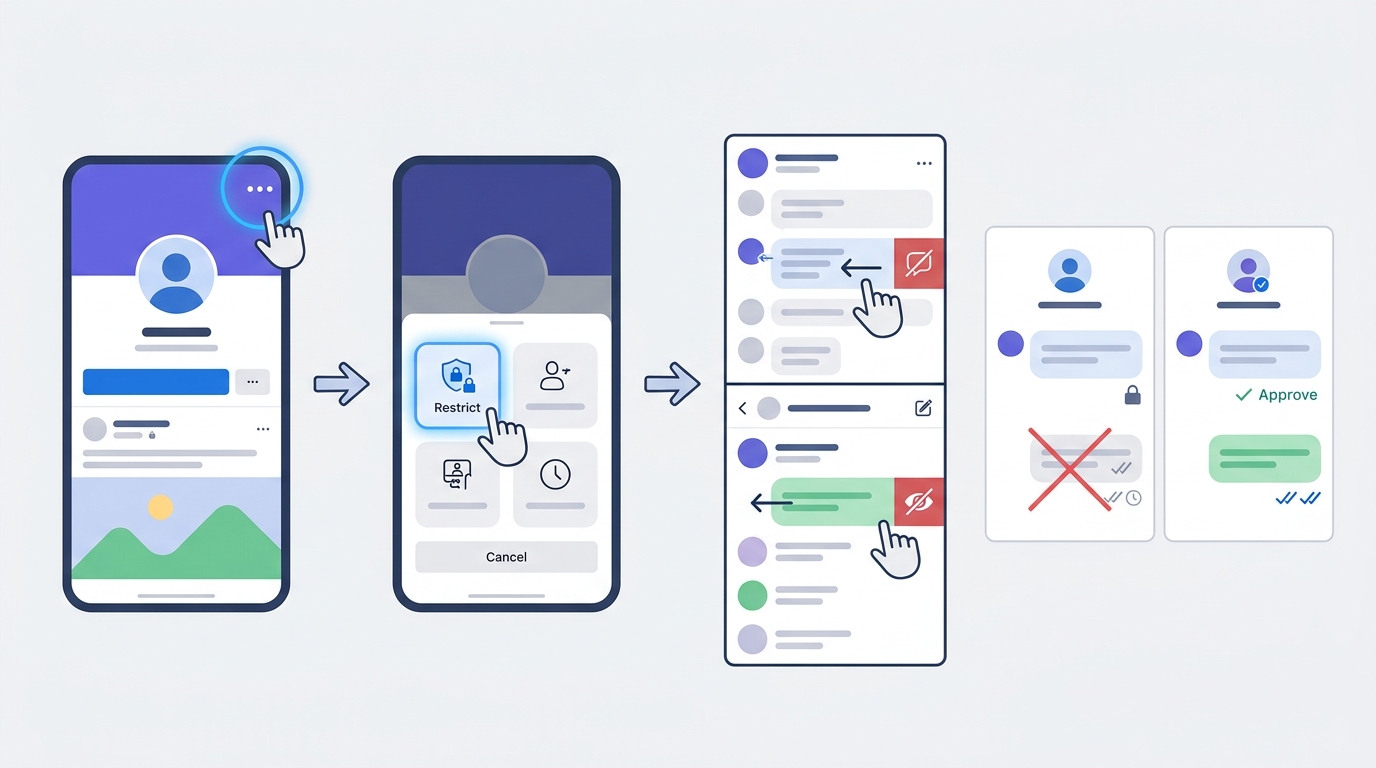
When you restrict someone on Instagram, several important changes occur that affect how that person interacts with your content. The beauty of this feature lies in its subtlety—the restricted person won’t receive any notification that they’ve been restricted.
Immediate Changes After Restricting
The moment you restrict someone, Instagram implements several protective measures:
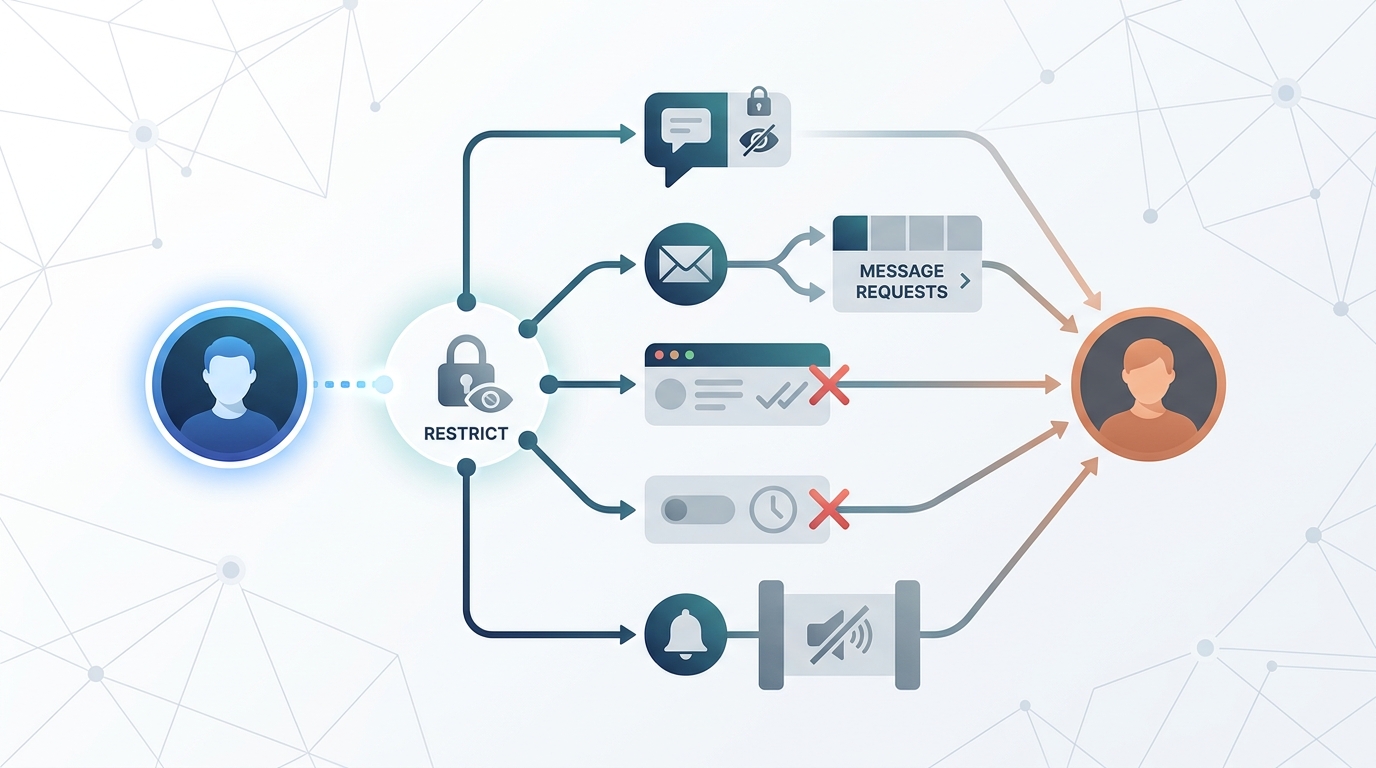
- Comment visibility becomes limited: Their comments on your posts are only visible to them unless you manually approve them
- Direct message filtering: New messages from restricted accounts move to message requests instead of your main inbox
- Activity status hidden: They can no longer see when you’re active on Instagram or when you’ve read their messages
- Story interactions change: They can still view your stories if your account is public, but with limited interaction capabilities
How Comments Work After Restriction
One of the most significant changes involves comment management. When someone you’ve restricted comments on your posts, only they can see their comment by default. This creates an interesting dynamic where the restricted person believes their comments are visible to everyone, but in reality, they’re hidden from public view.
You have complete control over these hidden comments. You can choose to approve them (making them visible to everyone), delete them, or simply leave them in their restricted state. This feature is invaluable for social media marketing teams dealing with trolls or negative commenters who might harm brand reputation.
| Feature | Restricted User | Non-Restricted User |
|---|---|---|
| Comment Visibility | Only visible to commenter (unless approved) | Visible to all followers |
| Your Response | Hidden unless comment is approved | Visible to all |
| Notification to User | None | Standard notifications |
| Comment Management | Approve, delete, or ignore | Standard comment controls |
Direct Messages and Communication Changes 💬
The restrict feature dramatically alters how direct messages function between you and the restricted account. Understanding these changes is essential for maintaining professional boundaries while managing your social media platforms effectively.
Message Request Filtering
All new messages from restricted accounts automatically move to your message requests folder. This means you won’t receive notifications when they message you, and you can choose whether to respond at your convenience. This filtering system helps content creators and digital marketing professionals maintain focus without constant interruptions.
- Messages appear in the « Requests » folder instead of your primary inbox
- No push notifications are sent when they message you
- You can read messages without the sender knowing
- Previous conversation history remains accessible
Read Receipts and Activity Status
One of the most appreciated aspects of restricting someone is the privacy it provides regarding your online activity. The restricted person can no longer see:
- When you’re currently active on Instagram
- When you were last active
- Whether you’ve read their messages
- Your typing status in conversations
This feature is particularly useful for social media marketing professionals who need to maintain boundaries with clients or followers while still managing multiple accounts across various social media platforms.
Story Visibility and Interaction Limitations 📱
Instagram Stories represent a significant portion of user engagement, and the restrict feature affects how restricted users interact with your Stories. These changes help protect your content while maintaining a professional presence.
Story Viewing Access
If your account is public, restricted users can still view your Stories. However, if your account is private, they can only see your Stories if they were already following you before being restricted. This distinction is important for brands managing their social media marketing strategies.
Story Interaction Restrictions
When it comes to interacting with your Stories, restricted users face several limitations:
- Reactions and replies: Their Story replies go to message requests, not your main inbox
- Mentions: You won’t receive notifications if they mention you in their Stories
- Resharing: Their ability to reshare your Story content remains unchanged
- Viewer list: They still appear in your Story viewers list if they watch
For businesses planning content around the best times to post on Instagram, understanding these restrictions helps optimize engagement strategies while maintaining control over unwanted interactions.
The Restricted Person’s Experience: What They See 👁️
Understanding the restricted user’s perspective is crucial for managing expectations and maintaining relationships. The restrict feature is designed to be discreet, so the restricted person experiences subtle changes rather than obvious blocks.
What Appears Normal to Them
From the restricted person’s viewpoint, several things seem unchanged:
- They can still view your public posts and profile
- They can like and save your content as usual
- They can send you direct messages (though these go to requests)
- They can comment on your posts (though only they see their comments)
- They remain in your followers list if they were following before
Subtle Clues They Might Notice
While Instagram doesn’t notify restricted users, some observant individuals might pick up on certain changes:
| Indicator | What They Might Notice | Likelihood of Detection |
|---|---|---|
| Comment Visibility | No one else likes or responds to their comments | High |
| Message Responses | Delayed or no responses to DMs | Medium |
| Activity Status | Your activity status never shows as active | Medium |
| Read Receipts | Messages never show as « seen » | High |
For social media managers and content marketers, this discretion allows you to maintain professional relationships while protecting your brand’s online presence. Similar to understanding what happens when you restrict someone on Instagram, knowing these subtle indicators helps you make informed decisions about account management.
How to Restrict Someone on Instagram: Step-by-Step Guide 📝
Restricting someone on Instagram is straightforward, but knowing the exact steps ensures you implement this privacy feature correctly. This process is essential for anyone managing social media platforms professionally.
Method 1: Through Their Profile
- Navigate to the profile of the person you want to restrict
- Tap the three dots (menu icon) in the top right corner
- Select « Restrict » from the menu options
- Confirm your choice when prompted
Method 2: Through Comments
- Find a comment from the person you want to restrict
- Swipe left on their comment (iOS) or tap and hold (Android)
- Select the exclamation mark icon
- Choose « Restrict » from the options
Method 3: Through Direct Messages
- Open your conversation with the person in Direct Messages
- Tap their name at the top of the chat
- Select « Restrict » from the menu
- Confirm the restriction
These methods work seamlessly across all social media platforms where Instagram is accessible, making it easy for digital marketing teams to manage multiple accounts efficiently.
Restrict vs. Block: Understanding the Key Differences 🔄
Many users confuse restricting with blocking, but these features serve different purposes in your Instagram privacy toolkit. Understanding when to use each option is crucial for effective social media marketing and personal account management.
| Feature | Restrict | Block |
|---|---|---|
| Profile Visibility | Can still view your profile | Cannot find or view your profile |
| Following Status | Remains unchanged | Automatically unfollowed |
| Direct Messages | Moved to message requests | Cannot send messages |
| Comments | Hidden from others (visible to them) | Cannot comment at all |
| Notification to User | None | None (but easily discoverable) |
| Story Viewing | Can view public Stories | Cannot view any Stories |
| Post Visibility | Can see public posts | Cannot see any posts |
| Reversibility | Easily unrestricted | Must unblock and they must re-follow |
When to Use Restrict Instead of Block
The restrict feature is ideal in several scenarios that social media marketing professionals commonly encounter:
- Professional relationships: When you need to maintain a connection with a client or colleague but want to limit their access
- Family dynamics: Managing interactions with family members without causing obvious offense
- Mild harassment: Dealing with annoying but not threatening behavior
- Brand management: Controlling negative comments without creating public confrontation
- Testing waters: Trying a softer approach before escalating to blocking
For businesses managing their presence across multiple social media platforms, the restrict feature offers a diplomatic solution that maintains professional appearances while protecting brand integrity.
Managing Multiple Restricted Accounts 📊
For social media managers and digital marketing professionals handling multiple accounts, keeping track of restricted users becomes essential. Instagram provides tools to help you manage these restrictions effectively.
Viewing Your Restricted List
To see all accounts you’ve restricted:
- Go to your Instagram profile and tap the menu icon
- Select « Settings and Privacy »
- Navigate to « Hidden Words »
- Tap « Manage Restricted Accounts »
- View your complete list of restricted users
Unrestricting Accounts
If you decide to unrestrict someone, the process is equally simple. From your restricted accounts list, tap on the account you want to unrestrict and select « Unrestrict. » All normal interactions will resume immediately.
This flexibility makes the restrict feature particularly valuable for businesses that need to adjust their social media marketing strategies based on changing relationships and circumstances. Similar to how you might manage followers when learning how to unfollow on Instagram, managing restrictions requires periodic review and adjustment.
Impact on Your Instagram Analytics and Engagement 📈
Understanding how restricting users affects your Instagram metrics is crucial for content marketers and brands tracking their performance across social media platforms. The restrict feature has both direct and indirect impacts on your analytics.
Engagement Metrics
When you restrict someone, their hidden comments don’t count toward your public engagement metrics. However, their likes, Story views, and approved comments still contribute to your overall analytics. This means:
- Your engagement rate may appear lower if you restrict frequent commenters
- Story view counts remain unchanged as restricted users can still view Stories
- Like counts continue to include likes from restricted accounts
- Reach and impressions aren’t affected by restriction status
Content Strategy Considerations
For brands optimizing their posting schedule around the best times to post on Instagram, restricting problematic users can actually improve your content performance. By reducing negative comments and spam, you create a more positive environment that encourages genuine engagement from your target audience.
| Metric | Impact | Consideration for Strategy |
|---|---|---|
| Comment Count | May decrease | Focus on quality over quantity |
| Engagement Rate | Potentially lower | More authentic engagement |
| Reach | No direct impact | Continue standard posting schedule |
| Story Views | Unchanged | Maintain Story strategy |
| Profile Visits | No impact | Track as usual |
When planning your social media marketing strategy, remember that the quality of engagement often matters more than quantity. Tools like social media marketing assistants can help you track these nuanced metrics and adjust your strategy accordingly.
Privacy and Security Benefits of Restricting 🛡️
The restrict feature offers significant privacy and security advantages that go beyond simple comment moderation. For individuals and brands alike, these benefits make restriction a valuable tool in your Instagram management arsenal.
Protection from Online Harassment
Restricting someone provides a layer of protection without escalating conflicts. Unlike blocking, which can provoke angry responses or retaliation through other accounts, restriction operates silently. This makes it particularly effective for:
- Managing persistent but non-threatening followers
- Dealing with ex-partners or former friends diplomatically
- Controlling interactions with overly enthusiastic fans
- Protecting your mental health from negative interactions
Brand Reputation Management
For businesses operating across multiple social media platforms, the restrict feature serves as a crucial reputation management tool. It allows you to:
- Control negative commentary without censorship accusations
- Manage competitor trolling discreetly
- Filter spam and bot accounts effectively
- Maintain professional relationships while setting boundaries
This approach aligns with broader digital marketing best practices that prioritize authentic engagement and community building. Just as you might learn how to look for someone on Instagram for networking purposes, understanding restriction helps you curate your online community effectively.
Common Scenarios: When to Use the Restrict Feature 💡
Understanding practical applications of the restrict feature helps social media managers and everyday users make informed decisions about account management. Here are the most common scenarios where restriction proves invaluable.
Professional and Business Contexts
Scenario 1: Managing Difficult Clients
When a client becomes overly demanding or crosses professional boundaries in Instagram DMs, restricting them allows you to maintain the business relationship while controlling communication flow. Their messages move to requests, giving you time to respond thoughtfully rather than feeling pressured by constant notifications.
Scenario 2: Handling Negative Brand Feedback
For brands managing their social media marketing presence, restricting serial complainers who leave unconstructive criticism prevents their comments from influencing other customers while still allowing legitimate concerns to be addressed privately.
Scenario 3: Competitor Monitoring
Restrict competing businesses that engage with your content primarily to poach followers or spread negative sentiment. This maintains your professional appearance while limiting their influence on your audience.
Personal Use Cases
Scenario 4: Ex-Relationships
After a breakup, restricting an ex-partner provides emotional space without the drama of blocking. They can still see your public content, but you control whether and when you engage with their messages or comments.
Scenario 5: Oversharing Acquaintances
Restrict friends or family members who constantly tag you in inappropriate content or leave embarrassing comments. This protects your online image without creating family conflict.
Scenario 6: Suspicious or Fake Accounts
When you suspect an account might be fake or created by someone to monitor you, restriction prevents them from gathering information about your activity status while you investigate further.
These scenarios demonstrate why the restrict feature has become essential for anyone managing their presence across social media platforms. Whether you’re a brand strategist or individual user, understanding these applications helps you maintain healthier online relationships.
Troubleshooting Common Issues with Restricted Accounts ⚙️
Even with Instagram’s user-friendly interface, users sometimes encounter issues when restricting accounts or managing restricted users. Here are solutions to the most common problems.
Restriction Not Working Properly
If you’ve restricted someone but their comments still appear publicly, try these solutions:
- Verify the restriction is active by checking your restricted accounts list
- Update your Instagram app to the latest version
- Clear your app cache and restart Instagram
- Log out and log back into your account
- Unrestrict and re-restrict the account
Can’t Find the Restrict Option
Some users report difficulty finding the restrict feature. This usually happens due to:
- Outdated app version: Update Instagram to access the latest features
- Account type limitations: Ensure you’re using a personal or business account, not a restricted test account
- Regional availability: While rare, some features roll out gradually across regions
Accidentally Restricted Someone
If you’ve restricted someone by mistake, unrestricting is quick and easy. Navigate to Settings > Privacy > Restricted Accounts, find the person, and tap « Unrestrict. » All normal interactions resume immediately without any notification to the user.
| Problem | Likely Cause | Solution |
|---|---|---|
| Comments still visible | Restriction not properly applied | Re-restrict the account |
| Can’t restrict from profile | Outdated app version | Update Instagram app |
| Restriction list not loading | Cache issues | Clear cache and restart |
| User still sees activity status | Settings conflict | Check privacy settings |
For comprehensive account management across social media platforms, staying informed about these technical details ensures smooth operation of your social media marketing efforts.
Integrating Restriction into Your Social Media Strategy 🎯
For digital marketing professionals and businesses, the restrict feature should be part of a comprehensive social media marketing strategy. Here’s how to integrate it effectively into your broader approach.
Creating Community Guidelines
Establish clear community guidelines that outline what behavior warrants restriction. This transparency helps manage expectations and provides justification for your moderation decisions. Your guidelines should address:
- Acceptable comment behavior and language
- Spam and promotional content policies
- Harassment and bullying definitions
- Consequences for violations (warning, restriction, or blocking)
Team Coordination for Multi-Manager Accounts
When multiple team members manage your Instagram account, coordination becomes essential. Implement these practices:
- Maintain a shared document tracking restricted accounts and reasons
- Establish decision-making protocols for when to restrict vs. block
- Schedule regular reviews of restricted accounts to assess if restrictions should continue
- Train all team members on proper use of restriction features
Balancing Restriction with Engagement
While restriction protects your brand, overusing it can limit authentic engagement. Strike the right balance by:
- Only restricting accounts that genuinely disrupt your community
- Responding to criticism constructively before resorting to restriction
- Regularly auditing your restricted list to identify accounts that can be unrestricted
- Focusing energy on fostering positive engagement rather than managing negative interactions
Platforms like social media management platforms can help you streamline these processes, making it easier to maintain consistent moderation standards across all your social media platforms.
Advanced Privacy Settings to Complement Restriction 🔐
The restrict feature works best when combined with Instagram’s other privacy settings. Creating a comprehensive privacy strategy ensures maximum protection for your account and content.
Comment Filtering and Controls
Beyond restriction, Instagram offers several comment management tools:
- Keyword filters: Automatically hide comments containing specific words or phrases
- Manual filters: Hide comments from specific accounts without restricting them
- Comment controls: Limit who can comment on your posts (everyone, followers, or people you follow)
- Hidden words: Filter potentially offensive comments automatically
Message Request Settings
Optimize your DM settings to work alongside restriction:
- Set message requests to only accept DMs from people you follow
- Enable message request filtering to automatically sort messages
- Use the « Only receive messages from people I follow » setting for maximum control
Activity Status and Read Receipts
Control your visibility across all accounts, not just restricted ones:
- Disable activity status to prevent anyone from seeing when you’re online
- Turn off read receipts to read messages without senders knowing
- Manage Story sharing settings to control who can reshare your content
These settings are particularly important for businesses managing their presence during the best time to post on Instagram, as they allow you to engage strategically without feeling pressured to respond immediately to every interaction.
The Psychology Behind Restricting vs. Blocking 🧠
Understanding the psychological implications of restriction helps you make better decisions about when to use this feature. The restrict option acknowledges that online relationships exist on a spectrum rather than in binary terms.
Why Restriction Feels Less Confrontational
Blocking someone represents a definitive end to digital interaction, which can feel harsh or create real-world consequences. Restriction offers a middle ground that:
- Maintains the appearance of connection while creating emotional distance
- Avoids the guilt some users feel about completely cutting someone off
- Prevents confrontation that might occur if someone discovers they’ve been blocked
- Allows relationships to naturally fade without dramatic gestures
Managing Digital Boundaries
For content marketers and individuals alike, restriction represents a healthy approach to digital boundaries. It acknowledges that not all negative interactions require nuclear options, and sometimes creating space is more effective than complete separation.
This nuanced approach to boundary-setting aligns with modern social media marketing best practices that prioritize authentic community building over aggressive moderation. Just as businesses learn strategies to gain followers on Instagram for free, they must also learn to maintain healthy community dynamics through thoughtful moderation.
Future of Instagram Privacy Features 🔮
As social media platforms evolve, privacy features like restriction will likely become more sophisticated. Understanding current trends helps prepare for future changes in digital marketing and personal account management.
Predicted Enhancements
Based on user feedback and platform trends, Instagram may introduce:
- Temporary restrictions: The ability to restrict someone for a set period (24 hours, one week, etc.)
- Bulk restriction management: Tools to restrict multiple accounts simultaneously
- Advanced filtering: AI-powered suggestions for accounts you might want to restrict based on behavior patterns
- Restriction analytics: Insights into how restriction affects your overall engagement and community health
Integration with Other Meta Platforms
As Meta continues integrating its platforms, restriction settings may sync across Facebook, Instagram, and Threads, providing unified privacy management across all your social media platforms. This would streamline the experience for social media managers handling multiple accounts.
Staying informed about these developments ensures your social media marketing strategy remains current and effective as platforms evolve.
Legal and Ethical Considerations ⚖️
While the restrict feature is a personal privacy tool, businesses using it must consider legal and ethical implications, especially when managing public-facing brand accounts.
Transparency and Fairness
Brands should establish clear, documented policies for when and why accounts are restricted. This documentation protects your business from accusations of discrimination or unfair treatment. Consider:
- Creating written guidelines that apply consistently to all users
- Training team members on fair application of restriction policies
- Maintaining records of restriction decisions for accountability
- Reviewing restricted accounts regularly to ensure fairness
Customer Service Implications
Restricting customers who reach out with legitimate complaints can damage your brand reputation. Before restricting someone, ask:
- Is this person expressing a legitimate concern that deserves a response?
- Have we exhausted other resolution methods?
- Could restriction be perceived as silencing valid criticism?
- Are there alternative ways to address this situation?
For businesses managing their reputation across social media platforms, tools like social media management platforms can help track interactions and ensure consistent, fair treatment of all community members.
Measuring the Success of Your Restriction Strategy 📊
To ensure your restriction approach supports your broader social media marketing goals, establish metrics to evaluate its effectiveness. This data-driven approach helps optimize your community management strategy.
Key Performance Indicators
Track these metrics to assess whether restriction improves your Instagram presence:
| Metric | What to Track | Success Indicator |
|---|---|---|
| Engagement Quality | Ratio of positive to negative comments | Increasing positive engagement |
| Response Time | Average time to respond to legitimate messages | Faster response to important DMs |
| Community Sentiment | Overall tone of comments and interactions | More positive community atmosphere |
| Moderation Time | Hours spent managing negative interactions | Reduced time spent on moderation |
| Follower Growth | Net follower gain/loss rate | Steady or improved growth |
Regular Audits and Adjustments
Schedule quarterly reviews of your restriction strategy to ensure it aligns with your goals. During these audits:
- Review your list of restricted accounts and assess whether restrictions should continue
- Analyze patterns in who gets restricted and why
- Gather team feedback on the effectiveness of current policies
- Update guidelines based on new challenges or platform changes
- Compare engagement metrics before and after implementing restriction strategies
This systematic approach ensures your restriction strategy enhances rather than hinders your digital marketing objectives across all social media platforms.
Alternatives to Restriction: Other Account Management Options 🔄
While restriction is powerful, it’s not always the right solution. Understanding alternative approaches helps you choose the most appropriate response to different situations.
Muting Instead of Restricting
Muting allows you to hide someone’s posts and Stories from your feed without affecting their ability to interact with you. This works well when:
- You want to reduce exposure to someone’s content without limiting their access to yours
- The person hasn’t done anything wrong, but their content doesn’t interest you
- You’re taking a temporary break from someone’s posts
Hiding Comments Without Restriction
Instagram allows you to hide individual comments without restricting the entire account. This targeted approach is ideal for:
- One-off inappropriate comments from otherwise respectful followers
- Managing specific posts that attract controversial comments
- Maintaining relationships while addressing isolated incidents
Direct Communication
Sometimes the best approach is simply communicating boundaries directly. This works particularly well in professional contexts where maintaining relationships matters for your social media marketing efforts.
Understanding these alternatives ensures you’re using the right tool for each situation, whether you’re managing personal relationships or professional brand accounts across social media platforms.
Expert Tips for Maximum Privacy Protection 🏆
Seasoned social media managers and privacy-conscious users employ these advanced strategies to maximize the effectiveness of Instagram’s restrict feature and maintain optimal account security.
Proactive Restriction Strategies
Don’t wait for problems to escalate. Consider restricting accounts that show early warning signs:
- Accounts that repeatedly ask personal questions in comments
- Users who screenshot and share your Stories without permission
- Followers who tag you in irrelevant or inappropriate content
- Accounts with suspicious activity patterns or fake-looking profiles
Combining Privacy Features
Layer multiple privacy features for comprehensive protection:
- Set your account to private to control who follows you initially
- Use close friends lists for sensitive Story content
- Restrict accounts that pass your initial screening but show problematic behavior
- Enable two-factor authentication to prevent unauthorized access
- Regularly review and remove followers who don’t align with your community standards
Documentation and Record-Keeping
For business accounts, maintain detailed records of restriction decisions:
- Screenshot problematic comments or messages before restricting
- Document dates and reasons for restrictions
- Keep a log of any attempts to circumvent restrictions through alternate accounts
- Note when restrictions are lifted and why
These practices prove invaluable if you ever need to justify moderation decisions or respond to complaints about account management. They’re especially important for businesses managing multiple brands across various social media platforms.
Teaching Others About Restriction: A Community Approach 👥
As a digital marketing professional or community leader, educating your audience about the restrict feature creates a healthier overall environment on social media platforms.
Creating Educational Content
Share information about restriction through:
- Instagram Stories explaining how the feature works
- Posts highlighting the benefits of restriction over blocking
- Live Q&A sessions addressing common questions about privacy features
- Guides showing step-by-step how to restrict accounts
Normalizing Boundary-Setting
Help your community understand that using privacy features isn’t mean or antisocial—it’s a healthy form of digital self-care. This perspective shift benefits everyone by:
- Reducing stigma around using privacy features
- Encouraging users to protect themselves from harassment
- Creating a culture where boundaries are respected
- Improving overall community health and engagement quality
For brands implementing comprehensive social media marketing for restaurants, social media marketing strategies, or other industry-specific approaches, educating your community about these features demonstrates that you value their safety and well-being.
Streamline Your Social Media Management with Orionix 🚀
Managing restrictions, monitoring comments, and maintaining a healthy Instagram presence requires significant time and effort—especially when you’re juggling multiple social media platforms simultaneously. This is where comprehensive social media management solutions become invaluable.
While Instagram’s native tools like restriction help protect individual accounts, professional social media managers and businesses need more robust solutions to handle complex workflows efficiently. From planning content around the best times to post on Instagram to managing community interactions across multiple accounts, the right tools make all the difference.
Why Comprehensive Management Matters
Effective social media marketing goes beyond just knowing how to deactivate Instagram or manage restrictions. It requires:
- Centralized content planning and scheduling across all platforms
- Unified analytics to track performance holistically
- Streamlined collaboration for teams managing multiple accounts
- Efficient workflow management that saves hours each week
- Consistent brand voice across all social media platforms
Whether you’re determining how do you delete an Instagram account that’s no longer serving your strategy or optimizing posting schedules, having a centralized platform simplifies every aspect of digital marketing.
Take Control of Your Social Media Strategy
Ready to transform how you manage your Instagram presence and other social media platforms? Orionix offers a centralized dashboard that brings all your content planning, creation, and publishing together in one place. Stop juggling multiple tools and start streamlining your workflow today.
Discover how Orionix can revolutionize your social media management. Visit our website to learn more about our comprehensive platform designed for modern content marketers, social media managers, and businesses serious about their online presence. Start your journey toward more efficient, effective social media management now! ✨
Article created using IntentRank